

v0.0.2
spear_menu
Flutter 화살표 드롭다운 메뉴 플러그인입니다. iOS 및 Android 모두 지원합니다.
38좋아요 1230일 다운로드40Pub 점수
플랫폼 정보 없음
Mohanraj153/flutter_spear_menu open-source repository details.

아래는 영문 원문 스냅샷입니다. 최신 내용은 GitHub에서 확인하세요.
A spear dropdown menu plugin. The Spear Menu widget is built to be below placed in the button or Icon widget, replacing the FloatingActionButton widget.
it's possible to set anywhere in scaffold.
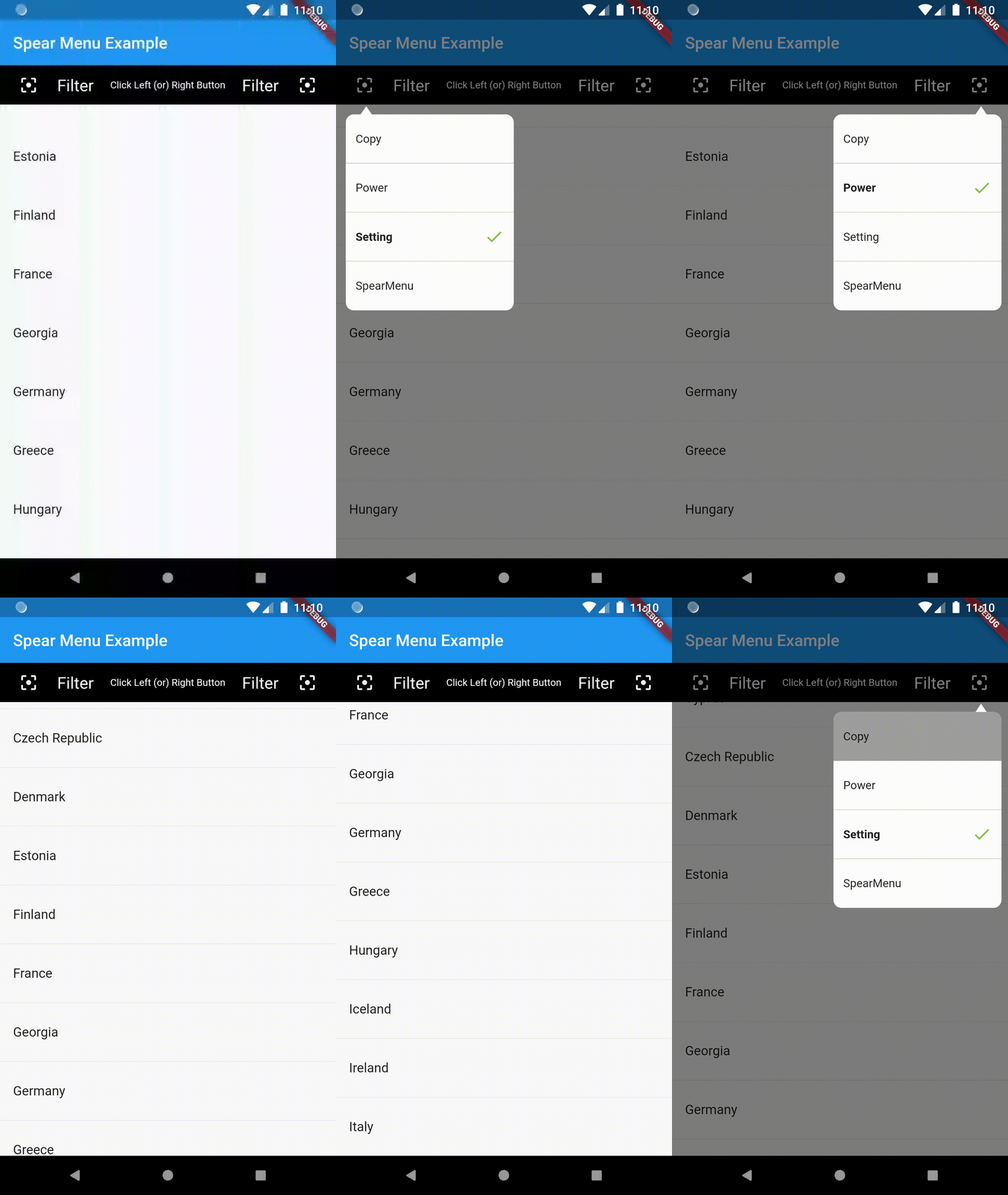
Example Usage (complete with all params):
You can find the demo at the 'example' folder.
First, you should set the context at somewhere in you code. Like below:
PopupMenu.context = context;
import 'package:flutter/material.dart';
import 'package:popup_menu/popup_menu.dart';
import 'CustomData.dart';

void main() => runApp(MyApp());

class MyApp extends StatelessWidget {
  // This widget is the root of your application.
  @override
  Widget build(BuildContext context) {
    return MaterialApp(
      title: 'Flutter Demo',
      home: MyHomePage(title: 'Popup Menu Example'),
    );
  }
}

class MyHomePage extends StatefulWidget {
  MyHomePage({Key key, this.title}) : super(key: key);

  final String title;

  @override
  _MyHomePageState createState() => _MyHomePageState();
}

class _MyHomePageState extends State<MyHomePage> {
  PopupMenu menu;
  GlobalKey btnKey = GlobalKey();
  List<CustomData> menuList = new List<CustomData>();

  @override
  Widget build(BuildContext context) {
    PopupMenu.context = context;

    return Scaffold(
      appBar: AppBar(
        title: Text(widget.title),
      ),
      body: Container(
        alignment: Alignment.topLeft,
        child: Column(
          mainAxisAlignment: MainAxisAlignment.end,
          children: <Widget>[
            Container(
              child: MaterialButton(
                height: 10.0,
                key: btnKey,
                onPressed: menuData,
                child: Icon(Icons.menu,),
              ),
            )
          ],
        ),
      ),
    );
  }

  void menuData() {
    if(menuList.isEmpty){
      menuList.clear();
      menuList.add(CustomData('Copy', false));
      menuList.add(CustomData('Power', false));
      menuList.add(CustomData('Setting', true));
      menuList.add(CustomData('PopupMenu', false));
    }

    List<MenuItemProvider> setData = new List<MenuItemProvider>();
    setData.clear();
    for(var io in menuList){
      print("Result : " + io.name);
      setData.add(MenuItem(title: io.name, isActive: io.isShow));
    }

    PopupMenu menu = PopupMenu(
        //backgroundColor: Colors.teal,
        // lineColor: Colors.tealAccent,
        items: setData,

        onClickMenu: onClickMenu,
        stateChanged: stateChanged,
        onDismiss: onDismiss);
    menu.show(widgetKey: btnKey);
  }

  void onClickMenu(MenuItemProvider item) {
    menuList.map((element) {
      if(item.menuTitle == element.name){
        element.isShow = true;
      }else{
        element.isShow = false;
      }
    }).toList();

    print('Click menu -> ${item.menuTitle}');
  }

  void stateChanged(bool isShow) {
    print('menu is ${isShow ? 'showing' : 'closed'}');
  }

  void onDismiss() {
    print('Menu is dismiss');
  }

}
Please file an issue to send feedback or report a bug. Thank you!
Every pull request is welcome.
의존성 목록 2 개
{"sdk":"flutter"}{"sdk":"flutter"}사용 목적에 따라 검색하고 개발 활동을 비교한 뒤 원본 저장소에서 요구 사항을 확인하세요.
“A repository is the most basic element of GitHub.”
GitHub Docs — About repositories ↗