
l
간단한 API 를 갖춘 크로스 플랫폼 html/io [L]ogger.

- 스타
- 38
- 포크
- 4
- 최근 푸시(UTC)
- 2025. 7. 17.
- 프로젝트 상태
- 활성
원본 README
아래는 영문 원문 스냅샷입니다. 최신 내용은 GitHub에서 확인하세요.
[L]ogger


About
Cross-platform html/io logger with simple API. No need to create a logger object. Just import and use. Simple and w/o boilerplate. Work with native console.
Core API
Example of usage
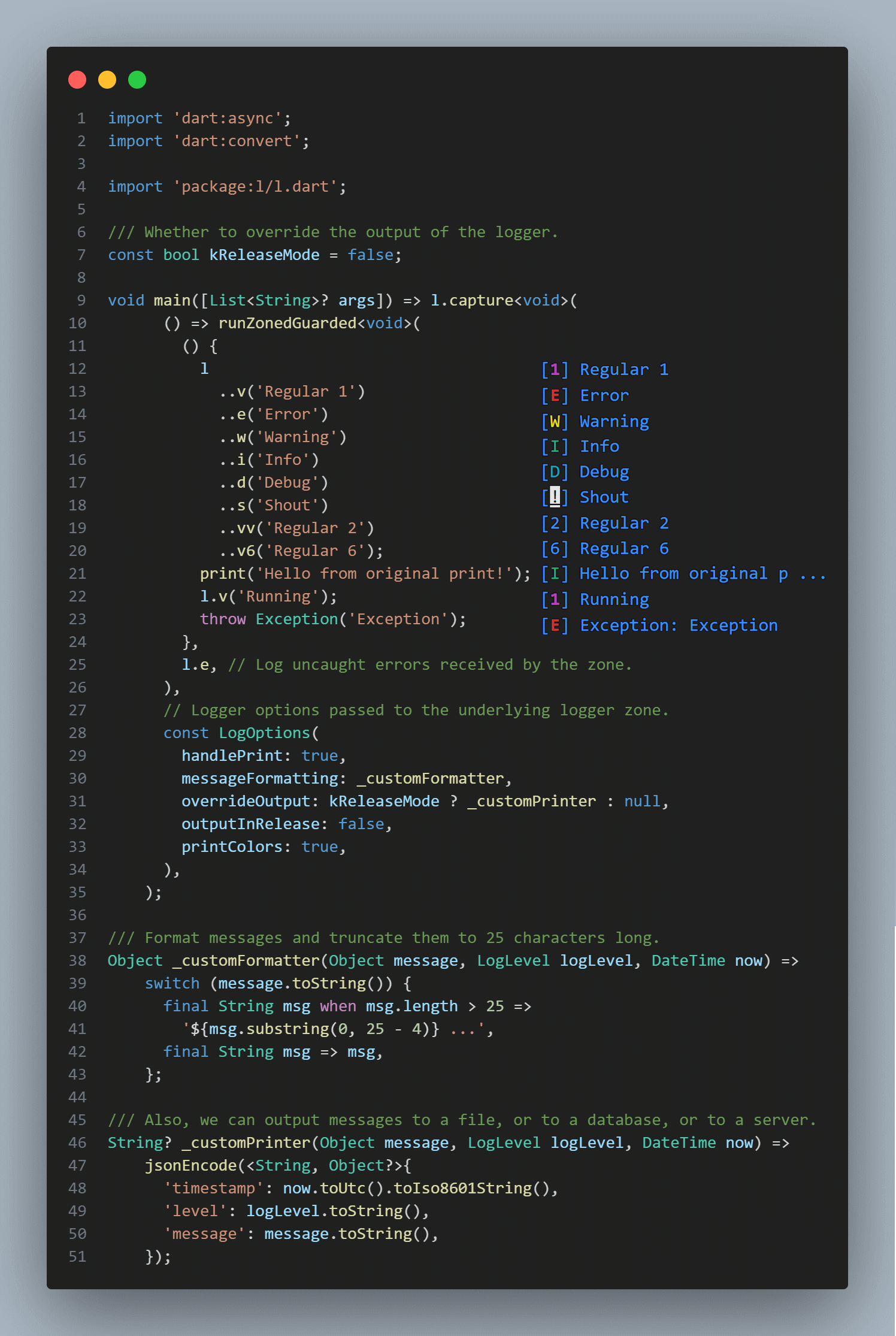 Example of using the library to display a message in the console.
Key features
| Method | Description |
|---|---|
| [s] | A shout is always displayed |
| [v1], [v] | Regular message with verbose level 1 |
| [e] | Error message with verbose level 1 |
| [v2], [vv] | Regular message with verbose level 2 |
| [w] | Warning message with verbose level 2 |
| [v3], [vvv] | Regular message with verbose level 3 |
| [i], [<] | Inform message with verbose level 3 |
| [v4], [vvvv] | Regular message with verbose level 4 |
| [d], [<<] | Debug message with verbose level 4 |
| [v5], [vvvvv] | Regular message with verbose level 5 |
| [v6], [vvvvvv] | Regular message with verbose level 6 |
l.s('shout me');
l.e('error msg');
l.w('warning msg');
l.i('info msg');
l < 'alt info msg';
l.d('debug msg');
l << 'alt debug msg';
l.v('verbose lvl #1');
l.vv('verbose lvl #2');
l.vvv('verbose lvl #3');
l.v4('verbose lvl #4');
l.v5('verbose lvl #5');
l.v6('verbose lvl #6');
Integration capabilities
| Method | Description |
|---|---|
| [listen] | Broadcast stream receiving logs. |
// Broadcast stream instantly receiving logs.
l.forEach((log) => print('* ${log.level} : ${log.message}'));
Print handling and customizing
Logger supports fine-tuning with the second argument LogOptions in a capture method.
Also, you can handle print and output with l on some function or in a whole app with this simple syntax:
import 'package:l/l.dart';

void main() => l.capture(
      someFunction,
      const LogOptions(
        handlePrint: true,
        printColors: true,
        outputInRelease: false,
        messageFormatting: _messageFormatting,
      ),
    );

Future<void> someFunction() async {
  print('Hello');
  await Future<void>.delayed(const Duration(milliseconds: 150));
  l.d('world');
  await Future<void>.delayed(const Duration(milliseconds: 150));
  l.e('!!!');
}

Object _messageFormatting(Object message, LogLevel logLevel, DateTime now) =>
    '${now.hour}:${now.minute.toString().padLeft(2, '0')} $message';
Handling errors
Flutter
final sourceFlutterError = FlutterError.onError;
FlutterError.onError = (details) {
  l.w(details.exceptionAsString(), details.stack);
  sourceFlutterError?.call(details);
};
Crashlytics
l.where((msg) => msg.level.maybeWhen(
      error: () => true,
      warning: () => true,
      orElse: () => false,
    ))
  .map<String>((msg) => msg.message.toString())
  .listen(FirebaseCrashlytics.instance.log);
Zoned Errors
runZonedGuarded(someFunction, l.e);
Handling uncaught errors
Isolate.current
       ..setErrorsFatal(false)
       ..addErrorListener(
         RawReceivePort(
           (List<dynamic> pair) => // ignore: avoid_types_on_closure_parameters
               l.e(pair.first as Object),
         ).sendPort,
       );
Limitations
- When there is no direct access to the terminal, it works through print.
- !!! PLEASE, DO NOT LOG SENSITIVE INFORMATION !!!
Changelog
Refer to the Changelog to get all release notes.
Maintainers
Funding
If you want to support the development of our library, there are several ways you can do it:
We appreciate any form of support, whether it's a financial donation or just a star on GitHub. It helps us to continue developing and improving our library. Thank you for your support!
License

Plague Fox ↗
분류
사용 중인 의존성
프로젝트에 맞는 저장소를 선택하려면?
사용 목적에 따라 검색하고 개발 활동을 비교한 뒤 원본 저장소에서 요구 사항을 확인하세요.
- 이름, 작성자 또는 설명으로 검색하고 기술 주제로 범위를 좁힙니다.
- 스타, 포크, 최근 푸시를 함께 비교하세요. 스타는 관심의 지표이며 품질을 보장하지 않습니다.
- 사용하기 전에 GitHub에서 README, 라이선스, Issues를 확인하세요.
출처 및 관리
“A repository is the most basic element of GitHub.”
GitHub Docs — About repositories ↗