
 v4.0.2
loading_indicator
순수한 다트로 작성된 로딩 애니메이션 모음입니다. 추가 종속성 없이 바로 사용 가능합니다.
695좋아요 5만30일 다운로드160Pub 점수
AndroidiOSWebmacOSWindowsLinux
🚅 순수한 다트로 작성된 플러터 기본 컬렉션 애니메이션.

{"sdk":"flutter"}^2.8.2^1.16.0^3.0.1{"sdk":"flutter"}—아래는 영문 원문 스냅샷입니다. 최신 내용은 GitHub에서 확인하세요.
https://github.com/TinoGuo/loading_indicator/workflows/Flutter%20Build%20Test%20CI/badge.svg?branch=master pub package GitHub top language
A collection of out of the box loading animations written in pure dart, no extra dependency, inspired by loaders.css and NVActivityIndicatorView.
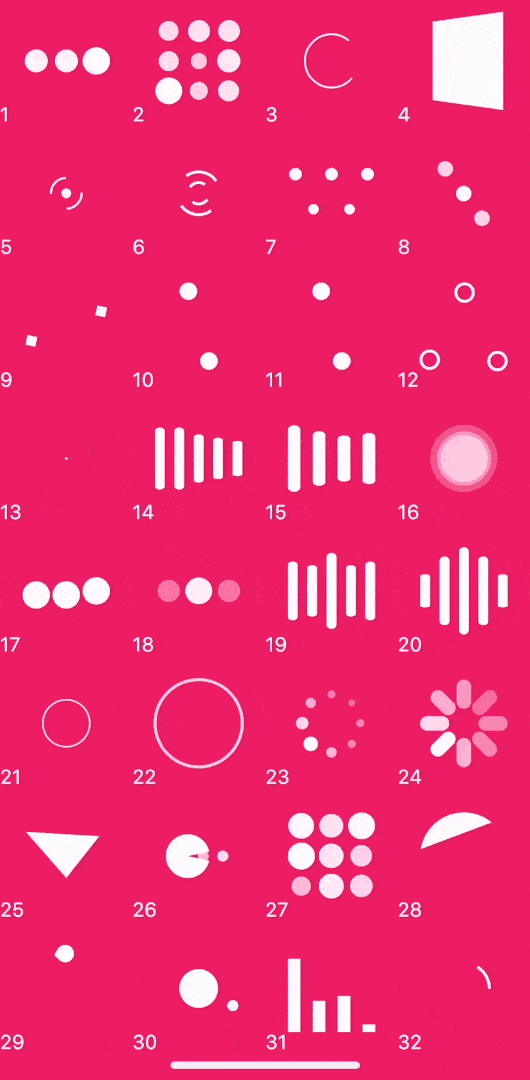
Now, you can click this site to preview.3D effect will be invalid in web.
https://raw.githubusercontent.com/TinoGuo/loading_indicator/HEAD/gif/demo_2021_07_18_02.gif
| Type | Type | Type | Type |
|---|---|---|---|
| 1. ballPulse | 2. ballGridPulse | 3. ballClipRotate | 4. squareSpin |
| 5. ballClipRotatePulse | 6. ballClipRotateMultiple | 7. ballPulseRise | 8. ballRotate |
| 9. cubeTransition | 10. ballZigZag | 11. ballZigZagDeflect | 12. ballTrianglePath |
| 13. ballTrianglePathColored | 14.ballTrianglePathColoredFilled | 15. ballScale | 16. lineScale |
| 17. lineScaleParty | 18. ballScaleMultiple | 19. ballPulseSync | 20. ballBeat |
| 21. lineScalePulseOut | 22. lineScalePulseOutRapid | 23. ballScaleRipple | 24. ballScaleRippleMultiple |
| 25. ballSpinFadeLoader | 26. lineSpinFadeLoader | 27. triangleSkewSpin | 28. pacman |
| 29. ballGridBeat | 30. semiCircleSpin | 31. ballRotateChase | 32. orbit |
| 33. audioEqualizer | 34. circleStrokeSpin |
Install the latest version from pub
Use the release helper from the latest master checkout to calculate the next
version from the existing stable tags and update the root pubspec.yaml and
CHANGELOG.md:
./scripts/prepare_release.sh --dry-run
./scripts/prepare_release.sh patch
patch, minor, and major are supported, as well as an explicit version
such as 4.0.2. The helper refreshes tags from origin and ignores local tags
that no longer exist remotely. It accepts a release tag that is either in the
current history or fully represented by cherry-picked commits, and refuses to
continue when the latest tag cannot be matched to the current history. For an
automatic patch, it asks GitHub for notes before changing files and copies the
returned Markdown into the dated changelog entry. A real patch
run (not --dry-run) requires a clean master matching origin/master,
updates only the root pubspec.yaml and CHANGELOG.md, commits them, pushes
master, creates and pushes the next version tag, and invokes gh release create with
the generated notes. It does not modify
example/pubspec.yaml. gh must be installed and authenticated. The existing
tag-triggered workflow safely skips release creation when the script has
already created it. minor, major, and explicit versions update the local
root pubspec.yaml and CHANGELOG.md with a placeholder, then print the
release-notes command.
Simple but powerful parameters
LoadingIndicator(
  indicatorType: Indicator.ballPulse, // Required: animation type
  colors: const [Colors.white],        // Optional: color collection
  strokeWidth: 2,                      // Optional: stroke and line width
  backgroundColor: Colors.black,       // Optional: widget background
  pathBackgroundColor: Colors.black,   // Optional: stroke background
)
strokeWidth controls the bar width of lineScale, lineScaleParty,
lineScalePulseOut, lineScalePulseOutRapid, and lineSpinFadeLoader.
When omitted, these indicators keep their original size-derived bar width.
Without a controller, every indicator plays continuously. To control playback,
create and dispose a LoadingIndicatorController with your widget:
late final LoadingIndicatorController _controller;

@override
void initState() {
  super.initState();
  _controller = LoadingIndicatorController();
}

@override
void dispose() {
  _controller.dispose();
  super.dispose();
}

@override
Widget build(BuildContext context) {
  return LoadingIndicator(
    indicatorType: Indicator.ballScaleMultiple,
    controller: _controller,
  );
}
The controller works with all 34 animation types:
_controller.pause(); // Freeze the current frame immediately.

await _controller.pauseAt(0.5); // Pause the next time progress reaches 50%.

await _controller.pauseAt(
  1.0,
  behavior: LoadingIndicatorPauseBehavior.jumpToTarget,
); // Advance the complete animation group to the target and pause now.

_controller.resume();
progress is the normalized position (0.0 to 1.0) of an indicator's
reference animation track: 0.0 is the start of a loop and 1.0 is its final
frame before reset. pauseAt completes only after the indicator has paused.
Replacing a pending command or disposing the controller completes that Future
with LoadingIndicatorCommandCanceled. One controller can be attached to only
one LoadingIndicator at a time; the last command sent while detached is
applied on the next attachment.
Version 4.0 removes the pause widget parameter. Replace it with a controller:
// 3.x
LoadingIndicator(indicatorType: Indicator.ballPulse, pause: isPaused);

// 4.0
LoadingIndicator(
  indicatorType: Indicator.ballPulse,
  controller: controller,
);

void setPaused(bool isPaused) {
  isPaused ? controller.pause() : controller.resume();
}
Copyright 2019 Tino Guo.

Licensed under the Apache License, Version 2.0 (the "License");
you may not use this file except in compliance with the License.
You may obtain a copy of the License at

   http://www.apache.org/licenses/LICENSE-2.0

Unless required by applicable law or agreed to in writing, software
distributed under the License is distributed on an "AS IS" BASIS,
WITHOUT WARRANTIES OR CONDITIONS OF ANY KIND, either express or implied.
See the License for the specific language governing permissions and
limitations under the License.