
 v0.9.0
very_good_infinite_list
Very Good Ventures에서 만든 페이지 단위 데이터를 쉽게 표시할 수 있는 라이브러리입니다. 활동 피드, 뉴스 피드 등에 적합합니다.
308좋아요 1.7만30일 다운로드150Pub 점수
AndroidiOSWebmacOSWindowsLinux
Very Good Ventures에서 만든 매우 좋은 무한 목록 위젯입니다. 활동 피드, 뉴스 피드 등에 적합합니다. 🦄

{"sdk":"flutter"}{"sdk":"flutter"}^8.0.0아래는 영문 원문 스냅샷입니다. 최신 내용은 GitHub에서 확인하세요.
Very Good Ventures Very Good Ventures
Developed with 💙 by Very Good Ventures 🦄
ci coverage pub package License: MIT style: very good analysis
[!NOTE] There is an active proposal to integrate this package's functionality directly into the Flutter framework. Follow the conversation and share your feedback in flutter/flutter#177451.
A library for easily displaying paginated data, created by Very Good Ventures.
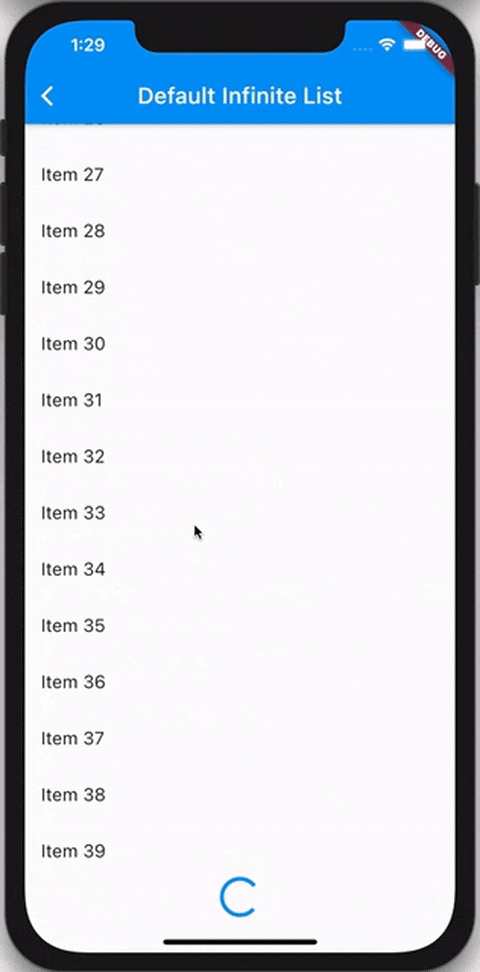
InfiniteList comes in handy when building features like activity feeds, news feeds, or anywhere else where you need to lazily fetch and render content for users to consume.
The InfiniteList API is very similar to that of ListView.builder. A basic implementation requires four parameters:
itemCount that represents the amount of items that should be rendered using the itemBuilder.itemBuilder that is responsible for returning a widget for every index of the itemCount.hasReachedMax flag that indicates if any more data is available.onFetchData callback that's triggered whenever new data should be fetched.import 'package:flutter/material.dart';
import 'package:very_good_infinite_list/very_good_infinite_list.dart';
void main() => runApp(MyApp());
class MyApp extends StatefulWidget {
@override
_MyAppState createState() => _MyAppState();
}
class _MyAppState extends State<MyApp> {
var _items = <String>[];
var _isLoading = false;
void _fetchData() async {
setState(() {
_isLoading = true;
});
await Future.delayed(const Duration(seconds: 1));
if (!mounted) {
return;
}
setState(() {
_isLoading = false;
_items = List.generate(_items.length + 10, (i) => 'Item $i');
});
}
@override
Widget build(BuildContext context) {
return Scaffold(
appBar: AppBar(
title: const Text('Simple Example'),
),
body: InfiniteList(
itemCount: _items.length,
isLoading: _isLoading,
onFetchData: _fetchData,
separatorBuilder: (context, index) => const Divider(),
itemBuilder: (context, index) {
return ListTile(
dense: true,
title: Text(_items[index]),
);
},
),
);
}
}
InfiniteList has multiple optional parameters which allow you to customize the loading and error behavior.
InfiniteList<String>(
  itemCount: 3,
  hasReachedMax: false,
  onFetchData: () => _fetchData(),
  itemBuilder: (context, index) => ListTile(title: Text('$index')),

  // An optional [ScrollController] this [InfiniteList] will attach to.
  // It's used to detect when the list has scrolled to the appropriate position
  // to call [onFetchData].
  //
  // Is optional and mostly used only for testing. If set to `null`, an
  // internal [ScrollController] is used instead.
  scrollController: _scrollController,

  // Indicates if new items are currently being loaded.
  //
  // While set to `true`, the [onFetchData] callback will not be triggered
  // and the [loadingBuilder] will be rendered.
  //
  // Is set to `false` by default.
  isLoading: false,

  // Indicates if an error has occurred.
  //
  // While set to `true`, the [onFetchData] callback will not be triggered
  // and the [errorBuilder] will be rendered.
  //
  // Is set to `false` by default.
  hasError: false,

  // Indicates if the list should be reversed.
  //
  // If set to `true`, the list of items, [loadingBuilder] and [errorBuilder]
  // will be rendered from bottom to top.
  //
  // Is set to `false` by default.
  reverse: false,

  // Indicates if the extent of the ScrollView in the scrollDirection
  // should be determined by the contents being viewed.
  //
  // Is set to `false` by default.
  shrinkWrap: false,

  // The duration with which calls to [onFetchData] will be debounced.
  //
  // Is set to a duration of 100 milliseconds by default.
  debounceDuration: const Duration(milliseconds: 100),

  // The offset, in pixels, that the internal [ScrollView] must be scrolled over
  // to trigger [onFetchData].
  //
  // Defaults to the same as [RenderAbstractViewport.defaultCacheExtent], which is 250.
  cacheExtent: 250.0,

  // The amount of space by which to inset the list of items.
  //
  // Is optional and can be `null`.
  padding: const EdgeInsets.all(16.0),

  // An optional builder that's shown when the list of items is empty.
  //
  // If `null`, nothing is shown.
  emptyBuilder: (context) => const Center(child: Text('No items.')),

  // Flag used to center the empty builder, it is optional and defaults to false
  centerEmpty: true,

  // An optional builder that's shown at the end of the list when [isLoading]
  // is `true`.
  //
  // If `null`, a default builder is used that renders a centered
  // [CircularProgressIndicator].
  loadingBuilder: (context) => const Center(child: CircularProgressIndicator()),

  // Flag used to center the loading builder, it is optional and defaults to false
  centerLoading: true,

  // An optional builder that's shown when [hasError] is not `null`.
  //
  // If `null`, a default builder is used that renders the text `"Error"`.
  errorBuilder: (context) => const Center(child: Text('Error')),

  // Flag used to center the error builder, it is optional and defaults to false
  centerError: true,

  // An optional builder that, when provided, is used to show a widget in
  // between every pair of items.
  //
  // If the [itemBuilder] returns a [ListTile], this is commonly used to render
  // a [Divider] between every tile.
  //
  // Is optional and can be `null`.
  separatorBuilder: (context, index) => const Divider(),

  // An optional [Axis] to be used by the internal [ScrollView] that defines
  // the axis of scroll.
  //
  // Is set to `Axis.vertical` by default.
  scrollDirection: Axis.vertical,

  // An optional [ScrollPhysics] to be used by the internal [ScrollView].
  //
  // Default to tha same as [ScrollView].
  physics: const AlwaysScrollableScrollPhysics(),
);
Refer to the example to see both basic and complex usage of InfiniteList.