
 v1.0.4
toasty_box
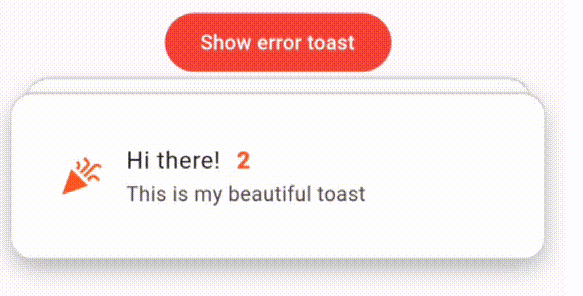
마음이 녹는 애니메이션을 갖춘 아름다운 토스트 라이브러리입니다. 현재 5가지 유형의 토스트(MessageToast, WidgetToast, SuccessToast, WarningToast, ErrorToast)를 지원합니다
48좋아요 52730일 다운로드150Pub 점수
AndroidiOSWebmacOSWindowsLinux
마음이 녹는 애니메이션을 가진 아름다운 토스트 라이브러리 🍞

{"sdk":"flutter"}{"sdk":"flutter"}^2.0.0아래는 영문 원문 스냅샷입니다. 최신 내용은 GitHub에서 확인하세요.
Toasty Box is a flutter plugin for showing beautiful animated toasts in your app. It comes with a fully customizable features and breath-taking animations.
Toasty Box Example Video
To use this plugin, add it to your pubspec.yaml file:
dependencies:
  toasty_box: ^1.0.1
Then, run:
$ flutter pub get
Import the package:
import 'package:toasty_box/toasty_box.dart';
Show a simple message toast:
ToastService.showToast(
                  context,
                  message: "This is a message toast 👋😎!",
                );
Pretty simple, isn't it? 😏
| Message Toast | Widget Toast |
|---|---|
| Message Toast | Widget Toast |
You can customize the appearance of your toasts by providing additional parameters.
For message toasts -
ToastService.showToast(
                  context,
                  isClosable: true,
                  backgroundColor: Colors.teal.shade500,
                  shadowColor: Colors.teal.shade200,
                  length: ToastLength.medium,
                  expandedHeight: 100,
                  message: "This is a message toast 👋😎!",
                  messageStyle: TextStyle(fontSize: 18),
                  leading: const Icon(Icons.messenger),
                  slideCurve: Curves.elasticInOut,
                  positionCurve: Curves.bounceOut,
                  dismissDirection: DismissDirection.none,
                );
For widget toast -
ToastService.showWidgetToast(
                  context,
                  isClosable: true,
                  backgroundColor: Colors.teal.shade500,
                  shadowColor: Colors.teal.shade200,
                  length: ToastLength.medium,
                  expandedHeight: 100,
                  leading: const Icon(Icons.messenger),
                  slideCurve: Curves.elasticInOut,
                  positionCurve: Curves.bounceOut,
                  dismissDirection: DismissDirection.none,
                  child: Container(
                  	color: Colors.blue,
                  	child: Center(
                  		child: Text('This is widget toast!'),
                  	),
                  ),
                );
message: The text to be displayed in the toast.messageStyle: Message text style to be displayed in the toastleading: Leading widget in the toastisClosable: Shows the close button as a trailing widgetexpandedHeight: Height of the toast from bottom of the screen when it is tappedlength: The duration of the toast in ToastLength enum - [short,medium,long,ages,never]backgroundColor: The background color of the toast.shadowColor: Shadow color of the toastslideCurve: Animation curve when list of toasts is reorderedpositionCurve: Animation curve when toast enters the screen and exits from the screenchild: Widget in the toast to be shownMoreover, there are other 3 types of toast templates I've prepared for your need -
For Success Toast:
ToastService.showSuccessToast(
                  context,
                  length: ToastLength.medium,
                  expandedHeight: 100,
                  message: "This is a success toast 🥂!",
                );
Success Toast
For Warning Toast:
ToastService.showWarningToast(
                  context,
                  length: ToastLength.medium,
                  expandedHeight: 100,
                  message: "This is a warning toast!",
                );
Warning Toast For Error Toast:
ToastService.showErrorToast(
  context,
  length: ToastLength.medium,
  expandedHeight: 100,
  message: "This is an error toast!",
);
Error Toast
Check out the example folder for a comprehensive implementation of how to use this plugin. The example demonstrates various customization options and use cases. You can run the example using:
$ cd example
$ flutter run
We welcome contributions! If you find any issues or have suggestions for improvements, feel free to open an issue or submit a pull request.
This project is licensed under the MIT License - see the LICENSE.md file for details.
MIT License

Copyright (c) 2023 YE LWIN OO

Permission is hereby granted, free of charge, to any person obtaining a copy
of this software and associated documentation files (the "Software"), to deal
in the Software without restriction, including without limitation the rights
to use, copy, modify, merge, publish, distribute, sublicense, and/or sell
copies of the Software, and to permit persons to whom the Software is
furnished to do so, subject to the following conditions:

The above copyright notice and this permission notice shall be included in all
copies or substantial portions of the Software.

THE SOFTWARE IS PROVIDED "AS IS", WITHOUT WARRANTY OF ANY KIND, EXPRESS OR
IMPLIED, INCLUDING BUT NOT LIMITED TO THE WARRANTIES OF MERCHANTABILITY,
FITNESS FOR A PARTICULAR PURPOSE AND NONINFRINGEMENT. IN NO EVENT SHALL THE
AUTHORS OR COPYRIGHT HOLDERS BE LIABLE FOR ANY CLAIM, DAMAGES OR OTHER
LIABILITY, WHETHER IN AN ACTION OF CONTRACT, TORT OR OTHERWISE, ARISING FROM,
OUT OF OR IN CONNECTION WITH THE SOFTWARE OR THE USE OR OTHER DEALINGS IN THE
SOFTWARE.
🏗️🏗️ More updates are coming soon...