

 v0.0.3
skeletons
로딩 중에 페이지 레이아웃을 모방하는 사용자 정의 스켈레톤 위젯을 만들기 위한 플러터 패키지입니다.
343좋아요 1.3천30일 다운로드60Pub 점수
플랫폼 정보 없음
로딩 중에 페이지 레이아웃을 모방하는 사용자 정의 스켈레톤 위젯을 만들기 위한 플러터 패키지입니다.

아래는 영문 원문 스냅샷입니다. 최신 내용은 GitHub에서 확인하세요.
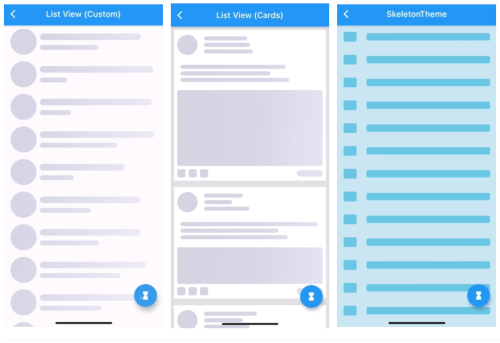
A Flutter package for building custom skeleton widgets to mimic the page's layout while loading.
| Items | ListView (Default) | |
|---|---|---|
 |
 |
 |
| ListView (Custom) | ListView (Complex Cards) | SkeletonTheme |
|---|---|---|
 |
 |
 |
| Light/Dark modes | Right-To-Left | Custom Shimmer |
|---|---|---|
 |
 |
 |
All examples can be found here examples.
Can be used by encapsulating the child widget in a Skeleton widget:
import 'package:skeletons/skeletons.dart';

Skeleton(
        isLoading: _isLoading,
        skeleton: SkeletonListView(),
        child: Container(child: Center(child: Text("Content"))),
      )
or directly:
Container(
    child: _isLoading
    ? SkeletonListView()
    : Container(child: Center(
                       child: Text("Content"))),
)
a SkeletonTheme can be used to set the default configs for all skeleton descendants in the tree.
SkeletonTheme(
    // themeMode: ThemeMode.light,
    shimmerGradient: LinearGradient(
        colors: [
          Color(0xFFD8E3E7),
          Color(0xFFC8D5DA),
          Color(0xFFD8E3E7),
        ],
        stops: [
          0.1,
          0.5,
          0.9,
        ],
      ),
      darkShimmerGradient: LinearGradient(
        colors: [
          Color(0xFF222222),
          Color(0xFF242424),
          Color(0xFF2B2B2B),
          Color(0xFF242424),
          Color(0xFF222222),
        ],
        stops: [
          0.0,
          0.2,
          0.5,
          0.8,
          1,
        ],
        begin: Alignment(-2.4, -0.2),
        end: Alignment(2.4, 0.2),
        tileMode: TileMode.clamp,
      ),
        child: MateriaApp(
            ...
        ),
      ),
| ListView (Complex Cards) |
|---|
|
for more complex shapes you can build your skeleton inside a SkeletonItem widget:
ListView.builder(
  physics: NeverScrollableScrollPhysics(),
  itemCount: 5,
  itemBuilder: (context, index) => Padding(
    padding: const EdgeInsets.all(8.0),
    child: Container(
      padding: const EdgeInsets.all(8.0),
      decoration: BoxDecoration(color: Colors.white),
      child: SkeletonItem(
          child: Column(
        children: [
          Row(
            children: [
              SkeletonAvatar(
                style: SkeletonAvatarStyle(
                    shape: BoxShape.circle, width: 50, height: 50),
              ),
              SizedBox(width: 8),
              Expanded(
                child: SkeletonParagraph(
                  style: SkeletonParagraphStyle(
                      lines: 3,
                      spacing: 6,
                      lineStyle: SkeletonLineStyle(
                        randomLength: true,
                        height: 10,
                        borderRadius: BorderRadius.circular(8),
                        minLength: MediaQuery.of(context).size.width / 6,
                        maxLength: MediaQuery.of(context).size.width / 3,
                      )),
                ),
              )
            ],
          ),
          SizedBox(height: 12),
          SkeletonParagraph(
            style: SkeletonParagraphStyle(
                lines: 3,
                spacing: 6,
                lineStyle: SkeletonLineStyle(
                  randomLength: true,
                  height: 10,
                  borderRadius: BorderRadius.circular(8),
                  minLength: MediaQuery.of(context).size.width / 2,
                )),
          ),
          SizedBox(height: 12),
          SkeletonAvatar(
            style: SkeletonAvatarStyle(
              width: double.infinity,
              minHeight: MediaQuery.of(context).size.height / 8,
              maxHeight: MediaQuery.of(context).size.height / 3,
            ),
          ),
          SizedBox(height: 8),
          Row(
            mainAxisAlignment: MainAxisAlignment.spaceBetween,
            children: [
              Row(
                children: [
                  SkeletonAvatar(
                      style: SkeletonAvatarStyle(width: 20, height: 20)),
                  SizedBox(width: 8),
                  SkeletonAvatar(
                      style: SkeletonAvatarStyle(width: 20, height: 20)),
                  SizedBox(width: 8),
                  SkeletonAvatar(
                      style: SkeletonAvatarStyle(width: 20, height: 20)),
                ],
              ),
              SkeletonLine(
                style: SkeletonLineStyle(
                    height: 16,
                    width: 64,
                    borderRadius: BorderRadius.circular(8)),
              )
            ],
          )
        ],
      )),
    ),
  ),
);
For issues, please report here. Contributions are welcome.
의존성 목록 2 개
{"sdk":"flutter"}{"sdk":"flutter"}사용 목적에 따라 검색하고 개발 활동을 비교한 뒤 원본 저장소에서 요구 사항을 확인하세요.
“A repository is the most basic element of GitHub.”
GitHub Docs — About repositories ↗