
 v1.0.2
animated_toast_list
이 패키지를 사용하는 사람은 더 자유로운 느낌을 받을 것입니다. 이 패키지가 일반적이기 때문에 원하는 토스트를 만들 수 있습니다.
30좋아요 81030일 다운로드150Pub 점수
AndroidiOSWebmacOSWindowsLinux
이 패키지를 사용하는 사람은 더 자유로운 느낌을 받을 것입니다. 이 패키지가 일반적이기 때문에 원하는 토스트를 만들 수 있습니다.

{"sdk":"flutter"}{"sdk":"flutter"}^2.0.0아래는 영문 원문 스냅샷입니다. 최신 내용은 GitHub에서 확인하세요.
When using Flutter, did you ever want to show toast with the design you want? Also, did you want to list the toast and show it with the desired animation? Then you have found what you are looking for! This package is generic, so there will be no problem with your toast. This package supports all platforms.
To use this package, wrap any widget with ToastListOverlay, as in the example below. For more details, see the example.
Widget build(BuildContext context) {
    return ToastListOverlay<MyToastModel>(
      itemBuilder: (BuildContext context, MyToastModel item, int index,
          Animation<double> animation) {
        return ToastItem(
          animation: animation,
          item: item,
          onTap: () => context.hideToast(
              item,
              (context, animation) =>
                  _buildItem(context, item, index, animation)),
        );
      },
      child: MaterialApp(
        theme: ThemeData(
          primarySwatch: Colors.blue,
        ),
        home: const MainScreen(),
        debugShowCheckedModeBanner: false,
      ),
    );
  }
| Property | Default value | Description |
|---|---|---|
| child | Required Widget | Wrapped widget |
| position | Alignment.topCenter | Specifies where toast to be displayed. |
| reverse | false | Reverse the Toast list. |
| limit | 5 | Specify how much toast to display. |
| itemBuilder | Required ToastListItemBuilder | The Toast widget is defined here. |
| width | 375 | Specifies the width of the toast. |
| timeoutDuration | 5 seconds | Specifies how long toast will be displayed. |
Now you can call the context.showToast method to display your toast. You can see more details in the example.
context.showToast(MyToastModel(ToastType.success.name, ToastType.success));
Note: MyToastModel is an example model.
To close the Toast, call the context.hideToast method.
context.hideToast(
  item,
  (context, animation) => ToastItem(
    animation: animation,
    item: item,
  ),
);
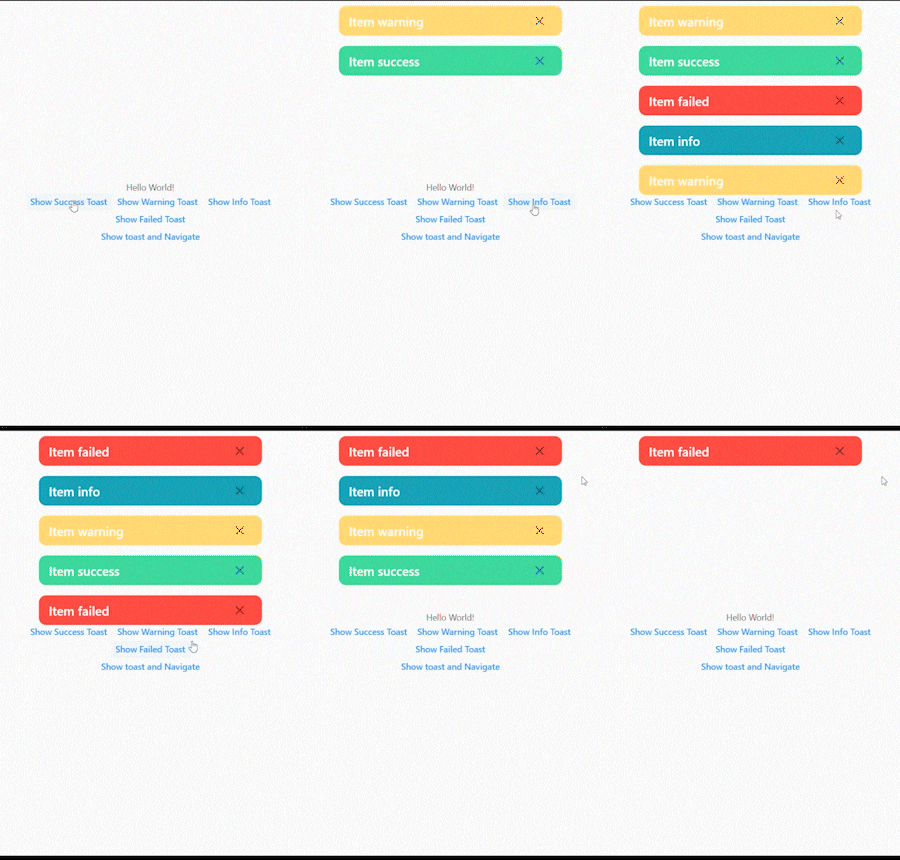
The figure below shows when the toast exceeds the limit.
2022-06-11_01-25-41_AdobeExpress
The figure below shows how to remove the toast by clicking the close button.
2022-06-11_01-25-41_AdobeExpress (1)
In the figure below, you can see the toast without any problems even if you navigate to another screen.
2022-06-11_01-25-41_AdobeExpress (2)
The figure below shows the toast list reversed.
2022-06-11_01-39-18_AdobeExpress