
 v0.0.3
overlapping_panels
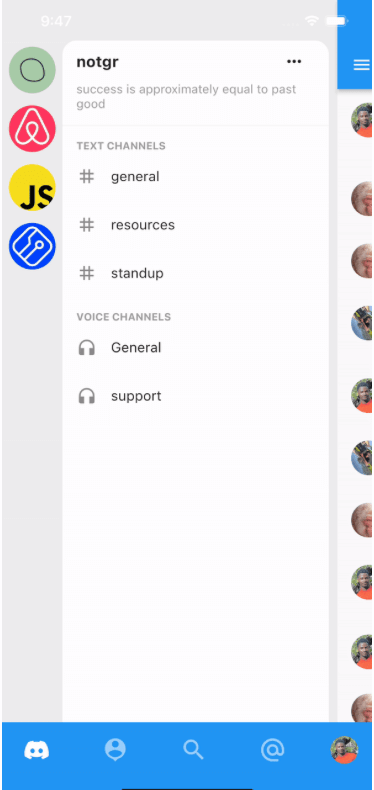
디스코드 모바일 앱 탐색에서 영감을 받았습니다. 제스처로 패널을 표시하고, 패널이 표시될 때 콜백을 수신할 수 있는 왼쪽 및 오른쪽 패널을 앱에 추가하세요.
56좋아요 1330일 다운로드150Pub 점수
AndroidiOSWebmacOSWindowsLinux
Flutter 앱을 위한 디스코드 스타일 네비게이션

{"sdk":"flutter"}{"sdk":"flutter"}^1.0.0아래는 영문 원문 스냅샷입니다. 최신 내용은 GitHub에서 확인하세요.
Add Discord-like navigation to your app. Demo project here: overlapping_panels_demo
DemoThis widget does not support navigation events yet. So pressing the back button, does not slide the main panel back into view. This feature will be implemented in the nearest future.
Simple and straight to the point. Just provide usual widgets for all panels:
class _MyHomePageState extends StatelessWidget {

  @override
  Widget build(BuildContext context) {
    return Stack(
      children: [
        OverlappingPanels(
          // Using the Builder widget is not required. You can pass your widget directly.
          // But to use `OverlappingPanels.of(context)` you need to wrap your widget in a Builder
          left: Builder(builder: (context) {
            return const LeftPage();
          }),
          right: Builder(
            builder: (context) => const RightPage(),
          ),
          main: Builder(
            builder: (context) {
              return const MainPage();
            },
          ),
          onSideChange: (side) {
            setState(() {
              if (side == RevealSide.main) {
                // hide something
              } else if (side == RevealSide.left) {
                // show something
              }
            });
          },
        ),
      ],
    );
  }
}
To be able to reveal a panel with the tap of a button, for example, do:
IconButton(
  icon: const Icon(Icons.menu),
  onPressed: () {
    // This is the main point
    OverlappingPanels.of(context)?.reveal(RevealSide.left);
  },
)