
 v8.1.0
pluto_grid
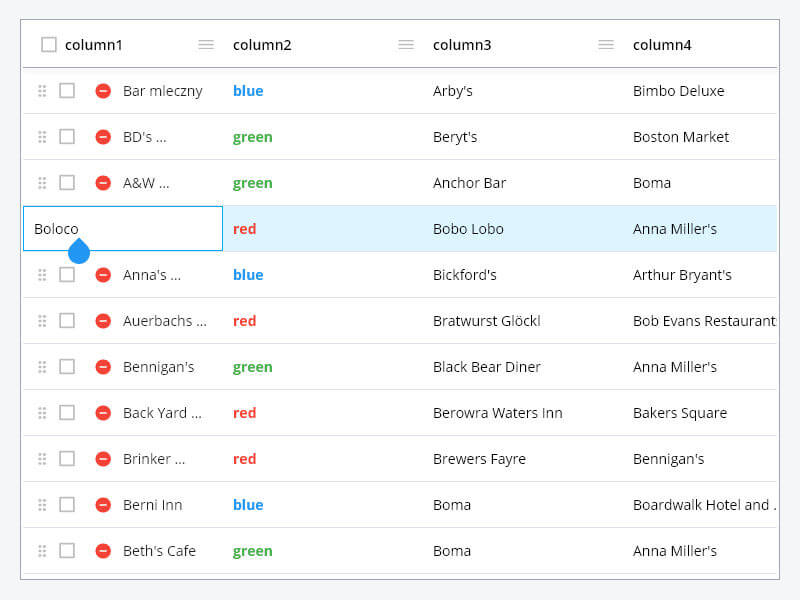
PlutoGrid는 데스크톱 및 웹에서 키보드로 제어할 수 있는 데이터 그리드입니다. 물론 안드로이드와 IOS에서도 잘 작동합니다. (DataGrid, DataTable, 데이터 그리드, 데이터 테이블, 스티키)
1.1천좋아요 3.4만30일 다운로드160Pub 점수
AndroidiOSWebmacOSWindowsLinux
PlutoGrid는 데스크톱 및 웹에서 키보드로 제어할 수 있는 플러터용 데이터 그리드입니다. 물론 안드로이드와 IOS에서도 잘 작동합니다.

{"sdk":"flutter"}^0.20.2^0.28.0^1.19.1{"sdk":"flutter"}^5.6.1^2.10.4^6.0.0아래는 영문 원문 스냅샷입니다. 최신 내용은 GitHub에서 확인하세요.
Awesome Flutter codecov License: MIT
PlutoGrid is a DataGrid that can be operated with the keyboard in various situations such as
moving cells.
It is developed with priority on the web and desktop.
Improvements such as UI on mobile are being considered.
If you comment on an issue, mobile improvements can be made quickly.
You can try out various functions and usage methods right away.
All features provide example code.
Check out how to install from the official distribution site.
The documentation has more details.
Please note the changes when changing the version of PlutoGrid you are using.
Report any questions or errors.
PlutoGridExport
This package can export the metadata of PlutoGrid as CSV or PDF.
PlutoGrid Normal
PlutoGrid Select Popup
PlutoGrid Select Date
PlutoGrid Cell renderer
PlutoGrid Multi select
Generate the data to be used in the grid.
List<PlutoColumn> columns = [

  /// Text Column definition
  PlutoColumn(
    title: 'text column',
    field: 'text_field',
    type: PlutoColumnType.text(),
  ),

  /// Number Column definition
  PlutoColumn(
    title: 'number column',
    field: 'number_field',
    type: PlutoColumnType.number(),
  ),

  /// Select Column definition
  PlutoColumn(
    title: 'select column',
    field: 'select_field',
    type: PlutoColumnType.select(['item1', 'item2', 'item3']),
  ),

  /// Datetime Column definition
  PlutoColumn(
    title: 'date column',
    field: 'date_field',
    type: PlutoColumnType.date(),
  ),

  /// Time Column definition
  PlutoColumn(
    title: 'time column',
    field: 'time_field',
    type: PlutoColumnType.time(),
  ),
];

List<PlutoRow> rows = [
  PlutoRow(
    cells: {
      'text_field': PlutoCell(value: 'Text cell value1'),
      'number_field': PlutoCell(value: 2020),
      'select_field': PlutoCell(value: 'item1'),
      'date_field': PlutoCell(value: '2020-08-06'),
      'time_field': PlutoCell(value: '12:30'),
    },
  ),
  PlutoRow(
    cells: {
      'text_field': PlutoCell(value: 'Text cell value2'),
      'number_field': PlutoCell(value: 2021),
      'select_field': PlutoCell(value: 'item2'),
      'date_field': PlutoCell(value: '2020-08-07'),
      'time_field': PlutoCell(value: '18:45'),
    },
  ),
  PlutoRow(
    cells: {
      'text_field': PlutoCell(value: 'Text cell value3'),
      'number_field': PlutoCell(value: 2022),
      'select_field': PlutoCell(value: 'item3'),
      'date_field': PlutoCell(value: '2020-08-08'),
      'time_field': PlutoCell(value: '23:59'),
    },
  ),
];
Create a grid with the data created above.
  @override
Widget build(BuildContext context) {
  return Scaffold(
    appBar: AppBar(
      title: const Text('PlutoGrid Demo'),
    ),
    body: Container(
      padding: const EdgeInsets.all(30),
      child: PlutoGrid(
          columns: columns,
          rows: rows,
          onChanged: (PlutoGridOnChangedEvent event) {
            print(event);
          },
          onLoaded: (PlutoGridOnLoadedEvent event) {
            print(event);
          }
      ),
    ),
  );
}
| Flutter | PlutoGrid |
|---|---|
| 3.38.0 or higher | 8.1.0 or higher |
| 3.19.0 or higher | 8.0.0 or higher |
| 3.10.0 or higher | 7.0.0 or higher |
| 3.7.0 or higher | 6.0.0 or higher |
| 3.3.0 or higher | 5.0.6 or higher |
| 3.0.0 or higher | 3.0.0-0.pre or higher |
| 2.5.0 or higher | 2.5.0 or higher |
For other versions, contact the issue
develop packages that make it easy to develop admin pages or CMS with Flutter.