
 v1.0.0
pluto_layout
PlutoLayout는 각 측면에 메뉴 또는 탭 화면을 구성할 수 있는 Flutter UI 패키지입니다.
82좋아요 20830일 다운로드140Pub 점수
AndroidiOSWebmacOSWindowsLinux
PlutoLayout는 각 측면에 메뉴 또는 탭 화면을 구성할 수 있는 Flutter UI 패키지입니다.

{"sdk":"flutter"}^1.17.0^0.27.7^2.1.3{"sdk":"flutter"}^2.0.1아래는 영문 원문 스냅샷입니다. 최신 내용은 GitHub에서 확인하세요.
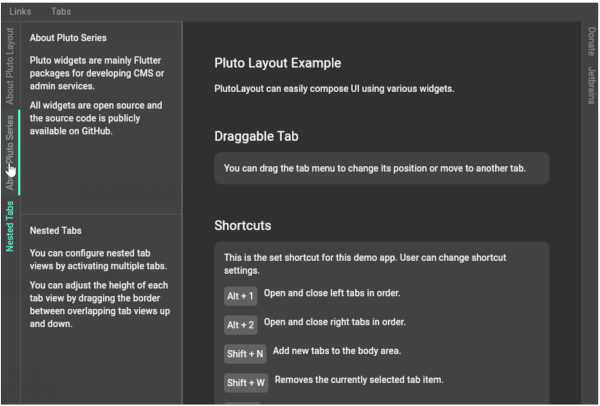
PlutoLayout is a Flutter UI package that can configure a menu or tab screen on each side.
You can adjust the width of the tab menu by dragging the right border of the tab menu.
You can also assign custom shortcut keys to open or close tab views and resize tab views.
PlutoLayout Screenshot
import 'package:flutter/material.dart';
import 'package:flutter/services.dart';
import 'package:pluto_layout/pluto_layout.dart';

void main() {
  runApp(const ExampleApp());
}

class ExampleApp extends StatelessWidget {
  const ExampleApp({super.key});

  @override
  Widget build(BuildContext context) {
    return MaterialApp(
      debugShowCheckedModeBanner: false,
      theme: ThemeData.dark(useMaterial3: true),
      home: const ExamplePage(),
    );
  }
}

class ExamplePage extends StatefulWidget {
  const ExamplePage({super.key});

  @override
  State<ExamplePage> createState() => _ExamplePageState();
}

class _ExamplePageState extends State<ExamplePage> {
  @override
  Widget build(BuildContext context) {
    return Scaffold(
      body: PlutoLayout(
        shortcuts: {
          LogicalKeySet(LogicalKeyboardKey.escape):
          PlutoLayoutActions.hideAllTabView(),
          LogicalKeySet(LogicalKeyboardKey.alt, LogicalKeyboardKey.digit1):
          PlutoLayoutActions.rotateTabView(
            PlutoLayoutContainerDirection.left,
          ),
          LogicalKeySet(LogicalKeyboardKey.alt, LogicalKeyboardKey.digit2):
          PlutoLayoutActions.rotateTabView(
            PlutoLayoutContainerDirection.right,
          ),
          LogicalKeySet(LogicalKeyboardKey.alt, LogicalKeyboardKey.arrowUp):
          PlutoLayoutActions.increaseTabView(),
          LogicalKeySet(LogicalKeyboardKey.alt, LogicalKeyboardKey.arrowDown):
          PlutoLayoutActions.decreaseTabView(),
        },
        body: const PlutoLayoutContainer(
          child: Text('Body container'),
        ),
        top: PlutoLayoutContainer(
          child: PlutoLayoutTabs(
            items: [
              PlutoLayoutTabItem(
                id: 'top1',
                title: 'top1',
                tabViewBuilder: (e) => const Text('top1'),
              ),
              PlutoLayoutTabItem(
                id: 'top2',
                title: 'top2',
                tabViewBuilder: (e) => const Text('top2'),
              ),
            ],
          ),
        ),
        left: PlutoLayoutContainer(
          child: PlutoLayoutTabs(
            items: [
              PlutoLayoutTabItem(
                id: 'left1',
                title: 'left1',
                tabViewBuilder: (e) => const Text('left1'),
              ),
              PlutoLayoutTabItem(
                id: 'left2',
                title: 'left2',
                tabViewBuilder: (e) => const Text('left2'),
              ),
            ],
          ),
        ),
        right: PlutoLayoutContainer(
          child: PlutoLayoutTabs(
            items: [
              PlutoLayoutTabItem(
                id: 'right1',
                title: 'right1',
                tabViewBuilder: (e) => const Text('right1'),
              ),
              PlutoLayoutTabItem(
                id: 'right2',
                title: 'right2',
                tabViewBuilder: (e) => const Text('right2'),
              ),
            ],
          ),
        ),
        bottom: PlutoLayoutContainer(
          child: PlutoLayoutTabs(
            items: [
              PlutoLayoutTabItem(
                id: 'bottom1',
                title: 'bottom1',
                tabViewBuilder: (e) => const Text('bottom1'),
              ),
              PlutoLayoutTabItem(
                id: 'bottom2',
                title: 'bottom2',
                tabViewBuilder: (e) => const Text('bottom2'),
              ),
            ],
          ),
        ),
      ),
    );
  }
}
| Flutter | PlutoLayout |
|---|---|
| 3.7.0 or higher | 1.0.0 or higher |
| Less than 3.3.7 | 0.x |
develop packages that make it easy to develop admin pages or CMS with Flutter.