

 v1.8.1
waveform_recorder
실시간 파형 시각화 기능을 갖춘 오디오 녹음용 플러터 패키지로, 채팅 애플리케이션의 음성 메시징 및 오디오 녹음 기능에 적합합니다.
53좋아요 1.8만30일 다운로드150Pub 점수
AndroidiOSWebmacOSWindowsLinux
실시간 파형 시각화 기능을 갖춘 오디오 녹음용 플러터 패키지

아래는 영문 원문 스냅샷입니다. 최신 내용은 GitHub에서 확인하세요.
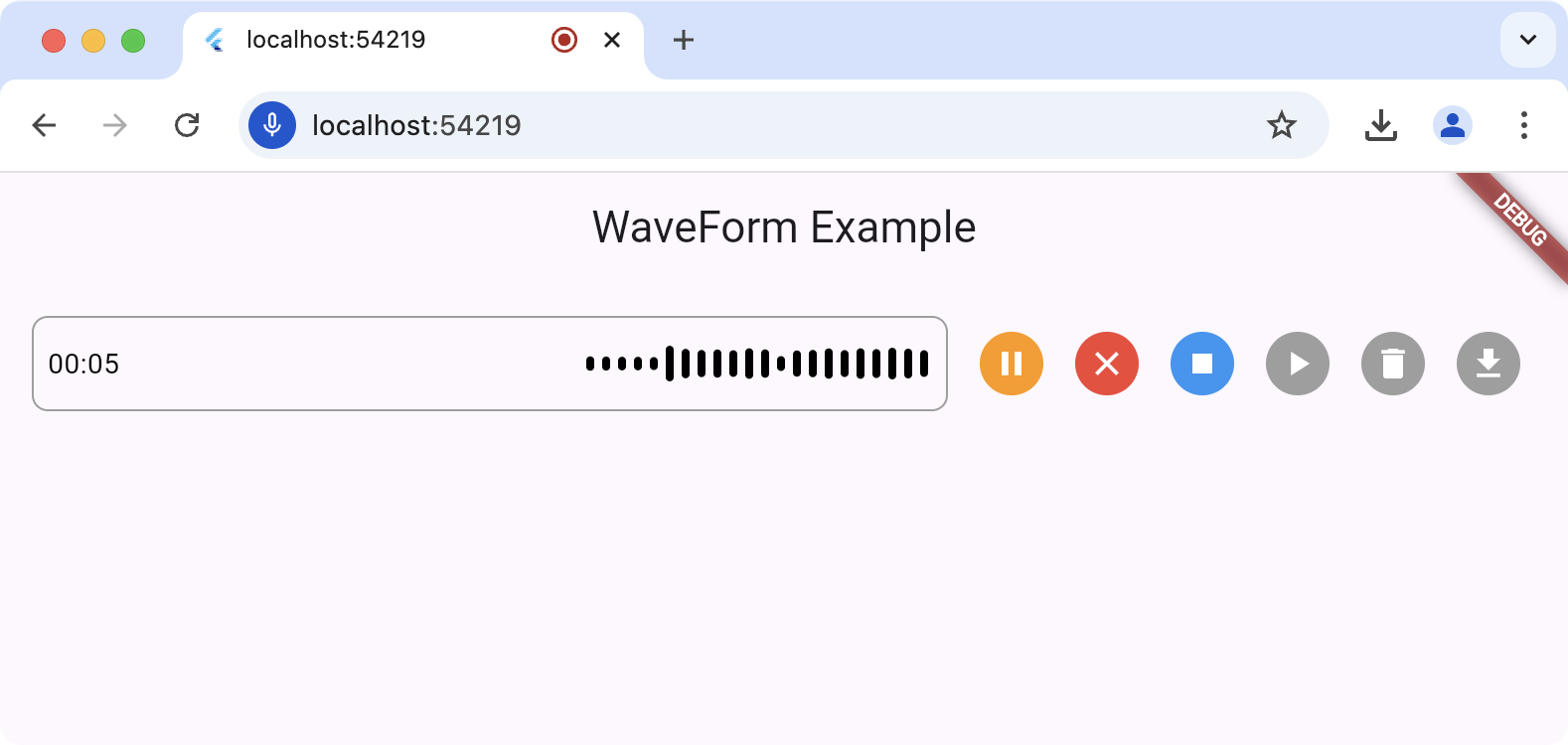
The waveform_recorder package provides a widget to show a waveform as an audio stream is being recorded in the style of recent AI chat packages.
For this package to work, you'll need to set up the underlying record
package according to the setup and permission
instructions.
The main entry point for this package is the WaveformRecorder widget, which
requires an instance of the WaveformRecorderController to start/stop
recording. Here's an example of using the recorder to record audio and then
allowing the user to play it back:
import 'dart:async';

import 'package:audioplayers/audioplayers.dart';
import 'package:flutter/foundation.dart';
import 'package:flutter/material.dart';
import 'package:gap/gap.dart';
import 'package:waveform_recorder/waveform_recorder.dart';

void main() => runApp(const MyApp());

class MyApp extends StatefulWidget {
  const MyApp({super.key});

  @override
  State<MyApp> createState() => _MyAppState();
}

class _MyAppState extends State<MyApp> {
  final _textController = TextEditingController();
  final _waveController = WaveformRecorderController();

  @override
  void dispose() {
    _textController.dispose();
    _waveController.dispose();
    super.dispose();
  }

  @override
  Widget build(BuildContext context) => MaterialApp(
        home: Scaffold(
          appBar: AppBar(title: const Text('WaveForm Example')),
          body: ListenableBuilder(
            listenable: _waveController,
            builder: (context, _) => Column(
              children: [
                Expanded(
                  child: Center(
                    child: OutlinedButton(
                      onPressed: !_waveController.isRecording &&
                              _waveController.file != null
                          ? _playRecording
                          : null,
                      child: const Text('Play'),
                    ),
                  ),
                ),
                Padding(
                  padding: const EdgeInsets.all(16),
                  child: Row(
                    children: [
                      Expanded(
                        child: DecoratedBox(
                          decoration: BoxDecoration(
                            border: Border.all(color: Colors.grey),
                            borderRadius: BorderRadius.circular(8),
                          ),
                          child: _waveController.isRecording
                              ? WaveformRecorder(
                                  height: 48,
                                  controller: _waveController,
                                  onRecordingStopped: _onRecordingStopped,
                                )
                              : TextField(
                                  controller: _textController,
                                  maxLines: 1,
                                  decoration: const InputDecoration(
                                    border: InputBorder.none,
                                    contentPadding: EdgeInsets.symmetric(
                                      horizontal: 8,
                                    ),
                                  ),
                                ),
                        ),
                      ),
                      const Gap(8),
                      IconButton(
                        icon: Icon(
                          _waveController.isRecording ? Icons.stop : Icons.mic,
                        ),
                        onPressed: _toggleRecording,
                      ),
                    ],
                  ),
                ),
              ],
            ),
          ),
        ),
      );

  Future<void> _toggleRecording() => switch (_waveController.isRecording) {
        true => _waveController.stopRecording(),
        false => _waveController.startRecording(),
      };

  Future<void> _onRecordingStopped() async {
    final file = _waveController.file;
    if (file == null) return;

    _textController.text = ''
        '${file.name}: '
        '${_waveController.length.inMilliseconds / 1000} seconds';

    debugPrint('XFile properties:');
    debugPrint('  path: ${file.path}');
    debugPrint('  name: ${file.name}');
    debugPrint('  mimeType: ${file.mimeType}');
  }

  Future<void> _playRecording() async {
    final file = _waveController.file;
    if (file == null) return;
    final source = kIsWeb ? UrlSource(file.path) : DeviceFileSource(file.path);
    await AudioPlayer().play(source);
  }
}
For all platforms except the web, the output of a record operation is a file on
your hard drive; it's your app's responsibility to remove this temp file when
it's done with it. When executing on the web, the file (an instance of the XFile
type from the cross_file package) of the
recorded audio will contain a path to a blob URL but otherwise, it will be a
file in the file system. You can get the path to that file from
WaveformRecorderController.file.path, e.g.
  Future<void> _deleteRecording() async {
    final file = _waveController.file;
    if (file == null) return;
    if (!kIsWeb) await File(file.path).delete();
  }
의존성 목록 9 개
^0.3.4+2{"sdk":"flutter"}^1.9.1^2.1.5^7.1.1^1.2.0^1.1.1^0.0.43{"sdk":"flutter"}사용 목적에 따라 검색하고 개발 활동을 비교한 뒤 원본 저장소에서 요구 사항을 확인하세요.
“A repository is the most basic element of GitHub.”
GitHub Docs — About repositories ↗