
시간 기간 선택기
시간 간격을 선택하기 위한 플러터 패키지
- 스타
- 8
- 포크
- 6
- 최근 푸시(UTC)
- 2024. 4. 10.
- 프로젝트 상태
- 활성
원본 README
아래는 영문 원문 스냅샷입니다. 최신 내용은 GitHub에서 확인하세요.
Time Duration Picker
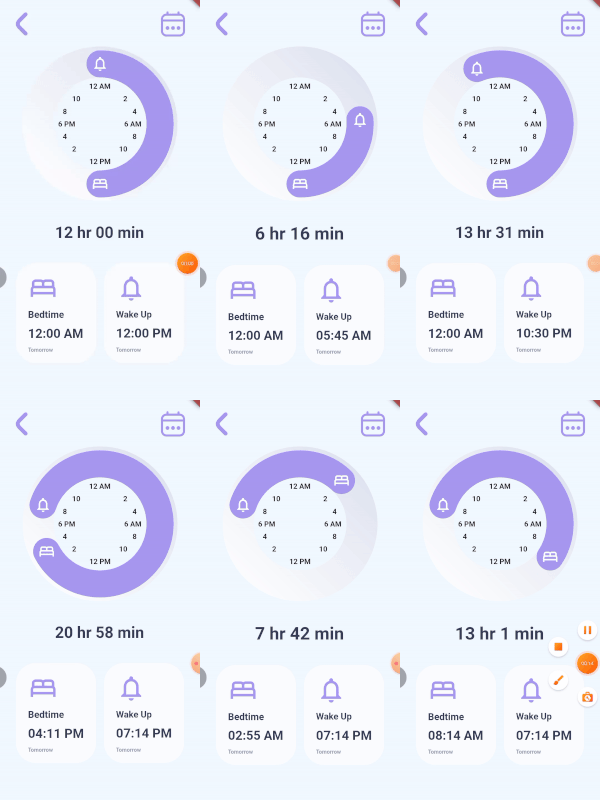
A time picker for paired consecutive tasks. It lets you specify the icons for each of your actions and callbacks when the user rotates each icon. You can optionally give callback for the time duration, decorations for the knob, the knob background, the clock and also color for your icons. The time and duration values are not displayed by the TimeDurationPicker widget, instead they are passed to the callbacks provided.
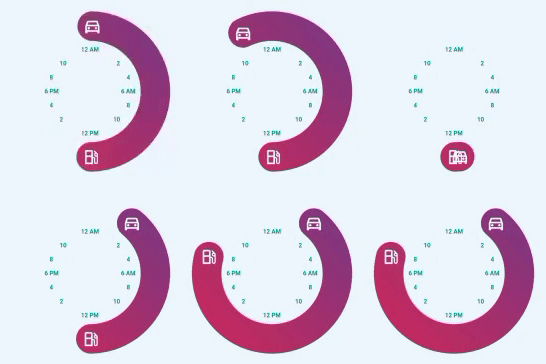
TimeDurationPicker(
      diameter: 300,
      icon1Data: Icons.directions_car_outlined,
      icon2Data: Icons.local_gas_station_outlined,
      knobDecoration: const BoxDecoration(
        gradient: LinearGradient(
          begin: Alignment.bottomLeft,
          end: Alignment.topRight,
          colors: [
            Color.fromRGBO(204, 43, 94, 1),
            Color.fromRGBO(117, 58, 136, 1),
          ],
        ),
      ),
      clockTextStyle: const TextStyle(
          color: Colors.teal, fontWeight: FontWeight.bold),
      onIcon1RotatedCallback: (value) {
        setState(() {
          goTime = value;
        });
      },
      onIcon2RotatedCallback: (value) {
        setState(() {
          gasTime = value;
        });
      },),
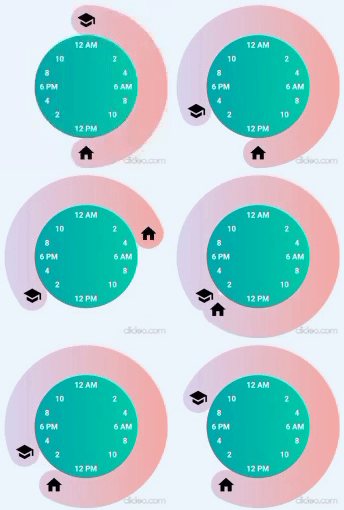
TimeDurationPicker(
  diameter: 305,
  icon1Data: Icons.school,
  icon2Data: Icons.home,
  clockTextStyle: const TextStyle(
      color: Colors.white, fontWeight: FontWeight.bold),
  iconColor: Colors.black,
  knobDecoration: const BoxDecoration(
    gradient: LinearGradient(
      colors: [
        Color.fromRGBO(221, 214, 243, 1),
        Color.fromRGBO(250, 172, 168, 1),
      ],
    ),
  ),
  clockDecoration: const BoxDecoration(
    gradient: LinearGradient(
      colors: [
        Color.fromRGBO(2, 170, 176, 1),
        Color.fromRGBO(0, 205, 172, 1),
      ],
    ),
  ),
  onIcon1RotatedCallback: (value) {
    setState(() {
      schoolTime = value;
    });
  },
  onIcon2RotatedCallback: (value) {
    setState(() {
      homeTime = value;
    });
  },
  setDurationCallback: (value) {
    setState(() {
      sleepDuration = value;
    });
  },
)
Inspired by Iphone Alarm UI Design by Ghulam Rasool

GitHub 작성자
Surafel Tariku ↗
언어DartC++CMakeHTMLCSwiftKotlinObjective-C
분류
사용 중인 의존성
의존성 목록 3 개
- flutter
{"sdk":"flutter"} - flutter_test개발 의존성
{"sdk":"flutter"} - flutter_lints개발 의존성
^1.0.0
프로젝트에 맞는 저장소를 선택하려면?
사용 목적에 따라 검색하고 개발 활동을 비교한 뒤 원본 저장소에서 요구 사항을 확인하세요.
- 이름, 작성자 또는 설명으로 검색하고 기술 주제로 범위를 좁힙니다.
- 스타, 포크, 최근 푸시를 함께 비교하세요. 스타는 관심의 지표이며 품질을 보장하지 않습니다.
- 사용하기 전에 GitHub에서 README, 라이선스, Issues를 확인하세요.
출처 및 관리
“A repository is the most basic element of GitHub.”
GitHub Docs — About repositories ↗