
expansion_widget
타일 위젯과 애니메이션을 사용자 정의할 수 있도록 한 편집된 ExpansionTile입니다.

- 스타
- 5
- 포크
- 4
- 최근 푸시(UTC)
- 2024. 4. 16.
- 프로젝트 상태
- 활성
원본 README
아래는 영문 원문 스냅샷입니다. 최신 내용은 GitHub에서 확인하세요.
expansion_widget
An edited version of Expansion Tile that allows you customize tile widget and animation.
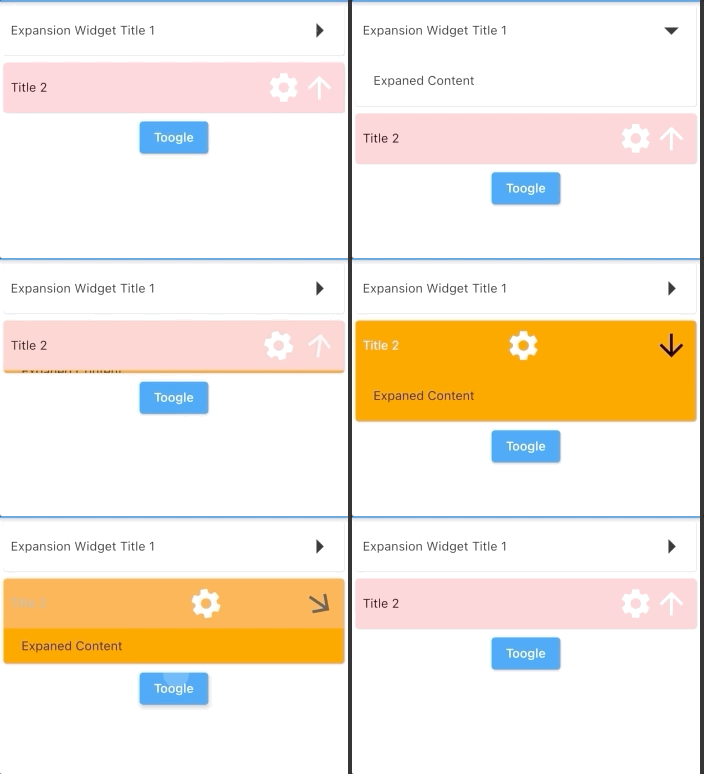
Parameters
| key | Key? | |
|---|---|---|
| titleBuilder | Widget Function( animationValue, easeInValue, isExpanded, toggleFunction) | required The builder of title. Typically a [Button] widget that call [toggleFunction] when pressed. |
| content | Widget | required The widget that are displayed when the expansionWidget expands. |
| initiallyExpanded | bool | default: false Specifies if the expansionWidget is initially expanded (true) or collapsed (false, the default). |
| maintainState | bool | default: false Specifies whether the state of the content is maintained when the expansionWidget expands and collapses. |
| expandedAlignment | Alignment? | default: Alignment.center Specifies the alignment of [content], which are arranged in a column when the expansionWidget is expanded. |
| onSaveState | Function (bool isExpanded)? | Function to save expansion state Called when expansion state changed |
| onRestoreState | bool? Function()? | default: null function to restore expansion state. Return null if there is no state to store, in this case, [initiallyExpanded] will be used |
| duration | Duration | default: 200 ms The length of time of animation |
| onExpansionWillChange | bool Function(bool)? | default: null Called when the widget will change expanded state. When the widget is going to start expanding/collapsing, this function is called with the value true/false. Return false to prevent expanded state to change. Return true(default) to allow expanded state changing. |
| onExpansionChanged | Function(bool)? | default: null Called when the widget expands or collapses. When the widget starts expanding, this function is called with the value true. When the tile starts collapsing, this function is called with the value false. |
Usage
import 'package:expansion_widget/expansion_widget.dart';
import 'dart:math' as math;

ExpansionWidget(
    initiallyExpanded: true,
    titleBuilder: (double animationValue, _, bool isExpaned, toogleFunction) {
      return InkWell(
          onTap: () => toogleFunction(animated: true),
          child: Padding(
            padding: EdgeInsets.all(8),
            child: Row(
              crossAxisAlignment: CrossAxisAlignment.center,
              children: [
                Expanded(child: Text('Expansion Widget Title 1')),
                Transform.rotate(
                  angle: math.pi * animationValue / 2,
                  child: Icon(Icons.arrow_right, size: 40),
                  alignment: Alignment.center,
                )
              ],
            ),
          ));
    },
    content: Container(
      width: double.infinity,
      color: Colors.grey.shade100,
      padding: EdgeInsets.all(20),
      child: Text('Expaned Content'),
    ))
Or using ExpansionWidget.autoSaveState() to auto save/restore expansion state.

GitHub 작성자
datvu7 ↗
언어C++CMakeDartHTMLSwiftCKotlinObjective-C
분류
사용 중인 의존성
의존성 목록 2 개
- flutter
{"sdk":"flutter"} - flutter_test개발 의존성
{"sdk":"flutter"}
프로젝트에 맞는 저장소를 선택하려면?
사용 목적에 따라 검색하고 개발 활동을 비교한 뒤 원본 저장소에서 요구 사항을 확인하세요.
- 이름, 작성자 또는 설명으로 검색하고 기술 주제로 범위를 좁힙니다.
- 스타, 포크, 최근 푸시를 함께 비교하세요. 스타는 관심의 지표이며 품질을 보장하지 않습니다.
- 사용하기 전에 GitHub에서 README, 라이선스, Issues를 확인하세요.
출처 및 관리
“A repository is the most basic element of GitHub.”
GitHub Docs — About repositories ↗