

 v0.0.18
flutter_stripe_payment
강력한 SCA 3DS 준수를 갖춘 Payment Intents를 사용하여 Flutter 애플리케이션에 Stripe를 추가하여 카드 결제를 수락하세요.
57좋아요 8530일 다운로드125Pub 점수
AndroidiOS
Flutter 애플리케이션에 Stripe 결제 추가

아래는 영문 원문 스냅샷입니다. 최신 내용은 GitHub에서 확인하세요.
Add Stripe to your Flutter Application to Accept Card Payments using Payment Intents and the Latest SCA Compliance 3DS Requirements
Strong Customer Authentication (SCA), a new rule coming into effect on September 14, 2019, as part of PSD2 regulation in Europe, will require changes to how your European customers authenticate online payments. Card payments will require a different user experience, namely 3D Secure, in order to meet SCA requirements. Transactions that don’t follow the new authentication guidelines may be declined by your customers’ banks.
The Payment Intents API is a new way to build dynamic payment flows. It tracks the lifecycle of a customer checkout flow and triggers additional authentication steps when required by regulatory mandates, custom Radar fraud rules, or redirect-based payment methods.
final _stripePayment = FlutterStripePayment();
_stripePayment.onCancel = (){
  print("User Cancelled the Payment Method Form");
};
_stripePayment.setStripeSettings(
        appConfig.values.stripePublishableKey,
        appConfig.values.applePayMerchantId);
var paymentResponse = await _stripePayment.addPaymentMethod();
if(paymentResponse.status == PaymentResponseStatus.succeeded)
  {
    print(paymentResponse.paymentMethodId);
  }
var intent = PaymentIntent();
    intent.amount = widget.order.cart.total;
    intent.isManual = true;
    intent.isConfirmed = false;
    intent.paymentMethodId = paymentResponse.paymentMethodId;
    intent.currency = "usd";
    intent.isOnSession = true;
    intent.isSuccessful = false;
    intent.statementDescriptor = "Dorm Mom, Inc";
    var response = await widget.clientDataStore.createPaymentIntent(intent);
var intentResponse = await _stripePayment.confirmPaymentIntent(
          response.clientSecret, paymentResponse.paymentMethodId, widget.order.cart.total);

      if (intentResponse.status == PaymentResponseStatus.succeeded) {
        widget.order.paymentIntentId = intentResponse.paymentIntentId;
        widget.order.paymentMethodId = paymentResponse.paymentMethodId;
        _submitOrder();
      } else if (intentResponse.status == PaymentResponseStatus.failed) {
        setState(() {
          hideBusy();
        });
        globals.Utility.showAlertPopup(
            context, "Error Occurred", intentResponse.errorMessage);
      } else {
        setState(() {
          hideBusy();
        });
      }
var intentResponse = await _stripePayment.setupPaymentIntent(
        response.clientSecret, paymentResponse.paymentMethodId);

    if (intentResponse.status == PaymentResponseStatus.succeeded) {
      await _addCardToAccount(paymentResponse.paymentMethodId);
    } else if (intentResponse.status == PaymentResponseStatus.failed) {
      setState(() {
        hideBusy();
      });
      globals.Utility.showAlertPopup(
          context, "Error Occurred", intentResponse.errorMessage);
    } else {
      setState(() {
        hideBusy();
      });
    }
 |
 |
|---|---|
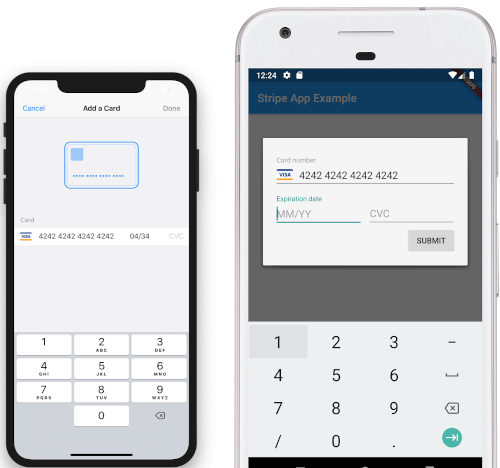
| iOS View | Android View |
의존성 목록 3 개
{"sdk":"flutter"}{"sdk":"flutter"}^2.0.0사용 목적에 따라 검색하고 개발 활동을 비교한 뒤 원본 저장소에서 요구 사항을 확인하세요.
“A repository is the most basic element of GitHub.”
GitHub Docs — About repositories ↗