

 v0.0.4
overlay_loader_with_app_icon
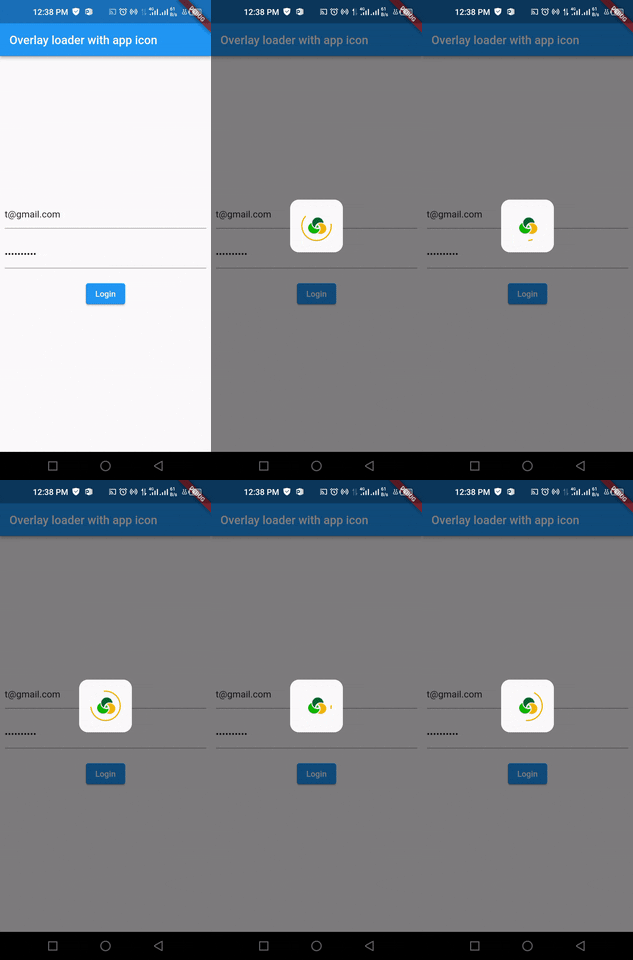
비동기 호출을 시작할 때 앱 아이콘과 함께 아름다운 오버레이 로더를 표시하는 플러터 패키지입니다.
86좋아요 36030일 다운로드130Pub 점수
AndroidiOSWebmacOSWindowsLinux
비동기 호출 시 앱 아이콘을 사용하여 로딩 프로세스를 표시하는 플러터 패키지입니다.

아래는 영문 원문 스냅샷입니다. 최신 내용은 GitHub에서 확인하세요.
A clean and light-weight package that shows a beautiful overlay loader with appIcon when initiating an async call.
Add package to pubspec.yaml
dependencies:
  ...
  overlay_loader_with_app_icon:
Next, import the library into your widget.
import 'package:overlay_loader_with_app_icon/overlay_loader_with_app_icon.dart';
To make an async call and display a modal with an appIcon progress indicator while the async call is taking place, wrap [OverlayLoaderWithAppIcon] around any widget. Using the [isLoading] boolean variable, the progress loader can be enabled or disabled.
bool _loading = false;
@override
Widget build(BuildContext context) {
  return Scaffold(
    body: OverlayLoaderWithAppIcon(
        isLoading: _loading,
        appIcon:  Image.asset('images/appIcon.png'),
        child: Container(
       child: Form(...)
    )),
  );
}
The current parameters are customizable in the constructor
OverlayLoaderWithAppIcon({
  required this.isLoading,
  required this.child,
  required this.appIcon,
  this.appIconSize=50,
  this.borderRadius=15,
  this.overlayOpacity=0.5,
  this.circularProgressColor,
  this.overlayBackgroundColor
});
Please open an issue so that we can discuss it
의존성 목록 3 개
{"sdk":"flutter"}{"sdk":"flutter"}^2.0.0사용 목적에 따라 검색하고 개발 활동을 비교한 뒤 원본 저장소에서 요구 사항을 확인하세요.
“A repository is the most basic element of GitHub.”
GitHub Docs — About repositories ↗