
 v0.0.8
pricing_cards
귀하의 플러터 프로젝트를 위한 멋진 유연한 가격 카드 및 사용자 지정 스타일 옵션
45좋아요 3630일 다운로드150Pub 점수
AndroidiOSWebmacOSWindowsLinux
귀하의 플러터 프로젝트를 위한 멋진 가격 카드 😎

{"sdk":"flutter"}^2.0.0-nullsafety.1{"sdk":"flutter"}아래는 영문 원문 스냅샷입니다. 최신 내용은 GitHub에서 확인하세요.
Awesome pricing cards with custom style options for your flutter project.
You can give as much cards you want to this and personalize the style of each one.
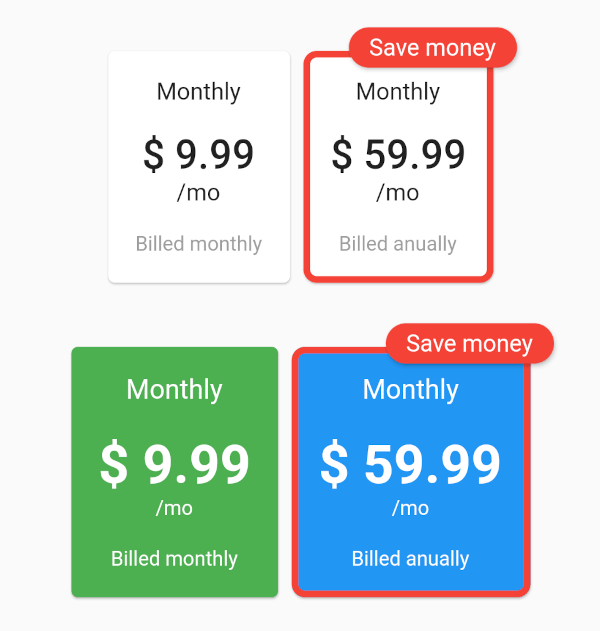
The example with all the parameters:
https://raw.githubusercontent.com/f2acode/pricing_cards/master/example/flutter_01.pngThe code of this:
Column(
    mainAxisAlignment: MainAxisAlignment.center,
    children: [
        PricingCards(
            pricingCards: [
                PricingCard(
                title: 'Monthly',
                price: '\$ 9.99',
                subPriceText: '\/mo',
                billedText: 'Billed monthly',
                onPress: () {
                    // make your business
                },
                ),
                PricingCard(
                title: 'Monthly',
                price: '\$ 59.99',
                subPriceText: '\/mo',
                billedText: 'Billed anually',
                mainPricing: true,
                mainPricingHighlightText: 'Save money',
                onPress: () {
                    // make your business
                },
                )
            ],
        ),
        SizedBox(height: 30),
        PricingCards(
            pricingCards: [
                PricingCard(
                title: 'Monthly',
                price: '\$ 9.99',
                subPriceText: '\/mo',
                billedText: 'Billed monthly',
                onPress: () {
                    // make your business
                },
                cardColor: Colors.green,
                priceStyle: TextStyle(
                    fontSize: 32,
                    fontWeight: FontWeight.bold,
                    color: Colors.white,
                ),
                titleStyle: TextStyle(
                    fontSize: 16,
                    color: Colors.white,
                ),
                billedTextStyle: TextStyle(
                    fontSize: 12,
                    color: Colors.white,
                ),
                subPriceStyle: TextStyle(
                    fontSize: 12,
                    color: Colors.white,
                ),
                cardBorder: RoundedRectangleBorder(
                    side: BorderSide(color: Colors.red, width: 4.0),
                    borderRadius: BorderRadius.circular(8.0),
                ),
                ),
                PricingCard(
                title: 'Monthly',
                price: '\$ 59.99',
                subPriceText: '\/mo',
                billedText: 'Billed anually',
                mainPricing: true,
                mainPricingHighlightText: 'Save money',
                onPress: () {
                    // make your business
                },
                cardColor: Colors.blue,
                priceStyle: TextStyle(
                    fontSize: 32,
                    fontWeight: FontWeight.bold,
                    color: Colors.white,
                ),
                titleStyle: TextStyle(
                    fontSize: 16,
                    color: Colors.white,
                ),
                billedTextStyle: TextStyle(
                    fontSize: 12,
                    color: Colors.white,
                ),
                subPriceStyle: TextStyle(
                    fontSize: 12,
                    color: Colors.white,
                ),
                cardBorder: RoundedRectangleBorder(
                    side: BorderSide(color: Colors.red, width: 4.0),
                    borderRadius: BorderRadius.circular(8.0),
                ),
                )
            ],
        ),
    ],
)