
 v2.2.0
flutter_decorated_text
규칙에 따라 텍스트의 일부를 스타일링하고 상호작용할 수 있는 위젯입니다. 단어, 구문 또는 패턴을 일치시키고 사용자 정의 스타일이나 작업을 적용합니다.
60좋아요 28630일 다운로드155Pub 점수
AndroidiOSWebmacOSWindowsLinux
gabdsg/flutter_decorated_text open-source repository details.

{"sdk":"flutter"}^1.19.1{"sdk":"flutter"}^6.0.0아래는 영문 원문 스냅샷입니다. 최신 내용은 GitHub에서 확인하세요.
The DecoratedText widget allows you to style and interact with different parts of a text string based on predefined rules. It's versatile, easy-to-use, and can handle different scenarios such as matching specific words, phrases, or patterns, allowing you to style the matched text differently.
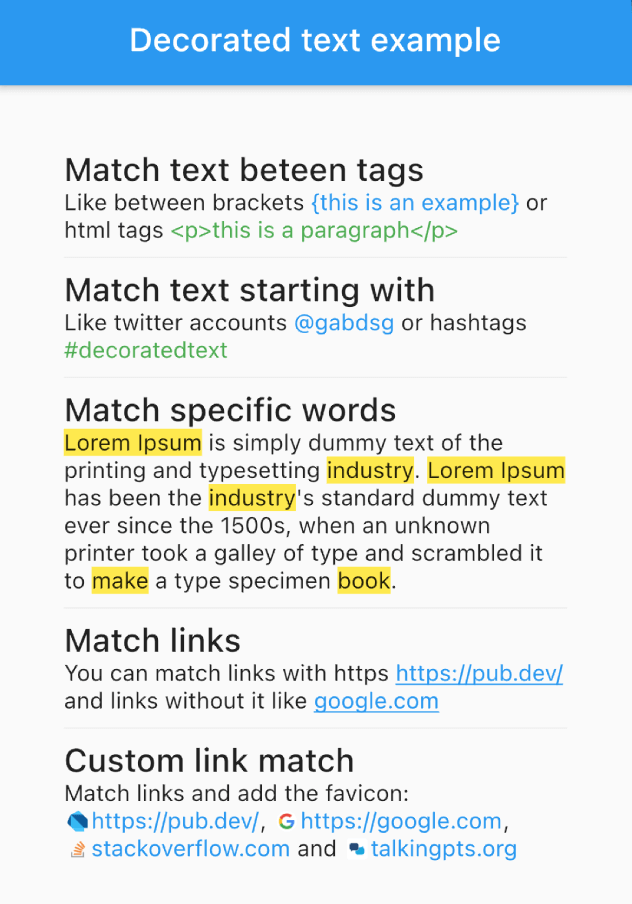
Example screenshot
selectable: true) to allow text selection in the DecoratedText widget.onTap callback, which returns the matched text, allowing you to implement interactive behavior such as opening a link when a URL is tapped.DecoratedText(
text: "Like between brackets {this is an example} or html tags <p>this is a paragraph</p>",
rules: [
DecoratorRule.between(
start: "{",
end: "}",
style: TextStyle(
color: Colors.blue,
),
),
DecoratorRule.between(
start: "<p>",
end: "</p>",
style: TextStyle(
color: Colors.green,
),
),
],
);
DecoratedText(
    text: "Like twitter accounts @gabdsg or hashtags #decoratedtext",
    rules: [
        DecoratorRule.startsWith(
            text: "@",
            onTap: (match) {
                print(match);
            },
            style: TextStyle(
                color: Colors.blue,
            ),
        ),
        DecoratorRule.startsWith(
            text: "#",
            onTap: (match) {
                print(match);
            },
            style: TextStyle(
                color: Colors.green,
            ),
        ),
    ],
);
DecoratedText(
    text: "Lorem Ipsum is simply dummy text of the printing and typesetting industry. Lorem Ipsum has been the industry's standard dummy text ever since the 1500s, when an unknown printer took a galley of type and scrambled it to make a type specimen book.",
    rules: [
        DecoratorRule.words(
            words: ["lorem ipsum", "industry", "book", "make"],
            onTap: (match) {
                print(match);
            },
            style: TextStyle(
                background: Paint()..color = Colors.yellow,
            ),
        ),
    ],
);
DecoratedText(
    text: "You can match links with https https://pub.dev/ and links without it like google.com",
    rules: [
        DecoratorRule.url(
            onTap: (url) {
                print(url);
            },
            style: TextStyle(
                color: Colors.blue,
                decoration: TextDecoration.underline,
            ),
        ),
    ],
);
DecoratedText(
    text: "Match links and add the favicon: https://pub.dev/, https://google.com, stackoverflow.com and talkingpts.org",
    rules: [
        DecoratorRule(
            regExp: RegExp(
                r'((https?:\/\/)?(www\.)?[-a-zA-Z0-9@:%._\+~#=]{2,256}\.[a-z]{2,4}\b([-a-zA-Z0-9@:%_\+.~#?&//=]*))',
                caseSensitive: false,
                dotAll: true,
                multiLine: true,
            ),
            onTap: (url) {
                print(url);
            },
            style: TextStyle(
                color: Colors.blue,
            ),
            leadingBuilder: (match) => Container(
                width: 16 * 0.8,
                height: 16 * 0.8,
                margin: const EdgeInsets.only(right: 2, left: 2),
                child: CachedNetworkImage(
                    imageUrl: "${sanitizeUrl(match)}/favicon.ico",
                ),
            ),
        ),
    ],
);
DecoratedText(
    text: "I love Flutter! 😍",
    rules: [
        DecoratorRule(
            regExp: RegExp(r'(\p{Emoji_Presentation})', unicode: true),
            style: const TextStyle(
                fontSize: 30.0,
            ),
            onTap: (emoji) {
                debugPrint('You tapped on the emoji: $emoji');
            },
        ),
    ],
);
For best performance when using custom RegExp patterns, cache them outside the build() method:
// Cache at the class or file level — avoid creating inside build()
final _myRegExp = RegExp(r'my-pattern');

@override
Widget build(BuildContext context) {
    return DecoratedText(
        text: "...",
        rules: [
            DecoratorRule(regExp: _myRegExp, style: TextStyle(...)),
        ],
    );
}
Built-in rules like DecoratorRule.words(), DecoratorRule.url(), etc. handle caching automatically.
Remember, with the DecoratedText widget, you can style your text based on predefined rules, add interactivity, and handle complex matching scenarios with ease. Happy coding!