
css_text_for_flutter
이 Flutter 라이브러리는 텍스트에 CSS를 사용하여 스타일을 지정할 수 있게 해줍니다
- 스타
- 56
- 포크
- 16
- 최근 푸시(UTC)
- 2023. 5. 26.
- 프로젝트 상태
- 활성
원본 README
아래는 영문 원문 스냅샷입니다. 최신 내용은 GitHub에서 확인하세요.
CSS Text
This library makes it easy for you to convert HTML and CSS content into RichText widgets. It supports most CSS properties that are relevant to text content, except those related to text alignment.
Here's some sample HTML content with inline CSS styles:
<body>
<p style="font-size:2.5em;color:darkseagreen">This is a test</p>
<p style="font-size:1.8em;color:#ff3311">So is this</p>
<p style="font-size:45px;background:#3311ff;color:yellow">And this!</p>
<br/>
<br/>
<p style="font-size:1.5em">
Hello <b style="font-style:italic;color:#bb0000;background:#eeff00">World</b>!!
<br/>
How are you <span style="font-family:RobotoBlack;color:#ff0000;">today?</span>
<br/>
<b>But</b> why are you doing <a href="https://google.com">this?</a><br/>
<br/>
<span style="text-decoration: underline wavy; font-size:2em">Can you tell <del>me</del>?</span>
<br/>
Multiple <span style="font-weight:100">font</span>
<span style="font-weight:600">weights</span><br/><br/>
Please visit <a style="font-weight:bold;" href="https://docs.flutter.io">Flutter docs</a>
<br/>
<br/>
<span style="color:#990000ff;background:#4400ff00">
This text is slightly transparent, and has a slightly transparent background too.
</span>
</p>
</body>
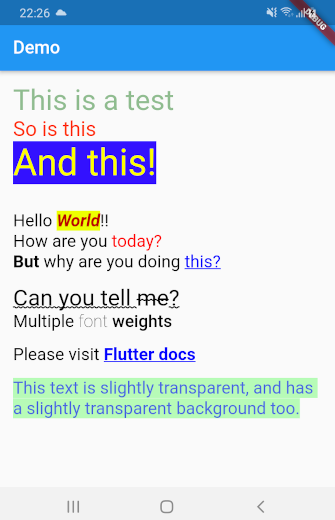
This library can automatically convert all the HTML content above into a TextSpan object or a RichText widget. Here's what the rendered HTML will look like:
Getting Started
Using css_text is extremely easy. First import the library in your Dart code:
import 'package:css_text/css_text.dart';
You can then create RichText widget from any HTML content by calling the HTML.toTextSpan() method.
String htmlContent = """
<p style="font-size:1.5em;color:#99ff0011">Hello <b>World</b>
""";

var myRichText = RichText(text: HTML.toTextSpan(context, htmlContent));
As a shortcut, you can also use the HTML.toRichText() method.
myRichText = HTML.toRichText(context, htmlContent);
Handling Links
Your HTML content can have links. To handle them, you must use the linksCallback optional parameter.
String htmlContent = """<span style="font-size:2em">
Please click <a href="https://pub.dartlang.org">here</a> or
<a href="https://old.reddit.com">here</a>.<br/>
<br/>
Go ahead! Try it.
</span>""";

var myRichText = HTML.toRichText(context, htmlContent, linksCallback: (link) {
    // You can now use the url_launcher library to open the link.
    // Or you can handle the link in your app itself. This gives you
    // complete control over your links.
    // For now, let's just print it
    print(link);
});

Ashraff Hathibelagal ↗
분류
사용 중인 의존성
의존성 목록 2 개
- flutter
{"sdk":"flutter"} - xml
^6.3.0
프로젝트에 맞는 저장소를 선택하려면?
사용 목적에 따라 검색하고 개발 활동을 비교한 뒤 원본 저장소에서 요구 사항을 확인하세요.
- 이름, 작성자 또는 설명으로 검색하고 기술 주제로 범위를 좁힙니다.
- 스타, 포크, 최근 푸시를 함께 비교하세요. 스타는 관심의 지표이며 품질을 보장하지 않습니다.
- 사용하기 전에 GitHub에서 README, 라이선스, Issues를 확인하세요.
출처 및 관리
“A repository is the most basic element of GitHub.”
GitHub Docs — About repositories ↗