
flutter_multiselect
다중 선택 UI 위젯을 위한 플러터 패키지

- 스타
- 54
- 포크
- 37
- 최근 푸시(UTC)
- 2025. 3. 2.
- 프로젝트 상태
- 활성
원본 README
아래는 영문 원문 스냅샷입니다. 최신 내용은 GitHub에서 확인하세요.
flutter_multiselect
Flutter package for multi-select UI widget

Android and iOS screenshot-

Getting Started
- Add the package into
pubspec.yaml
dependencies:
  flutter_multiselect:
- Import in your code
import 'package:flutter_multiselect/flutter_multiselect.dart';
Why? :wrench:
By default, there is no UI control for multi-select in iOS and Android, and my widget can be used to bridge this gap.
Example without customization :one:
child: MultiSelect(
  autovalidate: false,
  titleText: "Countries",
  validator: (value) {
    if (value == null) {
      return 'Please select one or more option(s)';
    }
  },
  errorText: 'Please select one or more option(s)',
  dataSource: [
    {
      "display": "Australia",
      "value": 1,
    },
    {
      "display": "Canada",
      "value": 2,
    },
    {
      "display": "India",
      "value": 3,
    },
    {
      "display": "United States",
      "value": 4,
    }
  ],
  textField: 'display',
  valueField: 'value',
  filterable: true,
  required: true,
  value: null,
  onSaved: (value) {
    print('The saved values are $value');
  }
),
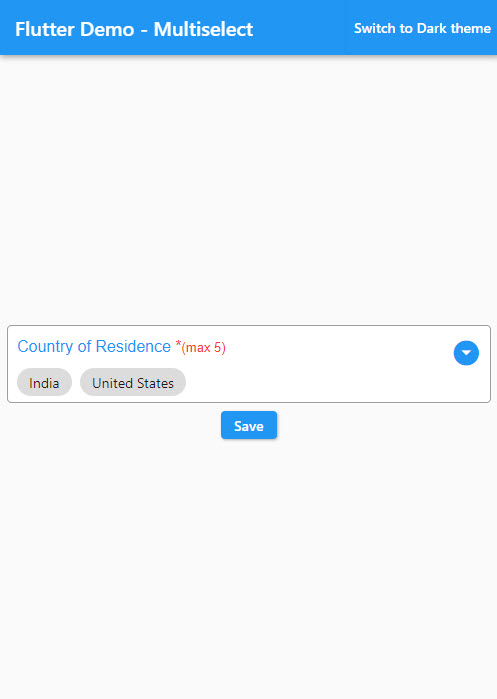
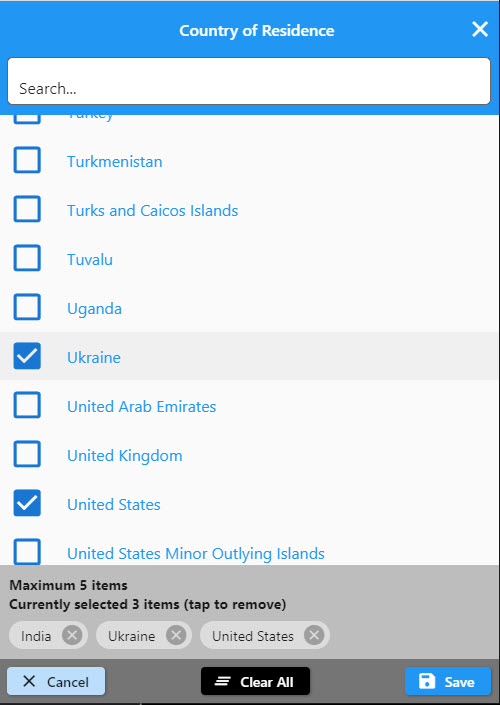
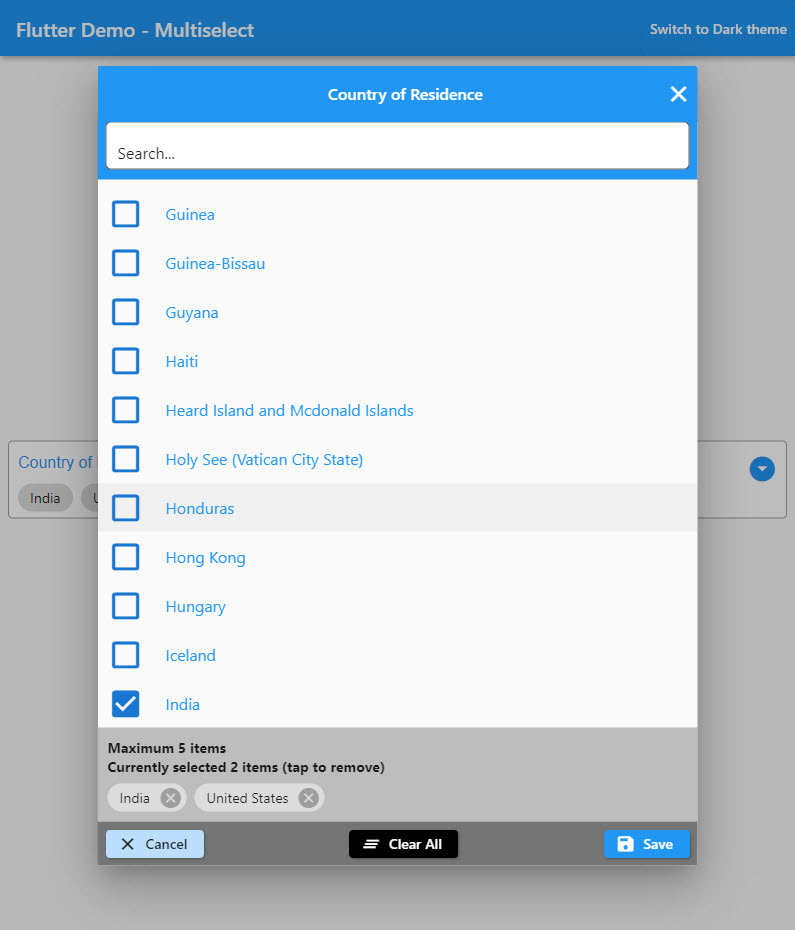
Example with customization :two:
Check the colors and text to see the changes that it makes to the modal interface
child: MultiSelect(
    //--------customization selection modal-----------
    buttonBarColor: Colors.red,
    cancelButtonText: "Exit",
    titleText: "Custom Title",
    checkBoxColor: Colors.black,
    selectedOptionsInfoText: "Selected custom text (tap to remove)",
    selectedOptionsBoxColor: Colors.green,
    autovalidate: true,
    maxLength: 5, // optional
    //--------end customization selection modal------------
    validator: (dynamic value) {
      if (value == null) {
        return 'Please select one or more option(s)';
      }
      return null;
    },
    errorText: 'Please select one or more option(s)',
    dataSource: [
      {"name": "Afghanistan", "code": "AF"},
      {"name": "Åland Islands", "code": "AX"},
      {"name": "Albania", "code": "AL"},
    ],
    textField: 'name',
    valueField: 'code',
    filterable: true,
    required: true,
    onSaved: (value) {
      print('The saved values are $value');
    }),
    change: (value) {
      print('The selected values are $value');
    })
and of course you can check the full list of the parameters to personalize your modal!
Here, the complete list of parameters to modify the selection modal :clipboard:
| Type | Parameter |
|---|---|
| Color | buttonBarColor |
| String | cancelButtonText |
| IconData | cancelButtonIcon |
| Color | cancelButtonColor |
| Color | cancelButtonTextColor |
| String | saveButtonText |
| IconData | saveButtonIcon |
| Color | saveButtonColor |
| Color | saveButtonTextColor |
| String | clearButtonText |
| IconData | clearButtonIcon |
| Color | clearButtonColor |
| Color | clearButtonTextColor |
| String | deleteButtonTooltipText |
| IconData | deleteIcon |
| Color | deleteIconColor |
| Color | selectedOptionsBoxColor |
| String | selectedOptionsInfoText |
| Color | selectedOptionsInfoTextColor |
| IconData | checkedIcon |
| IconData | uncheckedIcon |
| Color | checkBoxColor |
| Color | searchBoxColor |
| String | searchBoxHintText |
| Color | searchBoxFillColor |
| IconData | searchBoxIcon |
| String | searchBoxToolTipText |
| Size | responsiveDialogSize |

GitHub 작성자
hiddencaliber ↗
언어DartC++CMakeSwiftHTMLCObjective-CRubyJavaShellKotlin
사용 중인 의존성
의존성 목록 3 개
- flutter
{"sdk":"flutter"} - flutter_test개발 의존성
{"sdk":"flutter"} - mockito개발 의존성
^5.0.7
프로젝트에 맞는 저장소를 선택하려면?
사용 목적에 따라 검색하고 개발 활동을 비교한 뒤 원본 저장소에서 요구 사항을 확인하세요.
- 이름, 작성자 또는 설명으로 검색하고 기술 주제로 범위를 좁힙니다.
- 스타, 포크, 최근 푸시를 함께 비교하세요. 스타는 관심의 지표이며 품질을 보장하지 않습니다.
- 사용하기 전에 GitHub에서 README, 라이선스, Issues를 확인하세요.
출처 및 관리
“A repository is the most basic element of GitHub.”
GitHub Docs — About repositories ↗