
 v0.1.2
smooth_highlight
이 패키지는 사용자에게 특정 내용을 강조하고 싶을 때 특정 위젯을 하이라이트 애니메이션으로 강조할 수 있도록 도와줍니다.
32좋아요 1.4천30일 다운로드160Pub 점수
AndroidiOSWebmacOSWindowsLinux
이 패키지는 사용자에게 특정 내용을 강조하고 싶을 때 특정 위젯을 하이라이트 애니메이션으로 강조할 수 있도록 도와줍니다.
아래는 영문 원문 스냅샷입니다. 최신 내용은 GitHub에서 확인하세요.
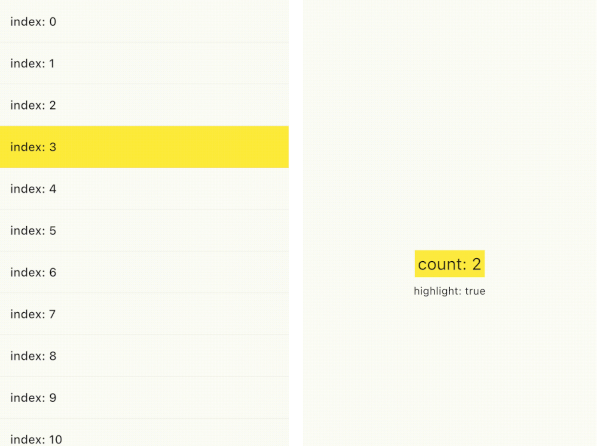
You can emphasize a specific widget by highlight animation when you want to emphasize something to your users. As you can see from the following samples, you can use smooth_highlight in any widget.
And also, you can use ValueChangeHighlight that is useful when you simply want to highlight only the text changes(refer to Sample2). It is inspired by the Cloud Firestore value change animation in the Firebase console.
| Sample1 | Sample2 | Sample3 |
|---|---|---|
 |
 |
 |
You just wrap SmoothHighlight in your widget.
SmoothHighlight(
  // set your custom color
  color: Colors.yellow,
  child: Text('Highlight'),
);
and you can also define custom behavior.
SmoothHighlight(
  // highlight in initState phase.
  useInitialHighLight: true,

  // Set custom duration.
  duration: const Duration(seconds: 1),

  // highlight whenever count is even.
  enabled: count % 2 ==0,
);
If you want to highlight the widget only the value changed, ValueChangeHighlight is useful. It requires highlight trigger value.
ValueChangeHighlight(
  // highlight if count changes
  value: count,
  color: Colors.yellow,
  child: Text('count: $count'),
);
if you don't want to highlight a specific values, disableFromValues property prevents it.
ValueChangeHighlight(
  value: count,

  // disable highlight if count changes from `null` or `2` to some value.
  // In this counter example, `0`, `3`, won't be highlighted.
  disableFromValues: const [null, 2],
);
Following gif is Firestore GUI in Firebase Console. Firestore realtime listener is powerful, but it is hard for your user to see what value changed. You can make the user notice by highlighting the changed value. It's probably a user-friendly consideration, I think.


의존성 목록 3 개
{"sdk":"flutter"}{"sdk":"flutter"}^2.0.0사용 목적에 따라 검색하고 개발 활동을 비교한 뒤 원본 저장소에서 요구 사항을 확인하세요.
“A repository is the most basic element of GitHub.”
GitHub Docs — About repositories ↗