

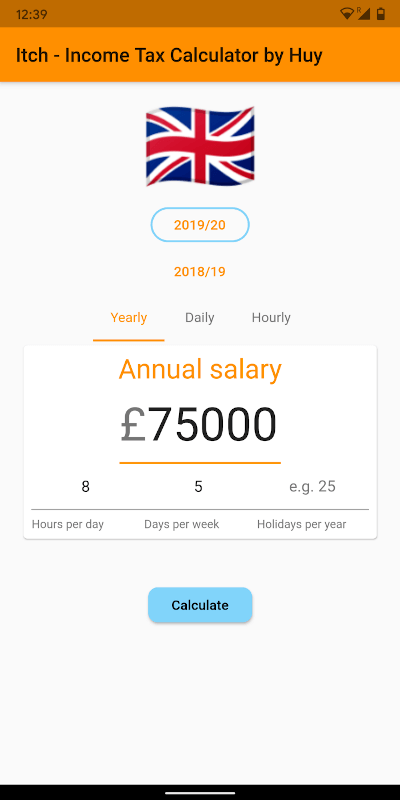
 v2.0.0
fitted_text_field_container
Material TextField의 텍스트 값을 자동으로 맞추어 크기가 조절되는 컨테이너입니다.
27좋아요 4530일 다운로드70Pub 점수
플랫폼 정보 없음
Flutter Container가 Material TextField의 텍스트 값을 자동으로 맞춰 크기를 조절합니다.

아래는 영문 원문 스냅샷입니다. 최신 내용은 GitHub에서 확인하세요.
A Container that automatically resizes it's width to fit the containing TextField's text value.
Read the short blog: https://medium.com/@huyffs/fitted-textfield-container-for-flutter-c9c63644441c
| Param | Type | Default | Description |
|---|---|---|---|
child |
TextField |
* required | The TextField to fit |
calculator |
CalculateFunction |
FittedTextFieldCalculator.fitVisible |
A function to calculate the width. The default function fits the visible content & decorations (i.e. it collapses to the content/label's width when hint text disappears) |
builder |
Widget Function(BuildContext context, TextField child) |
null |
A builder that can be used to build complex layouts. The child TextField is provided to the build function |
FittedTextFieldContainer(
    child: TextField(
        controller: someTextEditingController,
        textAlign: TextAlign.right,
        decoration: InputDecoration(
            prefixText: "£",
            labelText: "Amount",
        ),
    ),
)
All params from FittedTextFieldContainer plus the following
| Param | Type | Default | Description |
|---|---|---|---|
growCurve |
Curve |
Curves.easeOutCirc |
The curve to use in the grow animation |
growDuration |
Duration |
Duration(milliseconds: 300) |
Duration to animate the container's width when TextField grows |
shrinkCurve |
Curve |
Curves.easeInCirc |
The curve to use in the shrink animation |
shrinkDuration |
Duration |
Duration(milliseconds: 600) |
Duration to animate the container's width when TextField shrinks |
AnimatedFittedTextFieldContainer(
    growDuration: Duration(milliseconds: 300),
    shrinkDuration: Duration(milliseconds: 600),
    growCurve: Curves.easeOutCirc,
    shrinkCurve: Curves.easeInCirc,
    child: TextField(
        controller: someTextEditingController,
        textAlign: TextAlign.right,
        decoration: InputDecoration(
            prefixText: "£",
            labelText: "Amount",
        ),
    ),
)
FittedTextFieldMeasurerA class that takes a TextField and TextStyle and returns the following measurements:
textField The fitted textfieldtextStyle The fitted textfield's style or the default styletextWidth Width of the text contentlabelWidth Width of the labelhintWidth Width of the hint textfixedWidths Width of fixed elements (prefixText, suffixText, contentPadding and cursorWidth)CalculateFunctionThis function takes measured values and returns a width value.
double CalculateFunction(FittedTextFieldMeasurer)
FittedTextFieldContainer(
    calculator: (m) =>
        m.fixedWidths +
        max(m.labelWidth, max(m.hintWidth, m.textWidth)),
    child: TextField(
        controller: someTextEditingController,
        textAlign: TextAlign.right,
        decoration: InputDecoration(
            hintText: "Width of hint text",
        ),
    ),
);
A few calculators are provided for common use-cases
fitAll fits content, label and hint textsfitVisible fits the visible content & decorations (i.e. it collapses to the content/label's width when hint text disappears)fitVisibleWithPadding(double padding) in addition to fitting visible content it adds a fixed padding valuefitVisibleWithRange(double min, double max) in addition to fitting visible content it enforces a minimum and (optional) maximum widthFit all
FittedTextFieldContainer(
    calculator: FittedTextFieldCalculator.fitAll,
    child: ...
);
Fit visible with minimum
FittedTextFieldContainer(
    calculator: FittedTextFieldCalculator.fitVisibleWithRange(120),
    child: ...
);
Fit visible with maximum
FittedTextFieldContainer(
    calculator: FittedTextFieldCalculator.fitVisibleWithRange(0, 180),
    child: ...
);
builderAnimatedFittedTextFieldContainer(
child: TextField(
controller: someTextEditingController,
textAlign: TextAlign.right,
decoration: InputDecoration(
labelText: "Twinkle twinkle",
),
),
builder: (context, child) => Container(
child: Stack(
overflow: Overflow.visible,
children: <Widget>[
child,
Positioned(
top: 0,
right: -22,
child: _aniWholePoundCtl.text.isEmpty
? Icon(Icons.star_border)
: Icon(Icons.star, color: Colors.amber),
),
],
),
),
)
Pull requests are welcome!
MIT License
Copyright (c) 2020 Huy Dinh
의존성 목록 2 개
{"sdk":"flutter"}{"sdk":"flutter"}사용 목적에 따라 검색하고 개발 활동을 비교한 뒤 원본 저장소에서 요구 사항을 확인하세요.
“A repository is the most basic element of GitHub.”
GitHub Docs — About repositories ↗