
 v2.0.3
easy_admob_ads_flutter
최소한의 설정으로 AdMob 광고 형식을 통합할 수 있는 간단하고 유연한 Flutter 패키지입니다.
8좋아요 23130일 다운로드160Pub 점수
AndroidiOS
구글 애드모브 래퍼 플러터 패키지

{"sdk":"flutter"}^9.1.0^2.0.7^2.5.5^1.3.0^7.3.1{"sdk":"flutter"}^6.0.0아래는 영문 원문 스냅샷입니다. 최신 내용은 GitHub에서 확인하세요.
pub package Pub Points Last Commit Pull Requests Code Size License
A simple, configurable Flutter wrapper for Google AdMob. One EasyAdMobAds.instance sets up the SDK, GDPR/UMP consent, and a global on/off switch for ads. All six ad formats are supported with their own controller or widget.
Show some ❤️ by giving the repo a ⭐ and liking 👍 the package on pub.dev!
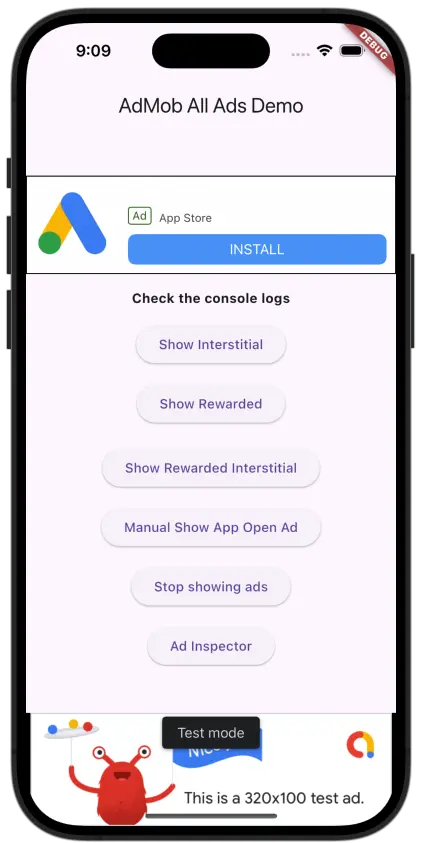
Static AdMob Demo Animated AdMob Demo Static AdMob Demo
initialize()dependencies:
easy_admob_ads_flutter: ^<latest_version>
Add your AdMob App ID:
Android — android/app/src/main/AndroidManifest.xml:
<meta-data
  android:name="com.google.android.gms.ads.APPLICATION_ID"
  android:value="ca-app-pub-xxxxxxxxxxxxxxxx~yyyyyyyyyy"/>
iOS — ios/Runner/Info.plist:
<key>GADApplicationIdentifier</key>
<string>ca-app-pub-xxxxxxxxxxxxxxxx~yyyyyyyyyy</string>
void main() async {
  WidgetsFlutterBinding.ensureInitialized();

  await EasyAdMobAds.instance.initialize(
    config: const EasyAdsConfig(
      androidAdUnitIds: {
        AdType.banner: 'ca-app-pub-.../...',
        AdType.interstitial: 'ca-app-pub-.../...',
      },
      iosAdUnitIds: {
        AdType.banner: 'ca-app-pub-.../...',
        AdType.interstitial: 'ca-app-pub-.../...',
      },
      testDeviceIds: ['YOUR_TEST_DEVICE_ID'],
    ),
  );

  runApp(const MyApp());
}
Any AdType you don't configure automatically falls back to a Google test ad unit ID
(with a warning logged), so the package works out of the box during development.
// Banner
const EasyBannerAd(collapsible: true, height: 100)

// Native
EasyNativeAd.medium()

// Interstitial
final interstitialAd = EasyInterstitialAd()..loadAd();
await interstitialAd.showAd();

// Rewarded
final rewardedAd = EasyRewardedAd(onRewardEarned: (reward) {
  // grant the reward
})..loadAd();
await rewardedAd.showAd();

// Rewarded Interstitial
final rewardedInterstitialAd = EasyRewardedInterstitialAd(onRewardEarned: (reward) {
  // grant the reward
})..loadAd();
await rewardedInterstitialAd.showAd();

// App Open — preloaded automatically; show it manually if you want:
await EasyAdMobAds.instance.appOpenAd?.showAdIfAvailable();

// Turn all ads on/off (e.g. after a "remove ads" purchase)
EasyAdMobAds.instance.adsEnabled = false;

// GDPR privacy options
if (EasyAdMobAds.instance.isPrivacyOptionsRequired) {
  EasyAdMobAds.instance.showPrivacyOptionsForm();
}
See the example/ app for a full demo screen with all ad types,
the on/off switch, and the consent button wired up.