
readmore
다이나믹하게 텍스트를 확장하고 축소할 수 있는 플러터 플러그인
- 스타
- 272
- 포크
- 93
- 최근 푸시(UTC)
- 2024. 8. 6.
- 프로젝트 상태
- 활성
원본 README
아래는 영문 원문 스냅샷입니다. 최신 내용은 GitHub에서 확인하세요.
readmore
A Flutter plugin that allows for expanding and collapsing text with the added capability to style and interact with specific patterns in the text like hashtags, URLs, and mentions using the Annotation feature.
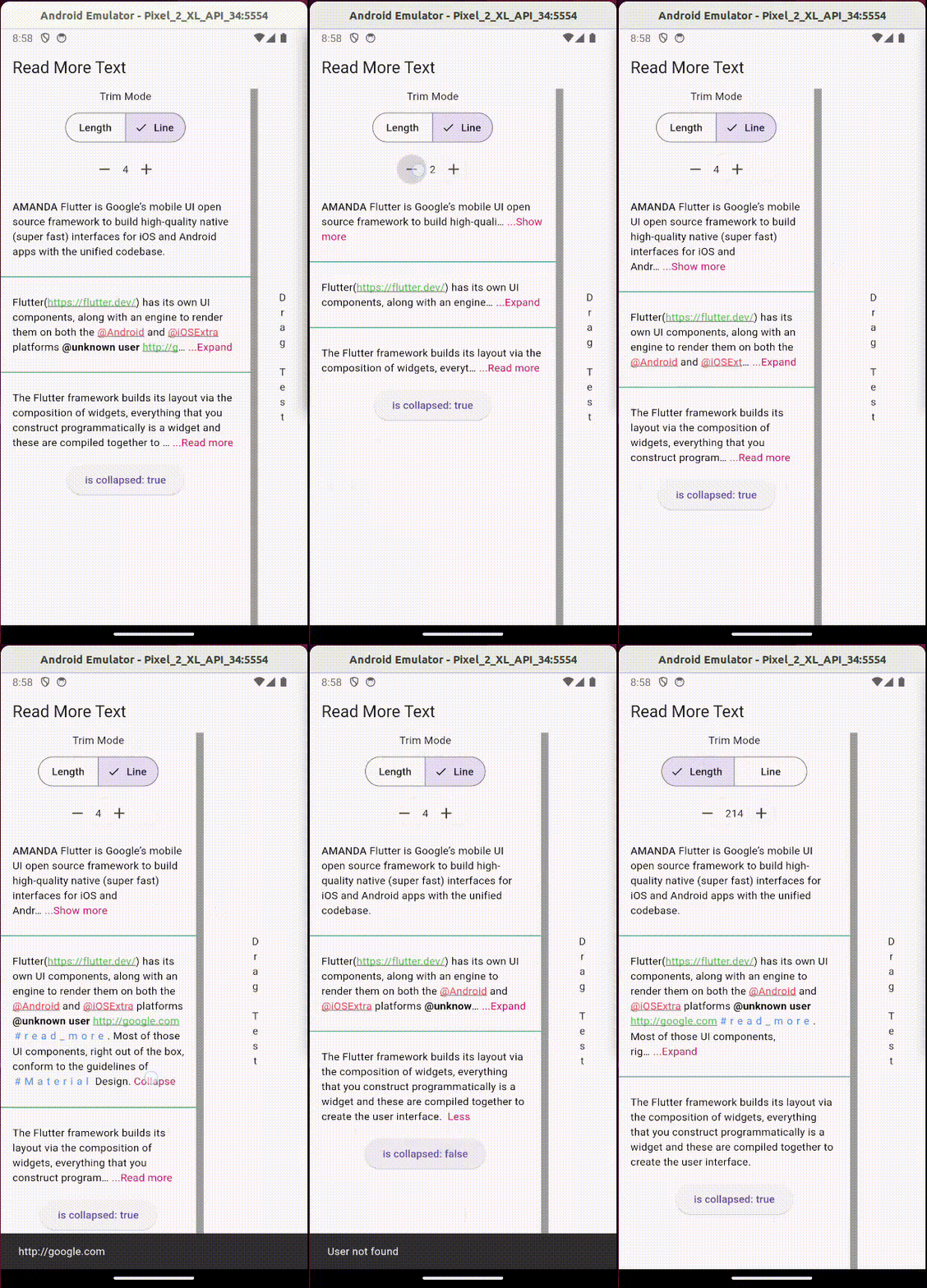
Usage:
Add the package to your pubspec.yaml:
readmore: ^3.0.0
Then, import it in your Dart code:
import 'package:readmore/readmore.dart';
Basic Example
ReadMoreText(
  'Flutter is Google’s mobile UI open source framework to build high-quality native (super fast) interfaces for iOS and Android apps with the unified codebase.',
  trimMode: TrimMode.Line,
  trimLines: 2,
  colorClickableText: Colors.pink,
  trimCollapsedText: 'Show more',
  trimExpandedText: 'Show less',
  moreStyle: TextStyle(fontSize: 14, fontWeight: FontWeight.bold),
);
Rich Text Example
With the ReadMoreText.rich constructor, you can create text with rich formatting, including different colors, decorations, letter spacing, and interactive elements within a single widget.
ReadMoreText.rich(
  TextSpan(
    style: const TextStyle(color: Colors.black),
    children: [
      const TextSpan(text: 'Rich '),
      const TextSpan(
        text: 'Text',
        style: TextStyle(
          color: Colors.blue,
          decoration: TextDecoration.underline,
          letterSpacing: 5,
          recognizer: TapGestureRecognizer()..onTap = () {
            // Handle tap
          },
        ),
      ),
    ],
  ),
  trimMode: TrimMode.Line,
  trimLines: 2,
  colorClickableText: Colors.pink,
  trimCollapsedText: '...Read more',
  trimExpandedText: ' Less',
);
Using Annotations
The Annotation feature enhances the interactivity and functionality of the text content. You can define custom styles and interactions for patterns like hashtags, URLs, and mentions.
ReadMoreText(
  'This is a sample text with a #hashtag, a mention <@123>, and a URL: https://example.com.',
  trimMode: TrimMode.Line,
  trimLines: 2,
  colorClickableText: Colors.pink,
  annotations: [
    Annotation(
      regExp: RegExp(r'#([a-zA-Z0-9_]+)'),
      spanBuilder: ({required String text, required TextStyle textStyle}) => TextSpan(
        text: text,
        style: textStyle.copyWith(color: Colors.blue),
      ),
    ),
    Annotation(
      regExp: RegExp(r'<@(\d+)>'),
      spanBuilder: ({required String text, required TextStyle textStyle}) => TextSpan(
        text: 'User123',
        style: textStyle.copyWith(color: Colors.green),
        recognizer: TapGestureRecognizer()..onTap = () {
          // Handle tap, e.g., navigate to a user profile
        },
      ),
    ),
    // Additional annotations for URLs...
  ],
  moreStyle: TextStyle(fontSize: 14, fontWeight: FontWeight.bold),
);
Note: This feature is not available with the ReadMoreText.rich constructor, as TextSpan gives you total control over styling and adding interactions to parts of the text.

Jonny Borges ↗
사용 중인 의존성
의존성 목록 1 개
- flutter
{"sdk":"flutter"}
프로젝트에 맞는 저장소를 선택하려면?
사용 목적에 따라 검색하고 개발 활동을 비교한 뒤 원본 저장소에서 요구 사항을 확인하세요.
- 이름, 작성자 또는 설명으로 검색하고 기술 주제로 범위를 좁힙니다.
- 스타, 포크, 최근 푸시를 함께 비교하세요. 스타는 관심의 지표이며 품질을 보장하지 않습니다.
- 사용하기 전에 GitHub에서 README, 라이선스, Issues를 확인하세요.
출처 및 관리
“A repository is the most basic element of GitHub.”
GitHub Docs — About repositories ↗