
 v1.3.4
easy_folder_picker
Flutter용 간편한 디렉터리 선택기. 후속 작업을 위해 디렉터리를 선택하거나 생성할 수 있습니다.
34좋아요 19730일 다운로드140Pub 점수
AndroidiOSWindows
Flutter용 간편한 폴더 선택기.

{"sdk":"flutter"}^11.3.1^1.9.0{"sdk":"flutter"}아래는 영문 원문 스냅샷입니다. 최신 내용은 GitHub에서 확인하세요.
Easy directory picker for Flutter
A flutter package to pick directories and handles requesting required permissions as well. This package only supports ANDROID.
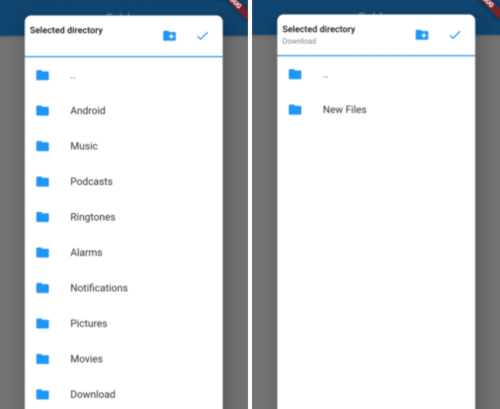
Picker Screenshot1 Picker Screenshot2
Add below line to your pubspec.yaml and run flutter packages get
easy_folder_picker: ^latest version
Add below line to your android/app/src/main/AndroidManifest.xml
<uses-permission android:name="android.permission.READ_EXTERNAL_STORAGE" />
If you want to allow creating new folders directly from picker then add the below permission also
<uses-permission android:name="android.permission.WRITE_EXTERNAL_STORAGE" />
In Android 10, you need to add the Following Lines in AndroidManifest file:
<application
      android:requestLegacyExternalStorage="true"
From Android 11, you need to manage permission within your app, if you want to write in different folders of external storage.
<uses-permission android:name="android.permission.MANAGE_EXTERNAL_STORAGE"/>
  var status = await Permission.manageExternalStorage.status;
      if (status!.isRestricted) {
        status = await Permission.manageExternalStorage.request();
      }

      if (status!.isDenied) {
        status = await Permission.manageExternalStorage.request();
      }
      if (status!.isPermanentlyDenied) {
        ScaffoldMessenger.of(context).showSnackBar(SnackBar(
          backgroundColor: Colors.green,
          content: Text('Please add permission for app to manage external storage'),
        ));
      }
import 'package:easy_folder_picker/FolderPicker.dart';

// In any callback call the below method
  Future<void> _pickDirectory(BuildContext context) async {
    Directory directory = selectedDirectory;
    if (directory == null) {
      directory = Directory(FolderPicker.ROOTPATH);
    }

    Directory newDirectory = await FolderPicker.pick(
        allowFolderCreation: true,
        context: context,
        rootDirectory: directory,
        shape: RoundedRectangleBorder(
            borderRadius: BorderRadius.all(Radius.circular(10))));
    setState(() {
      selectedDirectory = newDirectory;
      print(selectedDirectory);
    });
  }