
 v0.0.4
riff_switch
RiffSwitch를 통해 원활한 전환과 매력적인 상호작용을 경험하세요. 간편한 슬라이딩 효과와 매혹적인 애니메이션을 가능하게 하는 스위치 라이브러리입니다.
10좋아요 27230일 다운로드140Pub 점수
AndroidiOSWebmacOSWindowsLinux
RiffSwitch라는 사용자 지정 Flutter 스위치 위젯을 위한 패키지입니다.

{"sdk":"flutter"}^0.0.6{"sdk":"flutter"}^4.0.0아래는 영문 원문 스냅샷입니다. 최신 내용은 GitHub에서 확인하세요.
Build pub package pub points popularity likes Star on Github Awesome Flutter License: BSD
Breathe life into your Flutter UI with RiffSwitch, the switch library that empowers effortless sliding effects and captivating animations. Customize the sliding behavior for a unique user experience, while interactive dragging fosters a sense of control and responsiveness. Witness smooth state transitions as the switch flips, adding a touch of visual polish to your app. Whether you prefer simple or decorative switch types, RiffSwitch seamlessly integrates into your UI, transforming basic interactions into engaging experiences.
Experience seamless transitions and engaging interactions with RiffSwitch.
To use RiffSwitch in your Flutter project, add the following to your pubspec.yaml file:
dependencies:
  riff_switch: ^0.0.4
Then, run:
flutter pub get
Import the package:
import 'package:riff_switch/riff_switch.dart';
Add the RiffSwitch widget to your UI, providing the necessary parameters:
RiffSwitch(
  value: _isEnabled,
  onChanged: (bool newValue) {
    setState(() {
      _isEnabled = newValue;
    });
  },
  // Additional customization options...
)
Here's a basic example of how to use RiffSwitch:
import 'package:flutter/material.dart';
import 'package:riff_switch/riff_switch.dart';

void main() {
  runApp(MyApp());
}

class MyApp extends StatelessWidget {
  @override
  Widget build(BuildContext context) {
    return MaterialApp(
      home: Scaffold(
        appBar: AppBar(
          title: Text('RiffSwitch Example'),
        ),
        body: Center(
          child: RiffSwitch(
            value: true,
            onChanged: (bool newValue) {
              // Handle switch state change
            },
            // Additional customization options...
          ),
        ),
      ),
    );
  }
}
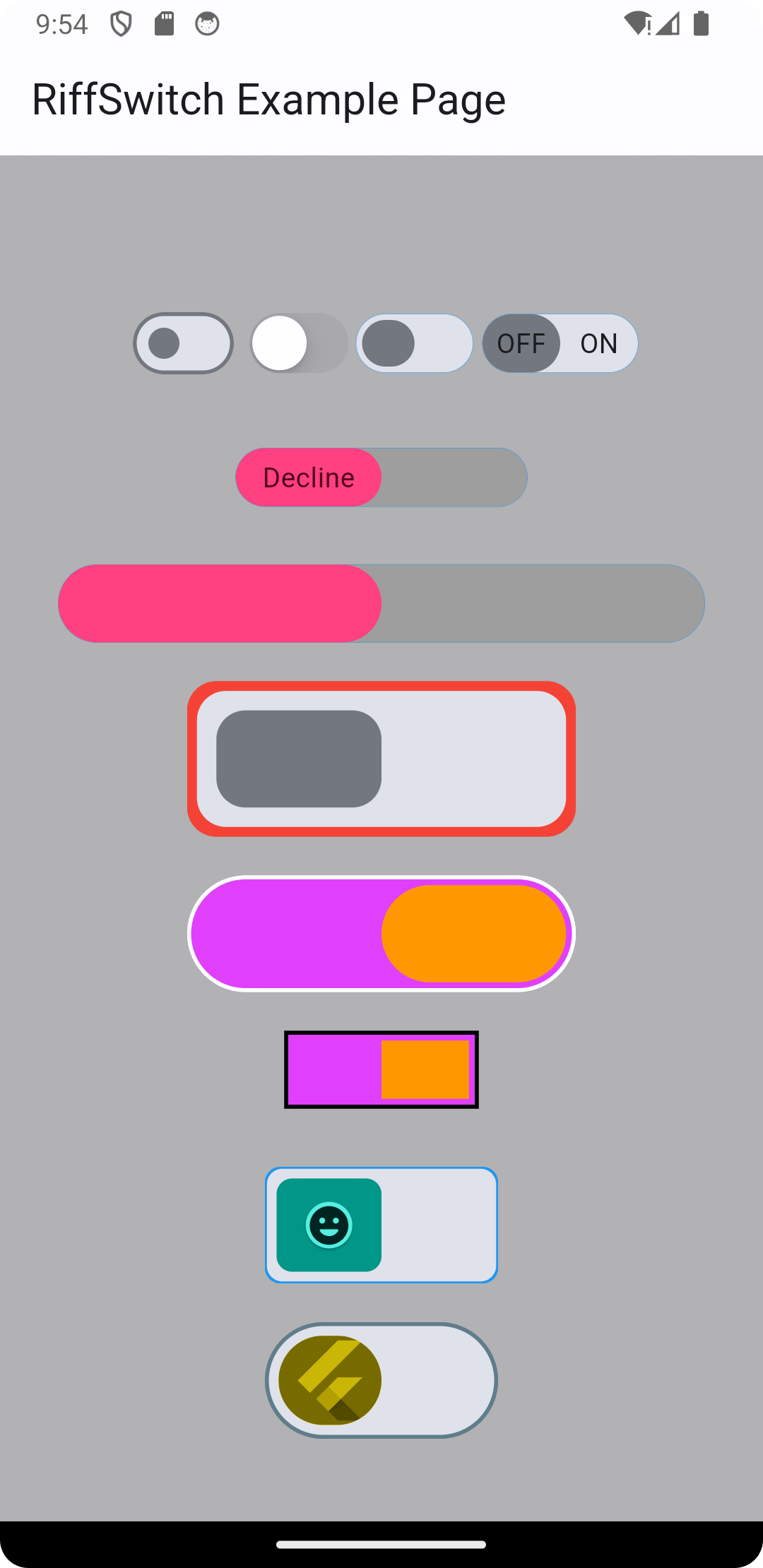
More examples from main.dart
// 1
  RiffSwitch(
    value: _switchValue,
    onChanged: (value) => setState(() {
      _switchValue = value;
    }),
    type: RiffSwitchType.simple,
  ),

  const SizedBox(height: 30),

  // 2
  RiffSwitch(
    value: _switchValue,
    onChanged: (value) => setState(() {
      _switchValue = value;
    }),
    type: RiffSwitchType.simple,
    activeText: const Text("Accept"),
    inactiveText: const Text("Decline"),
    thumbColor: MaterialStateProperty.resolveWith((Set<MaterialState> states) {
      if (states.contains(MaterialState.selected)) {
        return Colors.greenAccent;
      }
      return Colors.pinkAccent;
    }),
    trackColor: MaterialStateProperty.resolveWith((Set<MaterialState> states) {
      if (states.contains(MaterialState.selected)) {
        return Colors.grey;
      }
      return Colors.grey;
    }),
  ),

  const SizedBox(height: 30),

  // 3
  RiffSwitch(
    value: _switchValue,
    onChanged: (value) => setState(() {
      _switchValue = value;
    }),
    type: RiffSwitchType.decorative,
    activeColor: Colors.orange,
  ),

  const SizedBox(height: 30),

  // 4
  RiffSwitch(
    value: _switchValue,
    onChanged: (value) => setState(() {
      _switchValue = value;
    }),
    type: RiffSwitchType.decorative,
    activeChild: const Card(
      color: CupertinoColors.systemBlue,
      child: FlutterLogo(),
    ),
    inactiveChild: const Card(
      color: CupertinoColors.systemYellow,
      child: FlutterLogo(),
    ),
  )
NOTE: It's important to note that the
thumbColorproperty takes precedence over any color applied directly to theactiveorinactivethumb, whether through a container widget or any other means. This allows for consistent and predictable customization of the thumb's color across different states of the switch, ensuring a cohesive visual appearance throughout the application.
| Screenshot 1 | Screenshot 2 | Screenshot 3 |
|---|---|---|
| Screenshot 1 | Screenshot 2 | Screenshot 3 |
| Screenshot 4 | Screenshot 5 | Screenshot 6 |
|---|---|---|
| Screenshot 4 | Screenshot 5 | Screenshot 6 |
| Screen Record 1 | Screen Record 2 |
|---|---|
| Screen Record 1 | Screen Record 2 |
Contributions are welcome! Feel free to open issues or submit pull requests.
Issues: If you encounter any bugs, have feature requests, or want to suggest improvements, please open an issue on our GitHub repository. Provide as much detail as possible to help us understand the problem or idea better.
Pull Requests: If you'd like to contribute code changes, feel free to submit a pull request. Before doing so, make sure to fork the repository and create a new branch for your changes. Follow the existing coding style and guidelines, and write clear and concise commit messages. Your pull request will undergo review, and we'll work together to ensure the changes align with the project's goals.
Feature Requests: If you have ideas for new features or enhancements, please open an issue to discuss them. We value community feedback and want to ensure that new features align with the project's direction and objectives.
Spread the Word: Help us grow the FontResoft community by sharing the project with others. Whether through social media, blog posts, or word of mouth, spreading the word about FontResoft helps attract more users and contributors.
This project is licensed under the BSD 3-Clause License - see the LICENSE file for details.