
 v0.5.1
modal_progress_hud_nsn
사운드 null 안전성을 갖춘 모달 진행 표시 위젯. https://github.com/mmcc007/modal_progress_hud의 포크
301좋아요 9.7천30일 다운로드160Pub 점수
AndroidiOSWebmacOSWindowsLinux
장시간 실행 작업을 위한 모달 애니메이션 로딩 오버레이 패키지.

{"sdk":"flutter"}{"sdk":"flutter"}^2.0.0아래는 영문 원문 스냅샷입니다. 최신 내용은 GitHub에서 확인하세요.
A simple widget wrapper to enable modal progress HUD (a modal progress indicator, HUD = Heads Up Display)
A fork of the original modal_progress_hud by mmcc007 with Null Safety and additional features.
Add the modal_progress_hud_nsn to dependencies in pubspec.yaml.
dependencies:
    modal_progress_hud_nsn: ^0.5.1
Next, import the library into your app.
import 'package:modal_progress_hud_nsn/modal_progress_hud_nsn.dart';
Now, wrap your widget as a child of ModalProgressHUD, typically a form, together with a boolean variable that is maintained in local state.
...
bool _saving = false
...

@override
Widget build(BuildContext context) {
  return Scaffold(
     body: ModalProgressHUD(child: Container(
       Form(...)
     ), inAsyncCall: _saving),
  );
}
Below parameters can be customised accordingly.
ModalProgressHUD(
  @required inAsyncCall: bool,
  @required child: Widget,
  opacity: double,
  color: Color,
  progressIndicator: CircularProgressIndicator,
  offset: double
  dismissible: bool,
  blur: double,
);
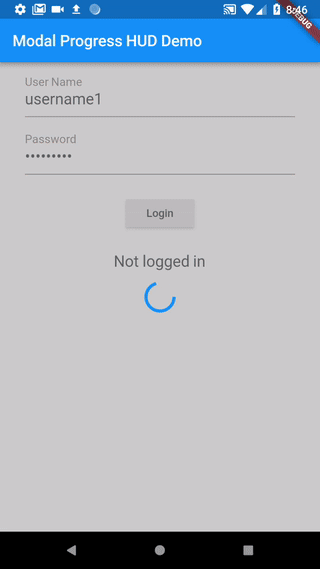
An example app that demonstrates the usage.
_saving defaults to false which causes your child widget to display._saving is set to true, which will display the modal._saving is set back to false, hiding the modal.class SettingsPage extends StatefulWidget {
@override
_SettingsPageState createState() => new _SettingsPageState();
}
class _SettingsPageState extends State<SettingsPage> {
bool _saving = false;
void _submit() {
setState(() {
_saving = true;
});
//Simulate a service call
print('submitting to backend...');
new Future.delayed(new Duration(seconds: 4), () {
setState(() {
_saving = false;
});
});
}
Widget _buildWidget() {
return new Form(
child: new Column(
children: [
new SwitchListTile(
title: const Text('Bedroom'),
value: _bedroom,
onChanged: (bool value) {
setState(() {
_bedroom = value;
});
},
secondary: const Icon(Icons.hotel),
),
new RaisedButton(
onPressed: _submit,
child: new Text('Save'),
),
],
),
);
}
@override
Widget build(BuildContext context) {
return new Scaffold(
appBar: new AppBar(
title: new Text('Flutter Progress Indicator Demo'),
backgroundColor: Colors.blue,
),
body: ModalProgressHUD(child: _buildWidget(), inAsyncCall: _saving),
);
}
}
See this article on Medium about async form validation
See the example application source for a complete sample app using the modal progress HUD. Included in the example is a method for using a form's validators while making async calls (see flutter/issues/9688 for details).
Please file issues to send feedback, request features or report a bug. Thank you!