

 v5.1.3
animated_size_and_fade
다른 높이를 가진 위젯 간에 페이드 및 크기 전환을 수행합니다. 또한 위젯의 표시/숨김에도 사용됩니다.
245좋아요 1.5만30일 다운로드160Pub 점수
AndroidiOSWebmacOSWindowsLinux
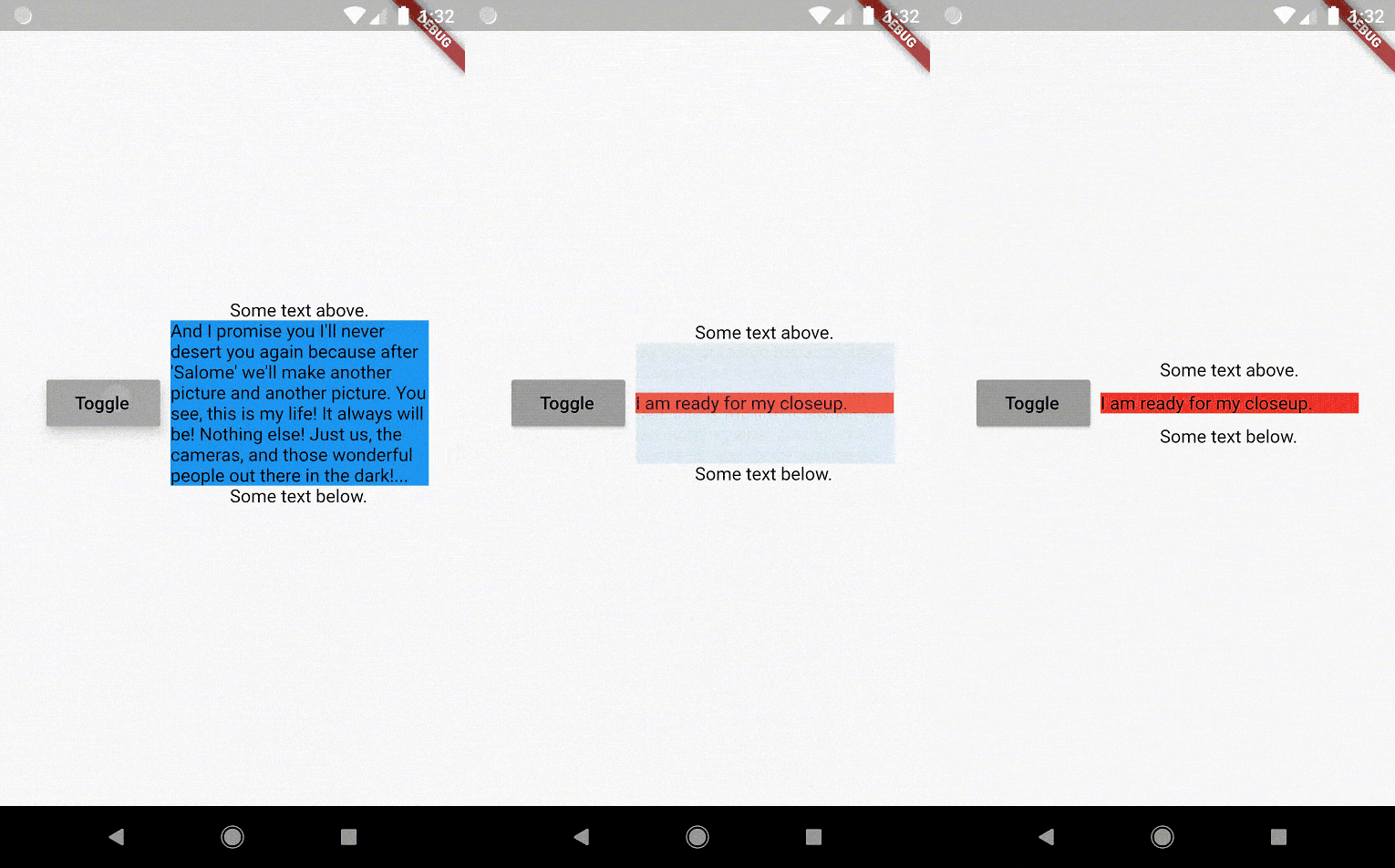
Flutter 패키지: 너비는 같지만 높이가 다른 위젯 간에 페이드 및 크기 전환을 수행하는 위젯이며, 사전에 크기를 알 필요가 없습니다.

아래는 영문 원문 스냅샷입니다. 최신 내용은 GitHub에서 확인하세요.








The AnimatedSizeAndFade widget allows you to:

To do a fade and size transition when you change the child widget,
the "old" and the "new" child must have the same width,
but can have different heights,
and you don't need to know their sizes in advance.
You can also define a duration and curve for both the fade and the size, separately.
Important: If the "new" child is the same widget type as the "old" child, but with different
parameters, then AnimatedSizeAndFade will NOT do a transition between them, since as far as
the framework is concerned, they are the same widget, and the existing widget can be updated with
the new parameters. To force the transition to occur, set a Key (typically a ValueKey
taking any widget data that would change the visual appearance of the widget) on each child widget
that you wish to be considered unique.
Example:
bool toggle=true;
Widget widget1 = ...;
Widget widget2 = ...;

AnimatedSizeAndFade(
   child: toggle ? widget1 : widget2
);
The AnimatedSizeAndFade.showHide constructor may be used to show/hide a widget, by resizing it
vertically while fading.
Example:
bool toggle=true;
Widget widget = ...;

AnimatedSizeAndFade.showHide(
   show: toggle,
   child: widget,
);
With AnimatedCrossFade you must provide both the firstChild and secondChild
at the same time, but with AnimatedSizeAndFade you may simply change its child.
With AnimatedSwitcher you may simply change its child, but then it only animates
the fade, not the size.
AnimatedContainer only works if you know the size of the children in advance.
Note: See the StackOverflow question that prompted this widget development.
glasberg.dev
github.com/marcglasberg
linkedin.com/in/marcglasberg/
twitter.com/glasbergmarcelo
stackoverflow.com/users/3411681/marcg
medium.com/@marcglasberg
My article in the official Flutter documentation:
The Flutter packages I've authored:
My Medium Articles:
의존성 목록 2 개
{"sdk":"flutter"}{"sdk":"flutter"}사용 목적에 따라 검색하고 개발 활동을 비교한 뒤 원본 저장소에서 요구 사항을 확인하세요.
“A repository is the most basic element of GitHub.”
GitHub Docs — About repositories ↗