
AwesomeButton
이것은 멋진 외관을 가진 플러터용 사전 빌드 버튼입니다.

- 스타
- 8
- 포크
- 2
- 최근 푸시(UTC)
- 2019. 8. 21.
- 프로젝트 상태
- 활성
원본 README
아래는 영문 원문 스냅샷입니다. 최신 내용은 GitHub에서 확인하세요.
AwesomeButton
This is a pre-built button for flutter with an awesome look.
Installation
Add the awesome_button to your dependencies in your pubspec.yaml.
awesome_button: ^1.0.2
Usage
Import the AwesomeButton.dart using this line below.
import 'package:awesome_button/awesome_button.dart';
Add the AwesomeButton widget to your widget tree and provide your parameter to it, like examples below.
Example
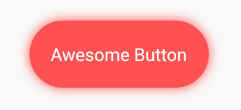
AwesomeButton(
  blurRadius: 10.0,
  splashColor: Color.fromRGBO(255, 255, 255, .4),
  borderRadius: BorderRadius.circular(37.5),
  height: 75.0,
  width: 200.0,
  onTap: () => print("tapped"),
  color: Colors.redAccent,
  child: Text(
    "Awesome Button",
    style: TextStyle(
      color: Colors.white,
      fontSize: 20.0,
    ),
  ),
),

AwesomeButton(
  blurRadius: 10.0,
  splashColor: Color.fromRGBO(255, 255, 255, .4),
  borderRadius: BorderRadius.circular(50.0),
  height: 100.0,
  width: 100.0,
  onTap: () => print("tapped"),
  color: Colors.greenAccent,
  child: Icon(
    Icons.account_circle,
    color: Colors.white,
    size: 50.0,
  ),
),
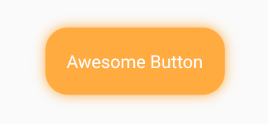
AwesomeButton(
  blurRadius: 10.0,
  splashColor: Color.fromRGBO(255, 255, 255, .4),
  borderRadius: BorderRadius.circular(25.0),
  height: 75.0,
  width: 200.0,
  onTap: () => print("tapped"),
  color: Colors.orangeAccent,
  child: Text(
    "Awesome Button",
    style: TextStyle(
      color: Colors.white,
      fontSize: 20.0,
    ),
   ),
),

GitHub 작성자
Millian ↗
언어Dart
프로젝트에 맞는 저장소를 선택하려면?
사용 목적에 따라 검색하고 개발 활동을 비교한 뒤 원본 저장소에서 요구 사항을 확인하세요.
- 이름, 작성자 또는 설명으로 검색하고 기술 주제로 범위를 좁힙니다.
- 스타, 포크, 최근 푸시를 함께 비교하세요. 스타는 관심의 지표이며 품질을 보장하지 않습니다.
- 사용하기 전에 GitHub에서 README, 라이선스, Issues를 확인하세요.
출처 및 관리
“A repository is the most basic element of GitHub.”
GitHub Docs — About repositories ↗