

 v1.0.3
sphinx_verify
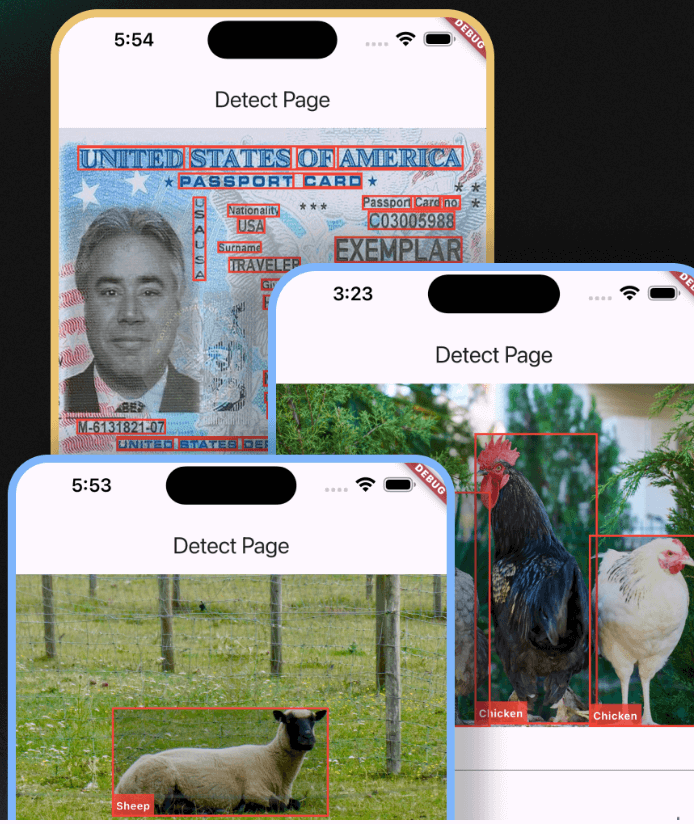
Sphinx Verify는 Amazon 인식 서비스에 대한 인터페이스를 제공하는 Flutter 패키지로, 내장된 사용 사례를 포함하고 있습니다.
5좋아요 3030일 다운로드150Pub 점수
AndroidiOSmacOSWindowsLinux
SphinxVerify는 Amazon 인식 서비스에 대한 인터페이스를 제공하는 것을 목표로 하는 Flutter 패키지이며, 내장된 사용 사례를 포함합니다.

아래는 영문 원문 스냅샷입니다. 최신 내용은 GitHub에서 확인하세요.


Sphinx Verify is a Flutter package that amis to provider an interface to amazon recognition service. with built-in use cases.
❗ In order to start using Sphinx Verify you must have the Fkutter installed on your machine.
Install via flutter pub add:
flutter pub add sphinx_verify
Install via pubspec.yaml:
dependencies:
  sphinx_verify: ^0.1.0
import 'package:sphinx_verify/sphinx_verify.dart';

/// initialize the sphinx verify
SphinxVerify sphinxVerify = SphinxVerify(
    region: AwsRegionEnum.usEast1 <- adjust to your region,
    accessKey: 'your access key',
    secretKey: 'your secret key',
    onVerificationComplete: (FaceMatchesModel faceMatchesModel) {
        print({
        '❌similarity': faceMatchesModel.matchedFaces?.first.similarity,
        'faceMatchesModel': faceMatchesModel,
        });
    },
);

/// exposed methods

// detect labels
LabelDetectionModel? res = await widget.sphinxVerify.awsSDK.detectLabels(
    file: _imageFile,
    imageUrl: _imageUrl,
);

// detect text
List<TextDetectionModel>? res = await widget.sphinxVerify.awsSDK.detectText(
    file: _imageFile,
    imageUrl: _imageUrl,
);

// detect faces
List<FaceDetectionModel>? res = await widget.sphinxVerify.awsSDK.detectFaces(
    file: _imageFile,
    imageUrl: _imageUrl,
);

// compare faces
FaceMatchesModel? res = await widget.sphinxVerify.awsSDK.compareFaces(
    sourceImageFile: _imageFile,
    sourceImageUrl: _imageUrl,
    targetImageFile: _targetImageFile,
    targetImageUrl: _targetImageUrl,
    similarityThreshold: 90,
);

// moderate content
ModerateContentModel? res = await widget.sphinxVerify.awsSDK.moderateContent(
    file: _imageFile,
    imageUrl: _imageUrl,
    minConfidence: 5,
);
import 'package:flutter/material.dart';
import 'package:sphinx_verify/sphinx_verify.dart';

class KycPage extends StatelessWidget {
  const KycPage({super.key, required this.sphinxVerify});
  final SphinxVerify sphinxVerify;

  @override
  Widget build(BuildContext context) {
    return sphinxVerify.kycWidget;
  }
}
의존성 목록 13 개
^3.0.6{"sdk":"flutter"}^3.1.0^1.2.2^1.1.2^0.20.2^4.9.0^2.4.13{"sdk":"flutter"}^3.2.3^6.8.0^1.0.4^10.0.0사용 목적에 따라 검색하고 개발 활동을 비교한 뒤 원본 저장소에서 요구 사항을 확인하세요.
“A repository is the most basic element of GitHub.”
GitHub Docs — About repositories ↗