

 v0.0.6
animated_read_more_text
텍스트의 '더 읽기/덜 읽기' 기능을 위한 애니메이션 Flutter 패키지로, 텍스트 처리 및 사용자 상호작용을 개선합니다.
69좋아요 66730일 다운로드155Pub 점수
AndroidiOSWebmacOSWindowsLinux
monster555/animated_read_more_text open-source repository details.

아래는 영문 원문 스냅샷입니다. 최신 내용은 GitHub에서 확인하세요.
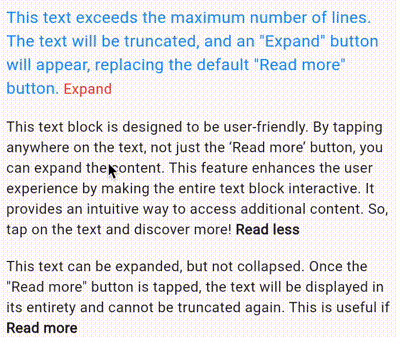
A Flutter package that provides a customizable widget for displaying text with an optional "Read more/Read less" button, enhancing the user experience for text-heavy content.
The AnimatedReadMoreText widget is a Flutter package that provides a user-friendly and visually appealing way to present lengthy text content. It dynamically adapts text length based on a predefined maximum line count, ensuring optimal readability on various screen sizes. The widget's key feature is its ability to seamlessly expand or collapse text based on user interaction. This functionality enhances readability by allowing users to focus on specific sections of text without being overwhelmed by lengthy passages. Additionally, the widget's subtle yet impactful animations add a touch of elegance to the user interface, further enhancing the overall reading experience.
To use this package, include it in your pubspec.yaml file:
dependencies:
  animated_read_more_text: ^0.0.6
Import the package in your Dart file:
import 'package:animated_read_more_text/animated_read_more_text.dart';
Use the AnimatedReadMoreText widget in your Flutter application:
AnimatedReadMoreText(
  yourLongText,
  maxLines: 3,
  // Set a custom text for the expand button. Defaults to Read more
  readMoreText: 'Expand',
  // Set a custom text for the collapse button. Defaults to Read less
  readLessText: 'Collapse',
  // Set a custom text style for the main block of text
  textStyle: TextStyle(
    fontSize: 16,
    color: Colors.red,
  ),
  // Set a custom text style for the expand/collapse button
  buttonTextStyle: TextStyle(
    fontSize: 16,
    fontWeight: FontWeight.bold,
  ),
)
Set custom animation curve and duration
AnimatedReadMoreText(
  yourLongText,
  // Set the curve of the animation
  animationCurve: Curves.easeInOut,
  // Set the duration of the animation
  animationDuration: Duration(milliseconds: 500),
)
Contributions and bug reports are welcome! Please feel free to create an issue or submit a pull request.
This package is licensed under the MIT License - see the LICENSE file for details.
의존성 목록 3 개
{"sdk":"flutter"}{"sdk":"flutter"}^3.0.1사용 목적에 따라 검색하고 개발 활동을 비교한 뒤 원본 저장소에서 요구 사항을 확인하세요.
“A repository is the most basic element of GitHub.”
GitHub Docs — About repositories ↗