
 v2.4.4
responsive_grid
Flutter용 반응형 그리드 레이아웃 및 목록
272좋아요 1.1만30일 다운로드115Pub 점수
AndroidiOSWebmacOSWindowsLinux
Flutter용 반응형 그리드 레이아웃

{"sdk":"flutter"}{"sdk":"flutter"}^1.0.0아래는 영문 원문 스냅샷입니다. 최신 내용은 GitHub에서 확인하세요.
Responsive Grid Layout, List and many Utilities for Flutter, to achieve good UI look and feel for different screen sizes
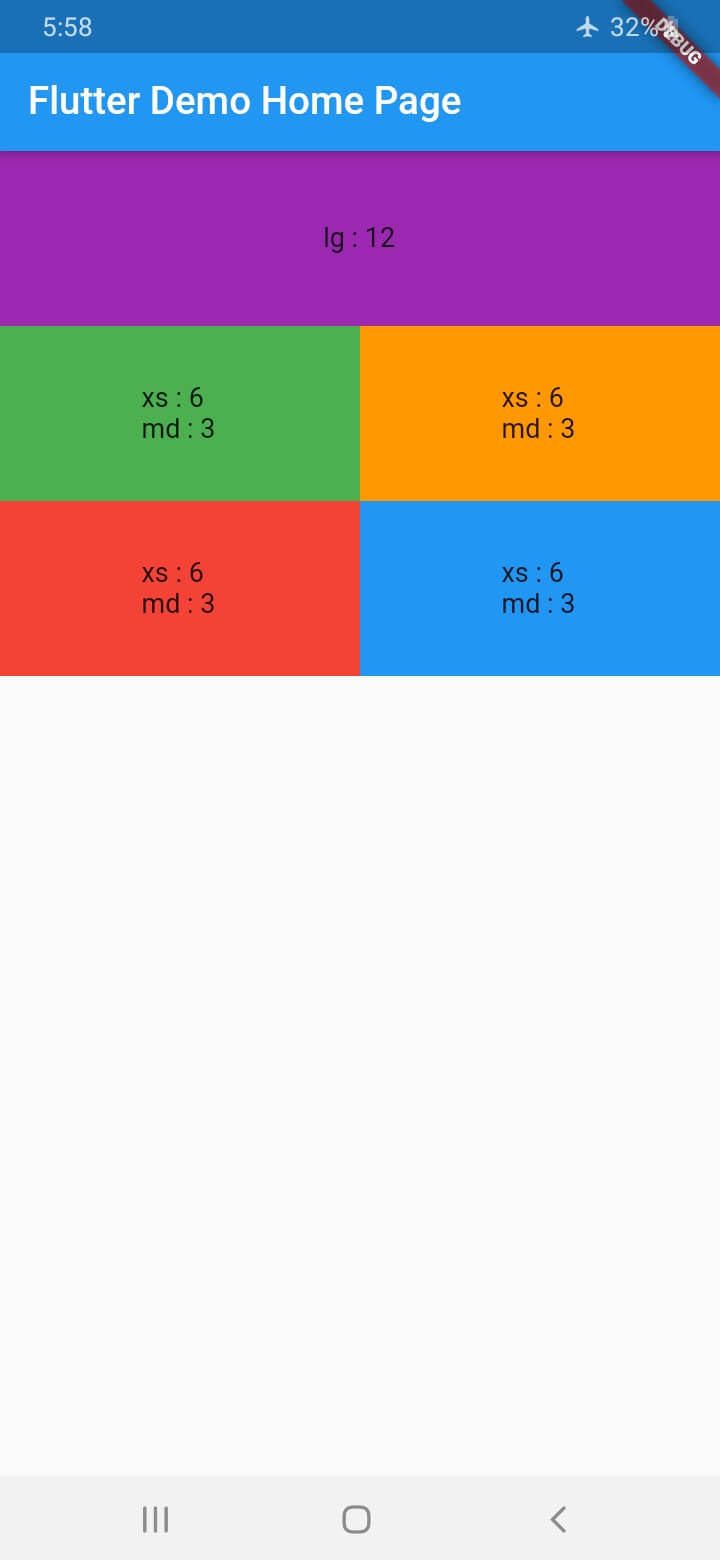
With ResponsiveGridRow and ResponsiveGridCol you can get the same behavior of bootstrap Grid System
Give every col the width it shall occupy at every size category assuming the total width is 12 (by default)
        ResponsiveGridRow(
          children: [
            ResponsiveGridCol(
              lg: 12,
              child: Container(
                height: 100,
                alignment: Alignment(0, 0),
                color: Colors.purple,
                child: Text("lg : 12"),
              ),
            ),
            ResponsiveGridCol(
              xs: 6,
              md: 3,
              child: Container(
                height: 100,
                alignment: Alignment(0, 0),
                color: Colors.green,
                child: Text("xs : 6 \r\nmd : 3"),
              ),
            ),
            ResponsiveGridCol(
              xs: 6,
              md: 3,
              child: Container(
                height: 100,
                alignment: Alignment(0, 0),
                color: Colors.orange,
                child: Text("xs : 6 \r\nmd : 3"),
              ),
            ),
            ResponsiveGridCol(
              xs: 6,
              md: 3,
              child: Container(
                height: 100,
                alignment: Alignment(0, 0),
                color: Colors.red,
                child: Text("xs : 6 \r\nmd : 3"),
              ),
            ),
            ResponsiveGridCol(
              xs: 6,
              md: 3,
              child: Container(
                height: 100,
                alignment: Alignment(0, 0),
                color: Colors.blue,
                child: Text("xs : 6 \r\nmd : 3"),
              ),
            ),
          ],
        )
https://raw.githubusercontent.com/muhammad369/ResponsiveGrid_Flutter/master/images/1.jpg https://raw.githubusercontent.com/muhammad369/ResponsiveGrid_Flutter/master/images/2.jpg
ResponsiveGridList works differently in that you only specify a desired width for the items and spacing, and it will decide how many items shall fit in a line, and the width of the item and spacing will change (only small change) to fill the entire width
    ResponsiveGridList(
        desiredItemWidth: 100,
        minSpacing: 10,
        children: List.generate(20, (index)=> index+1).map((i) {
          return Container(
            height: 100,
            alignment: Alignment(0, 0),
            color: Colors.cyan,
            child: Text(i.toString()),
          );
        }).toList()
    )
https://raw.githubusercontent.com/muhammad369/ResponsiveGrid_Flutter/master/images/3.jpg https://raw.githubusercontent.com/muhammad369/ResponsiveGrid_Flutter/master/images/4.jpg
The same as the ResponsiveGridList, but arranges items in columns inside one big row, so every item has independent height
ResponsiveWidget , ResponsiveBuilder, ResponsiveLayoutBuilder and responsiveValue()
To provide a custom responsive Widget, Builder or a single value, for every size tier
ResponsiveLocalWidget, ResponsiveLocalBuilder and ResponsiveLocalLayoutBuilder
To provide a responsive Widget or Builder for its own width, not the viewport's, they are just wrappers on top of flutter LayoutBuilder
Warning: make sure not to use any of them inside unbounded width widget, as the width will be read infinity
To create widgets conditionally for every size tier
To create different layouts for every size tier, for example put children inside a Column for XS and in a Row from MD and larger
ResponsiveLayoutBuilder(
                  xs: (BuildContext context, List<Widget> children) => Column(
                    children: children,
                  ),
                  md: (BuildContext context, List<Widget> children) => Row(
                    children: children,
                  ),
                  children: .....,
                ),
A conditional value on size tier, may be used to achieve any complicated behavior, for example say you have a GridView you can make the crossAxisCount increase with the width
GridView.count(
            crossAxisCount: responsiveValue(context, xs: 2, sm: 3, md: 4, lg: 6, xl: 7),
            children: .....
          )
Another example you can make a widget visible in small sizes and hidden starting from MD tier
Visibility(
      visible: responsiveValue(context, xs: true, md: false),
      child: .....)
To create widgets conditionally for each specified available width for it
To Layout widgets conditionally for each specified available width for them, for example say you want to put children inside a Column if available space width is less than 500 and in a Row if larger
ResponsiveLocalLayoutBuilder(configs: [
                  ResponsiveLayoutBuilderConfig(
                    upToWidth: 500,
                    builder: (BuildContext context, List<Widget> children) => Column(
                      children: children,
                    ),
                  ),
                  ResponsiveLayoutBuilderConfig(
                    upToWidth: double.infinity,
                    builder: (BuildContext context, List<Widget> children) => Row(
                      children: children,
                    ),
                  )
                ], children: .....)
Add before attaching App widget
ResponsiveGridBreakpoints.value = ResponsiveGridBreakpoints(
  xs: 600,
  sm: 905,
  md: 1240,
  lg: 1440,
);