
 v2.3.0
flutter_scroll_to_top
사용자가 스크롤할 때 위로 이동 프롬프트를 표시할 수 있도록, 스크롤 가능한 위젯을 감싸는 간단한 래퍼를 제공하는 패키지입니다.
104좋아요 27130일 다운로드70Pub 점수
플랫폼 정보 없음
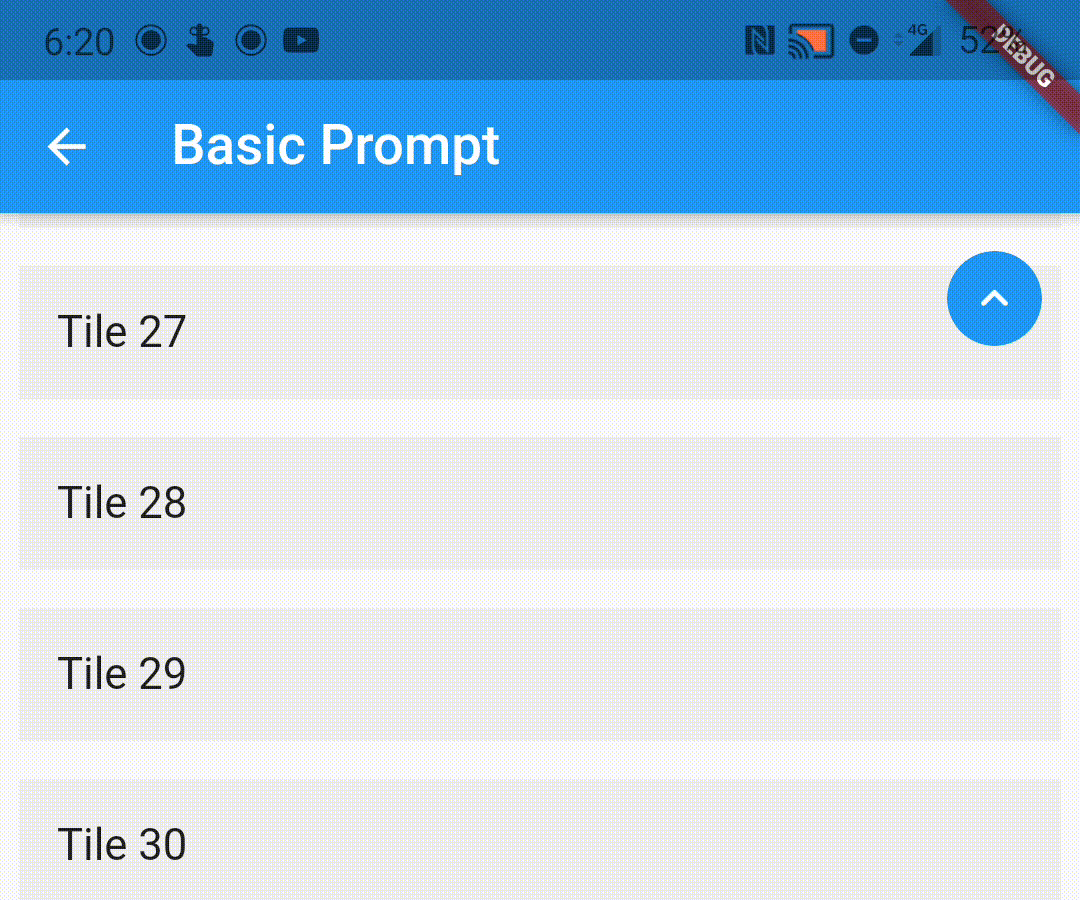
스크롤 가능한 위젯에서 스크롤할 때 사용자에게 맨 위로 이동하는 프롬프트를 표시하기 위한 래퍼입니다.
아래는 영문 원문 스냅샷입니다. 최신 내용은 GitHub에서 확인하세요.

A wrapper to show a scroll to top prompt to the user on ScrollView widgets.
Add the following dependency to your pubspec.yaml file:
dependencies:
  flutter_scroll_to_top: ^2.2.4
Import the package
import 'package:flutter_scroll_to_top/flutter_scroll_to_top.dart';
Just wrap the scrollable widget you want to show the scroll to top prompt over with a ScrollWrapper.
ScrollWrapper(
    builder: (context, properties) => ListView.builder(
        itemBuilder: (context, index) => Padding(
            padding: const EdgeInsets.all(8.0),
            child: ListTile(
                title: Text('Tile $index'),
                tileColor: Colors.grey.shade200,
            ),
        ),
    ),
)

If the child ScrollView has different properties for scrollController, scrollDirection,
primary or reverse parameters than the default values, you need to pass them to the ScrollWrapper
widget as it requires the same parameters. It provides a ScrollViewProperties object in the builder
callback that you can use to access the properties in the ScrollView widget.
ScrollWrapper(
    primary: true,
    scrollDirection: Axis.horizontal,
    reverse: true,
    builder: (context, properties) => ListView.builder(
        controller: properties.scrollController,
        scrollDirection: properties.scrollDirection,
        reverse: properties.reverse,
        primary: properties.primary,
        itemBuilder: (context, index) => Padding(
            padding: const EdgeInsets.all(8.0),
            child: ListTile(
                title: Text('Tile $index'),
                tileColor: Colors.grey.shade200,
            ),
        ),
    ),
)
You can pass the following parameters to customise the prompt accordingly
enabledAtOffset - At what scroll offset to enable the prompt on.alwaysVisibleAtOffset - If the prompt is to be always visible at the provided offset. Setting this to false only shows the prompt when the user starts scrolling upwards. Default value is false.scrollOffsetUntilVisible - Offset should the user scroll in the opposite direction before the prompt becomes visible.scrollOffsetUntilHide - Offset should the user scroll before the prompt hides itself, if visible.promptAlignment - Where on the widget to align the prompt.promptDuration - Duration it takes for the prompt to come into view/vanish.promptAnimationCurve - Animation Curve that the prompt will follow when coming into view.promptAnimationType - PromptAnimation that the prompt follows when animating. Has three options, fade, scale and size.scrollToTopDuration - Duration it takes for the page to scroll to the top on prompt button press.scrollToTopCurve - Animation Curve for scrolling to the top.promptTheme - You can pass PromptButtonTheme to modify the prompt button further. It has the following parameters:
padding - Padding around the prompt button.iconPadding - Padding around the icon inside the button.icon - The icon inside the button.color - Color of the prompt button.elevation - Elevation of the button.ScrollWrapper(
promptAlignment: Alignment.topCenter,
promptAnimationCurve: Curves.elasticInOut,
promptDuration: const Duration(milliseconds: 400),
enabledAtOffset: 300,
scrollOffsetUntilVisible: 500,
promptTheme: const PromptButtonTheme(
icon: Icon(Icons.arrow_circle_up, color: Colors.amber),
color: Colors.deepPurpleAccent,
iconPadding: EdgeInsets.all(16),
padding: EdgeInsets.all(32)),
builder: (context, properties) => ListView.builder(
controller: properties.scrollController,
scrollDirection: properties.scrollDirection,
reverse: properties.reverse,
primary: properties.primary,
itemBuilder: (context, index) => Padding(
padding: const EdgeInsets.all(8.0),
child: ListTile(
title: Text('Tile $index'),
tileColor: Colors.grey.shade200,
),
),
),
)

You can replace the default prompt widget with a widget of your choosing by passing it off in the promptReplacementBuilder parameter.
ScrollWrapper(
    promptReplacementBuilder: (context, function) => MaterialButton(
        onPressed: () => function(),
        child: const Text('Scroll to top'),
    ),
    builder: (context, properties) => ListView.builder(
        controller: properties.scrollController,
        scrollDirection: properties.scrollDirection,
        reverse: properties.reverse,
        primary: properties.primary,
        itemBuilder: (context, index) => Padding(
            padding: const EdgeInsets.all(8.0),
            child: ListTile(
                title: Text('Tile $index'),
                tileColor: Colors.grey.shade200,
            ),
        ),
    ),
)

This is a limitation of the way Flutter handles this scenario. If you are receiving this error (likely due to multiple scrollables under a NestedScrollView), this library bundles a modified version of the scrollviews which would fix this issue.
To use them, add the following import:
import 'package:flutter_scroll_to_top/scroll_view.dart' as scrollview;
Then replace your scrollview in the following way:
Before
ScrollWrapper(
    builder: (context, properties) => ListView.builder(
        itemBuilder: (context, index) => Padding(
            padding: const EdgeInsets.all(8.0),
            child: ListTile(
                title: Text('Tile $index'),
                tileColor: Colors.grey.shade200,
            ),
        ),
    ),
)
After
ScrollWrapper(
    builder: (context, properties) => scrollview.ListView.builder(
        properties: properties,
        itemBuilder: (context, index) => Padding(
            padding: const EdgeInsets.all(8.0),
            child: ListTile(
                title: Text('Tile $index'),
                tileColor: Colors.grey.shade200,
            ),
        ),
    ),
)

의존성 목록 3 개
{"sdk":"flutter"}^2.0.1{"sdk":"flutter"}사용 목적에 따라 검색하고 개발 활동을 비교한 뒤 원본 저장소에서 요구 사항을 확인하세요.
“A repository is the most basic element of GitHub.”
GitHub Docs — About repositories ↗