
 v1.0.1
carousel_nerdzlab
엣지 투 엣지 요소와 중앙 정렬이 있는 사용자 지정 PageView
0좋아요 4830일 다운로드150Pub 점수
AndroidiOSWebmacOSWindowsLinux
엣지 투 엣지 요소와 중앙 정렬이 있는 사용자 지정 PageView
아래는 영문 원문 스냅샷입니다. 최신 내용은 GitHub에서 확인하세요.
This package provides a custom implementation of the CenteredPageView widget that behaves like the default PageView, but with padEnds: false while centered elements, and an optional dot indicator.
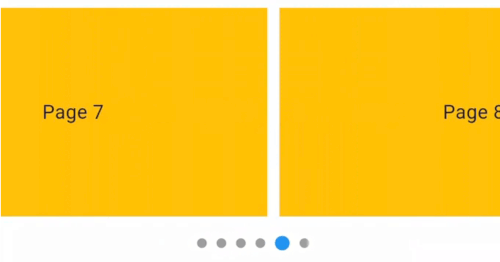
Package CenteredPageView. Items snap to a centered position.
Default PageView. Elements align based on scroll position but are not centered.
CenteredPageView widget that centers items while retaining the default properties of the PageView.CenteredPageView.Here's how to implement CenteredPageView in your Flutter app:
CenteredPageView.builder(
  itemCount: 9,
  controller: PageController(viewportFraction: 0.8),
  showIndicator: true, // Set to 'false' if you do not want to display the dot indicator
  indicatorStyle: const IndicatorStyle(
      indicatorWidth: 100, unselectedSize: Size(8, 8)),
  itemBuilder: (context, index) => Container(
      width: MediaQuery.of(context).size.width,
      margin: const EdgeInsets.symmetric(horizontal: 5.0),
      padding: const EdgeInsets.symmetric(horizontal: 16),
      decoration: const BoxDecoration(color: Colors.amber),
      child: Align(
        child: Text(
          'Page $index',
          style: const TextStyle(fontSize: 16.0),
        ),
      )),
),
Customizing the Dot Indicator
showIndicator property is a boolean that controls the visibility of the dot indicator.indicatorStyle property allows you to customize the appearance of the dot indicator.
의존성 목록 3 개
{"sdk":"flutter"}{"sdk":"flutter"}^4.0.0사용 목적에 따라 검색하고 개발 활동을 비교한 뒤 원본 저장소에서 요구 사항을 확인하세요.
“A repository is the most basic element of GitHub.”
GitHub Docs — About repositories ↗