
 v3.0.1
candlesticks
금융 앱용 고성능이고 상호작용 가능한 Flutter 캔들스틱 차트입니다.
141좋아요 1.7천30일 다운로드160Pub 점수
AndroidiOSWebmacOSWindowsLinux
r-mzy47/candlesticks open-source repository details.

{"sdk":"flutter"}^6.0.0{"sdk":"flutter"}아래는 영문 원문 스냅샷입니다. 최신 내용은 GitHub에서 확인하세요.
A high-performance, interactive Flutter candlestick chart for financial apps.
Flutter Dart pub package version
iOS supported Android supported Web supported macOS supported Windows supported Linux supported
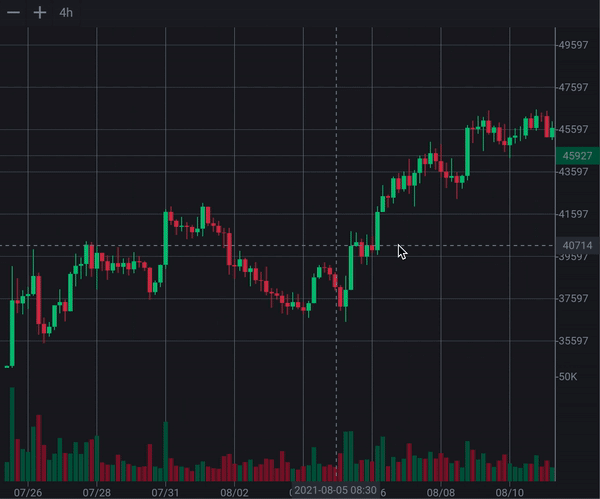
candlesticks is a Flutter package for rendering interactive OHLCV candlestick charts.
It supports mobile and desktop gestures, crosshair interaction, panning, zooming, switching between logarithmic and linear price scales, volume bars, controller-based viewport control, lazy loading, and custom chart styling.
Try the live web demo:
https://r-mzy47.github.io/candlesticks/master/
On the web, use Alt/Option + scroll for anchored zoom.
Note:
Ctrl + scrollis currently avoided on web because browsers may intercept it for page zoom.
| Linear and logarithmic scales Logarithmic and linear scale demo |
Long press for crosshair Long press crosshair demo |
| Advanced gestures: pan in any direction Advanced chart gesture demo |
Anchored and regular zoom Anchored and regular zoom demo |
Add this to your pubspec.yaml:
dependencies:
  candlesticks: ^3.0.1
Then run:
flutter pub get
import 'package:candlesticks/candlesticks.dart';
import 'package:candlesticks/candlesticks.dart';
import 'package:flutter/material.dart';

class ChartPage extends StatelessWidget {
  const ChartPage({super.key});

  List<Candle> get candles {
    return [
      Candle(
        date: DateTime(2024, 1, 2),
        open: 105,
        high: 115,
        low: 101,
        close: 108,
        volume: 1500,
      ),
      Candle(
        date: DateTime(2024, 1, 1),
        open: 100,
        high: 110,
        low: 95,
        close: 105,
        volume: 1200,
      ),
    ];
  }

  @override
  Widget build(BuildContext context) {
    return Scaffold(
      body: SafeArea(
        child: Candlesticks(
          candles: candles,
        ),
      ),
    );
  }
}
The candle list must be ordered from newest to oldest. The newest candle should be at index 0.
final candles = [
  newestCandle,
  previousCandle,
  olderCandle,
];
Candle represents one OHLCV data point.
final candle = Candle(
  date: DateTime.now(),
  open: 100,
  high: 120,
  low: 90,
  close: 110,
  volume: 5000,
);
| Field | Type | Description |
|---|---|---|
date |
DateTime |
Candle timestamp. Usually the opening time of the candle interval. |
open |
double |
Opening price. |
high |
double |
Highest price during the candle period. |
low |
double |
Lowest price during the candle period. |
close |
double |
Closing price. |
volume |
double |
Traded volume. |
isBull |
bool |
Returns true when open <= close. |
const Candlesticks({
  super.key,
  required this.candles,
  this.onLoadMoreCandles,
  this.loadingWidget,
  this.controller,
  this.style,
});
| Property | Type | Description |
|---|---|---|
candles |
List<Candle> |
Candle data. The list must be ordered from newest to oldest. |
onLoadMoreCandles |
Future<void> Function()? |
Called when the chart scroll position is close to the oldest loaded candle. |
loadingWidget |
Widget? |
Widget displayed when candles is empty. |
controller |
CandlesticksController? |
Optional controller for programmatic viewport control. |
style |
CandleSticksStyle? |
Optional visual style for the chart. |
When candles is empty, the chart shows a loading indicator by default.
Candlesticks(
  candles: const [],
)
Use loadingWidget to customize it:
Candlesticks(
  candles: const [],
  loadingWidget: const Text('Loading candles...'),
)
Use onLoadMoreCandles to fetch older candles when the user scrolls near the end of the loaded history.
Candlesticks(
  candles: candles,
  onLoadMoreCandles: () async {
    final olderCandles = await repository.fetchOlderCandles();

    setState(() {
      candles.addAll(olderCandles);
    });
  },
)
Older candles should be added to the end of the list.
candles = [
  newestCandle,
  previousCandle,
  olderCandle,
  evenOlderCandle,
];
Use CandlesticksController when you want to control the chart viewport manually.
final controller = CandlesticksController();
Candlesticks(
  candles: candles,
  controller: controller,
)
Dispose the controller if you create it inside a State object:
@override
void dispose() {
  controller.dispose();
  super.dispose();
}
class ControlledChartPage extends StatefulWidget {
  const ControlledChartPage({super.key});

  @override
  State<ControlledChartPage> createState() => _ControlledChartPageState();
}

class _ControlledChartPageState extends State<ControlledChartPage> {
  final CandlesticksController controller = CandlesticksController();

  @override
  void dispose() {
    controller.dispose();
    super.dispose();
  }

  @override
  Widget build(BuildContext context) {
    return Column(
      children: [
        Row(
          children: [
            IconButton(
              onPressed: controller.zoomIn,
              icon: const Icon(Icons.zoom_in),
            ),
            IconButton(
              onPressed: controller.zoomOut,
              icon: const Icon(Icons.zoom_out),
            ),
            IconButton(
              onPressed: () => controller.animateTo(-10),
              icon: const Icon(Icons.keyboard_double_arrow_right),
            ),
          ],
        ),
        Expanded(
          child: Candlesticks(
            candles: candles,
            controller: controller,
          ),
        ),
      ],
    );
  }
}
| Member | Description |
|---|---|
isNearEnd |
Whether the visible range is close to the oldest loaded candle. |
jumpTo(double index) |
Jumps to a scroll index without animation. |
animateTo(double index) |
Animates to a scroll index. |
setZoom(double width) |
Sets candle width directly. |
zoomBy(double factor) |
Multiplies the current candle width by a factor. |
zoomIn() |
Zooms in by a fixed step. |
zoomOut() |
Zooms out by a fixed step. |
scrollByPixels(...) |
Scrolls horizontally by a pixel delta. |
By default, the chart chooses a light or dark style based on the current Flutter theme.
Candlesticks(
  candles: candles,
)
You can pass your own style:
Candlesticks(
  candles: candles,
  style: CandleSticksStyle.dark(
    chartBackgroundColor: const Color(0xFF0F0F0F),
    candleBullColor: const Color(0xFF26A69A),
    candleBearColor: const Color(0xFFEF5350),
  ),
)
Or use the light style:
Candlesticks(
  candles: candles,
  style: CandleSticksStyle.light(),
)
| Field | Description |
|---|---|
chartBackgroundColor |
Main chart background. |
gridLineColor |
Horizontal and vertical grid lines. |
axisTextColor |
Price and time axis text. |
candleBullColor |
Bullish candle body and wick. |
candleBearColor |
Bearish candle body and wick. |
volumeBullColor |
Bullish volume bar. |
volumeBearColor |
Bearish volume bar. |
crosshairLineColor |
Dashed crosshair line. |
crosshairLabelBackgroundColor |
Crosshair price/time label background. |
crosshairLabelTextColor |
Crosshair price/time label text. |
ohlcInfoTextColor |
OHLC info label text. |
ohlcInfoBullColor |
Bullish OHLC value text. |
ohlcInfoBearColor |
Bearish OHLC value text. |
priceIndicatorBullBackgroundColor |
Last price label background when the latest candle is bullish. |
priceIndicatorBearBackgroundColor |
Last price label background when the latest candle is bearish. |
priceIndicatorTextColor |
Last price label text. |
scaleButtonActiveBackgroundColor |
Active scale button background. |
scaleButtonActiveTextColor |
Active scale button text. |
scaleButtonInactiveBackgroundColor |
Inactive scale button background. |
scaleButtonInactiveTextColor |
Inactive scale button text. |
loadingIndicatorColor |
Default loading indicator color. |
The repository includes a complete example app that demonstrates the core features of this package in a real project.
The example app uses the Binance API and includes:
Run it locally:
cd example
flutter run
Live web example:
https://r-mzy47.github.io/candlesticks/master/
See MIGRATION.md for the migration guide from version 2.x to version 3.0.0.