
 v1.0.3
flat_3d_button
클릭 애니메이션을 가진 간단한 3D 평면 버튼, 평면 3D 버튼에는 3가지 메서드가 포함되어 있습니다. 어떤 위젯도 자식으로 사용할 수 있는 평면 3D 버튼, 텍스트를 자식으로 사용하는 평면 3D 버튼, 그리고 아이콘을 자식으로 사용하는 평면 3D 버튼입니다.
39좋아요 4130일 다운로드160Pub 점수
AndroidiOSWebmacOSWindowsLinux
클릭 애니메이션과 함께하는 간단한 3D 평면 버튼!

{"sdk":"flutter"}{"sdk":"flutter"}^2.0.0아래는 영문 원문 스냅샷입니다. 최신 내용은 GitHub에서 확인하세요.
https://github.com/rijfas/flat_3d_button/raw/main/images/banner.png
A simple 3D flat button with click animation!
dependencies:
  flat_3d_button: ^1.0.3
import 'package:flat_3d_button/flat_3d_button.dart';
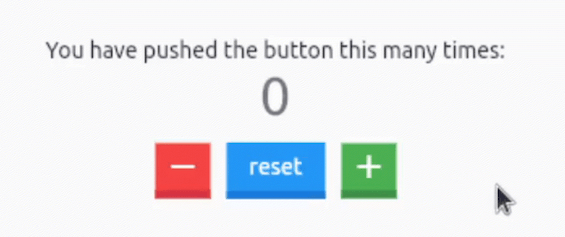
https://github.com/rijfas/flat_3d_button/raw/main/images/flat_3d_button_counter.GIF
  Flat3dButton.icon(
    color: Colors.red,
    onPressed: _decrementCounter,
    icon: Icons.remove,
  ),
  const SizedBox(width: 10),
  Flat3dButton.text(
    onPressed: _resetCounter,
    text: 'reset',
  ),
  const SizedBox(width: 10),
  Flat3dButton.icon(
    color: Colors.green,
    onPressed: _incrementCounter,
    icon: Icons.add,
  ),
refer to the main.dart in the example for complete source code.
https://github.com/rijfas/flat_3d_button/raw/main/images/flat_3d_button_text.GIF
Flat3dButton.text(
  onPressed: () => print('clicked'),
  text: 'Flat',
);
https://github.com/rijfas/flat_3d_button/raw/main/images/flat_3d_button_icon.GIF
Flat3dButton.icon(
  onPressed: () => print('clicked'),
  icon: Icons.rocket,
);
https://avatars.githubusercontent.com/u/67458012?s=40&v=4
MIT License