
 v3.0.3
firebase_notifications_handler
간편한 사용을 위한 Firebase 알림 핸들러로 내장된 로컬 알림 지원 기능을 통해 추가 설정 없이 앱이 프론트엔드에서 알림을 표시할 수 있습니다.
50좋아요 27230일 다운로드160Pub 점수
AndroidiOSmacOS
Firebase 알림을 위한 사용하기 쉬운 알림 핸들러로, 로컬 알림을 내장된 지원 기능으로 제공하여 앱이 포그라운드에 있을 때도 추가 설정 없이 알림을 표시할 수 있습니다.

{"sdk":"flutter"}^1.6.0^1.9.1^0.11.1^2.1.6^16.4.3^22.2.0^6.0.0아래는 영문 원문 스냅샷입니다. 최신 내용은 GitHub에서 확인하세요.
pub package downloads likes pub points license MIT
FirebaseNotificationsHandler is a simple and easy-to-use notifications handler for Firebase Notifications. It includes built-in support for local notifications, allowing your app to display notifications even when it's in the foreground with no extra setup. With customization options available, you can manage notification behavior seamlessly.
The package uses a widget-based approach, and exposes a widget to handle the notifications. This makes it feel like home for Flutter developers, as it integrates seamlessly with Flutter’s UI-driven architecture. With easy-to-use callbacks such as onTap, you can effortlessly manage and respond to notification taps and customize the notification behavior, providing a smooth integration process for any Flutter project.
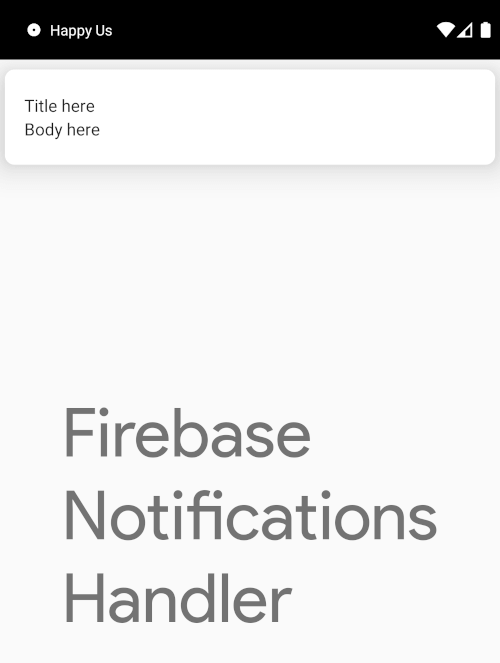
| App In Foreground | App In Background | Expanded Notification |
|---|---|---|
| https://github.com/rithik-dev/firebase_notifications_handler/raw/master/screenshots/unpublished/foreground.webp | https://github.com/rithik-dev/firebase_notifications_handler/raw/master/screenshots/unpublished/background.webp | https://github.com/rithik-dev/firebase_notifications_handler/raw/master/screenshots/published/notification.webp |
onTap), when a notification arrives when app open (onOpenNotificationArrive), etc., making the widget simple to use.notificationTapsSubscription, notificationArrivesSubscription allowing listening to important notification events and managing them easily with the provided NotificationInfo objects.minSdk must be at least 24.flutter_local_notifications 22 requires the consuming app to enable desugaring and compile against Java 17. Without it the build fails with Dependency ':flutter_local_notifications' requires core library desugaring to be enabled. See Platform-Specific Setup → Android for the exact configuration.
sendLocalNotification no longer takes uiLocalNotificationDateInterpretationUILocalNotificationDateInterpretation was removed upstream in flutter_local_notifications v22, so the parameter is gone. Remove the argument from your calls — there is no replacement:
await FirebaseNotificationsHandler.sendLocalNotification(
  id,
  notificationDetails: details,
  scheduledDateTime: when,
  androidScheduleMode: AndroidScheduleMode.exactAllowWhileIdle,
  // uiLocalNotificationDateInterpretation: ...,  <-- delete this line
);
This package re-exports firebase_messaging and flutter_local_notifications, so their breaking changes reach your code directly. firebase_messaging moved 15 → 16 and flutter_local_notifications 18 → 22; most notably the latter moved show, zonedSchedule and initialize to named parameters.
Messages sent with title_loc_key / body_loc_key carry no title or body, so they previously rendered blank. Provide titleGetter / bodyGetter in LocalNotificationsConfiguration to resolve them against your app's own localizations.
For more details, refer to the CHANGELOG.
Several parameters and callbacks were renamed for clarity and consistency:
NotificationTapDetails is now NotificationInfo.onFCMTokenInitialize is now onFcmTokenInitialize.onFCMTokenUpdate is now onFcmTokenUpdate.initializeFCMToken is now initializeFcmToken.requestPermissionsOnInit is now requestPermissionsOnInitialize.AppState.closed is now AppState.terminated.navigatorKey parameter is no longer available in onTap and onOpenNotificationArrive. You’ll need to manage your own navigator key in your app. See the example app for more details on handling navigation.onFcmTokenInitialize and onFcmTokenUpdate no longer accept context. Ensure that any context-dependent logic is refactored.NotificationTapDetails has been renamed to NotificationInfo. This class now includes the firebaseMessage parameter, providing more comprehensive information.onTap and onOpenNotificationArrive now return a NotificationInfo object, replacing the previous payload. The payload can still be accessed using the payload property of NotificationInfo.notificationArrivesSubscription stream now returns NotificationInfo instead of just the payload.The configuration of local notifications has been refactored to use platform-specific getters in LocalNotificationsConfiguration:
channelId, channelName, and sound have been moved to localNotificationsConfiguration.androidConfig.sound have been moved to localNotificationsConfiguration.iosConfig.notificationIdGetter function is now also part of the LocalNotificationsConfiguration.onFCMTokenRefresh has been removed. Use onFcmTokenUpdate instead to handle token updates.sendFcmNotification has been deprecated for sending notifications from the client side. You'll now need to send notifications using Firebase Cloud Messaging (FCM) server-side APIs.sendLocalNotification function is introduced, which allows sending or scheduling local notifications.notificationTapsSubscription and notificationArrivesSubscription are available for handling notification taps and arrivals.permissionGetter, shouldHandleNotification, messageModifier, and stateKeyGetter are introduced for finer control over the notification lifecycle.getInitialMessage callback added for retrieving the initial notification that launched the app.For more details, refer to the CHANGELOG.
Create a Firebase project. Learn more about Firebase projects here.
Add your Android & iOS apps to your Firebase project and configure the Firebase the apps by following the setup instructions for Android and iOS separately.
Add firebase_core as a dependency in your pubspec.yaml file.
dependencies:
  flutter:
    sdk: flutter

  firebase_core:
Call Firebase.initializeApp() in the main() method as shown to intialize Firebase in your project.
import 'package:firebase_core/firebase_core.dart';

void main() async {
  WidgetsFlutterBinding.ensureInitialized();
  await Firebase.initializeApp(options: DefaultFirebaseOptions.currentPlatform);
  runApp(MyApp());
}
[!IMPORTANT]
flutter_local_notificationsrequires core library desugaring. Without it the build fails withDependency ':flutter_local_notifications' requires core library desugaring to be enabled. This applies even if you never schedule notifications. AndroidminSdkmust also be at least 24.
android/app/build.gradle:android {
compileOptions {
coreLibraryDesugaringEnabled = true
sourceCompatibility = JavaVersion.VERSION_17
targetCompatibility = JavaVersion.VERSION_17
}
kotlinOptions {
jvmTarget = JavaVersion.VERSION_17
}
}
dependencies {
coreLibraryDesugaring("com.android.tools:desugar_jdk_libs:2.1.4")
}
[!NOTE] For the current
desugar_jdk_libsversion and the rest of the platform specific setup for local notifications, refer here
AndroidManifest.xml under the <application> tag:<!-- Can add a default notification channel (if not sending a channel id when sending notification) -->
<!-- If you don't specify a default channel id, and don't pass an id when sending notification, Android creates a default channel "Miscellaneous" -->
<meta-data
android:name="com.google.firebase.messaging.default_notification_channel_id"
android:value="default" />
<!-- Use the following tags if you need to different icons or color for app icon -->
<!-- <meta-data
android:name="com.google.firebase.messaging.default_notification_icon"
android:resource="@drawable/notification_icon" />
<meta-data
android:name="com.google.firebase.messaging.default_notification_color"
android:resource="@color/notification_color" /> -->
<intent-filter> in the <activity> tag:<intent-filter>
<action android:name="FLUTTER_NOTIFICATION_CLICK" />
<category android:name="android.intent.category.DEFAULT" />
</intent-filter>
[!NOTE] Refer to the platform specific setup for local notifications here
Provide the vapidKey in FirebaseNotificationsHandler from the cloud messaging settings by generating a new Web push certificate.
Add this script tag in index.html after adding the firebase config script
<script>
if ("serviceWorker" in navigator) {
  window.addEventListener("load", function () {
    // navigator.serviceWorker.register("/flutter_service_worker.js");
    navigator.serviceWorker.register("/firebase-messaging-sw.js");
  });
}
</script>
firebase-messaging-sw.js in the web folder itself and paste the following contents. Add your own firebase app config here.importScripts("https://www.gstatic.com/firebasejs/7.15.5/firebase-app.js");
importScripts("https://www.gstatic.com/firebasejs/7.15.5/firebase-messaging.js");
firebase.initializeApp(
// YOUR FIREBASE CONFIG MAP HERE
);
const messaging = firebase.messaging();
messaging.setBackgroundMessageHandler(function (payload) {
const promiseChain = clients
.matchAll({
type: "window",
includeUncontrolled: true
})
.then(windowClients => {
for (let i = 0; i < windowClients.length; i++) {
const windowClient = windowClients[i];
windowClient.postMessage(payload);
}
})
.then(() => {
return registration.showNotification("New Message");
});
return promiseChain;
});
self.addEventListener('notificationclick', function (event) {
console.log('notification received: ', event)
});
firebase_notifications_handler as a dependency in your pubspec.yaml file.dependencies:
flutter:
sdk: flutter
firebase_notifications_handler:
FirebaseNotificationsHandler widget ideally as a parent widget on the MaterialApp to enable your application to receive notifications.import 'package:firebase_notifications_handler/firebase_notifications_handler.dart';
class MyApp extends StatelessWidget {
@override
Widget build(BuildContext context) {
return FirebaseNotificationsHandler(
child: MaterialApp(),
);
}
}
Although, the widget automatically initializes the FCM token, but if the FCM token is needed before the widget is built, use the FirebaseNotificationsHandler.initializeFcmToken() function to initialize the token, which will initialize and return initialized token. This will also trigger the onFCMTokenInitialize callback.
FirebaseNotificationsHandler(
  localNotificationsConfiguration: LocalNotificationsConfiguration(
    androidConfig: AndroidNotificationsConfig(
      // ...
    ),
    iosConfig: IosNotificationsConfig(
      // ...
    ),
  ),
  onOpenNotificationArrive: (info) {
    log(
      id,
      msg: 'Notification received while app is open with payload ${info.payload}',
    );
  },
  onTap: (info) {
    final payload = info.payload;
    final appState = info.appState;
    final firebaseMessage = info.firebaseMessage;

    // If you want to push a screen on notification tap
    //
    // Globals.navigatorKey.currentState?.pushNamed(payload['screenId']);
    //
    // OR
    ///
    // Get current context
    // final context = Globals.navigatorKey.currentContext!;

    log(
      id,
      msg: 'Notification tapped with $appState & payload $payload. Firebase message: $firebaseMessage',
    );
  },
  onFcmTokenInitialize: (token) => Globals.fcmTokenNotifier.value = token,
  onFcmTokenUpdate: (token) => Globals.fcmTokenNotifier.value = token,
  // ...
);
By default, if you send a notification, the device will automatically create a notification channel with the passed channelId, but the priority for that channel will be normal, and the notification will not show up as a popup.
Creating a default channel lets you set the priorty to high and also give you more customization of the channels like setting a custom notification sound, setting vibration patterns etc.
FirebaseNotificationsHandler.createAndroidNotificationChannel(
  const AndroidNotificationChannel(
    'marketing',
    'Marketing',
    description: 'Notification channel for marketing',
    playSound: true,
    importance: Importance.max,
    sound: RawResourceAndroidNotificationSound('marketing'),
  ),
);
It is recommended to create notification channels as soon as the app starts, as the custom sounds will not play if the channel is not created for the first time, and it might cause issues with other parameters as well.
FirebaseNotificationsHandler.createAndroidNotificationChannels([
  const AndroidNotificationChannel(
    'promotions',
    'Promotions',
    description: 'Notification channel for promotions',
    playSound: true,
    importance: Importance.max,
    sound: RawResourceAndroidNotificationSound('chime'),
  ),
  const AndroidNotificationChannel(
    'order-updates',
    'Order Updates',
    description: 'Notification channel for order updates',
    playSound: true,
    importance: Importance.max,
    sound: RawResourceAndroidNotificationSound('elevator'),
  ),
  const AndroidNotificationChannel(
    'messages',
    'Messages',
    description: 'Notification channel for messages',
    playSound: true,
    importance: Importance.max,
    sound: RawResourceAndroidNotificationSound('bell'),
  ),
]);
[!IMPORTANT] Add a keep.xml file in the
android/app/src/main/res/raw/folder, as flutter strips off therawfolder when compiling app in release mode, and hence the custom sounds won't work in release mode.
android/app/src/main/res/raw/ folder.ios/Runner/Resources/ folder.On Android devices, a notification channel by default when a notification arrives, but that might not have the priority set to high. The notification only shows up as a popup if the channel you're sending it to has priority set as "high". We can solve this issue by creating a notification channel on app start using:
FirebaseNotificationsHandler.createAndroidNotificationChannel(
  const AndroidNotificationChannel(
    'default',
    'Default',
    importance: Importance.high,
  ),
);
On Android devices, a notification channel by default when a notification arrives, but that won't have the sound set to it by default. The sound will only play if the channel was creating while specifying the custom sound you want to play for that channel.
[!NOTE] You cannot modify a channel's sound after it's created. Only way is to either use a new channel id or delete an existing channel using
FirebaseNotificationsHandler.deleteAndroidNotificationChannel(String channelId);and creating a new one with the new sound. Or try uninstalling the app and creating the channel again.
We can solve this issue by creating a notification channel on app start and passing in the sound using:
FirebaseNotificationsHandler.createAndroidNotificationChannel(
  const AndroidNotificationChannel(
    'default',
    'Default',
    playSound: true,
    importance: Importance.high,
    sound: RawResourceAndroidNotificationSound('pop'),
  ),
);
The max size for a notification to be displayed by firebase on an Android device is 1MB (Source). So, if an image exceeds this size, it is not shown in the notification. However, if the app is in foreground, then there is no size limitation as then it's handled by local notifications.
Flutter strips off the raw folder during compiling build for release mode. We can add a file keep.xml in the raw folder, which tells flutter to not strip off the raw folder, and hence fixing the issue.
See the example app for a complete app. Learn how to setup the example app for testing here.
Check out the full API reference of the widget here.
import 'package:firebase_core/firebase_core.dart';
import 'package:firebase_notifications_handler/firebase_notifications_handler.dart';
import 'package:flutter/material.dart';
import 'package:notifications_handler_demo/firebase_options.dart';
import 'package:notifications_handler_demo/screens/splash_screen.dart';
import 'package:notifications_handler_demo/utils/app_theme.dart';
import 'package:notifications_handler_demo/utils/globals.dart';
import 'package:notifications_handler_demo/utils/helpers.dart';
import 'package:notifications_handler_demo/utils/route_generator.dart';

void main() async {
  WidgetsFlutterBinding.ensureInitialized();
  await Firebase.initializeApp(options: DefaultFirebaseOptions.currentPlatform);
  runApp(const _MainApp());
}

class _MainApp extends StatelessWidget {
  static const id = '_MainApp';

  const _MainApp();

  @override
  Widget build(BuildContext context) {
    return FirebaseNotificationsHandler(
      localNotificationsConfiguration: LocalNotificationsConfiguration(
        androidConfig: AndroidNotificationsConfig(
            // ...
        ),
        iosConfig: IosNotificationsConfig(
            // ...
        ),
      ),
      shouldHandleNotification: (msg) {
        // add some logic and return bool on whether to handle a notif or not
        return true;
      },
      onOpenNotificationArrive: (info) {
        log(
          id,
          msg: 'Notification received while app is open with payload ${info.payload}',
        );
      },
      onTap: (info) {
        final payload = info.payload;
        final appState = info.appState;
        final firebaseMessage = info.firebaseMessage;

        /// If you want to push a screen on notification tap
        ///
        // Globals.navigatorKey.currentState?.pushNamed(
        //   payload['screenId'],
        // );
        ///
        /// or
        ///
        /// Get current context
        // final context = Globals.navigatorKey.currentContext!;

        log(
          id,
          msg: 'Notification tapped with $appState & payload $payload. Firebase message: $firebaseMessage',
        );
      },
      onFcmTokenInitialize: (token) => Globals.fcmTokenNotifier.value = token,
      onFcmTokenUpdate: (token) => Globals.fcmTokenNotifier.value = token,
      child: MaterialApp(
        debugShowCheckedModeBanner: false,
        title: 'FirebaseNotificationsHandler Demo',
        navigatorKey: Globals.navigatorKey,
        scaffoldMessengerKey: Globals.scaffoldMessengerKey,
        theme: AppTheme.lightTheme,
        darkTheme: AppTheme.darkTheme,
        onGenerateRoute: RouteGenerator.generateRoute,
        initialRoute: SplashScreen.id,
      ),
    );
  }
}
Built and maintained by Rithik Bhandari, a mobile developer building cross-platform apps with Flutter.