
 v1.2.0
ensure_visible_when_focused
이 위젯이 포커스를 얻을 때마다 특정 위젯으로 스크롤하는 편리한 Flutter 위젯입니다.
53좋아요 1만30일 다운로드160Pub 점수
AndroidiOSWebmacOSWindowsLinux
rodrigobastosv/ensure_visible_when_focused open-source repository details.

{"sdk":"flutter"}{"sdk":"flutter"}아래는 영문 원문 스냅샷입니다. 최신 내용은 GitHub에서 확인하세요.
I was having a hard time scrolling to a specific wdget in a scenario where I had a very large form, with lots of form fields.
I found an issue with no concrete answer https://github.com/flutter/flutter/issues/58877
After digging a litlle deeper I found a solution to this problem https://www.didierboelens.com/2018/04/hint-4 -ensure-a-textfield-or-textformfield-is-visible-in-the-viewport-when-has-the-focus/. Hence the idea of creating and making this widget available.
This widget solves this problem in a very elegant way. You just have to give the same FocusNode of the widget you want to scroll to.
The widget is very simple to use. You need to Wrap your widget on a EnsureVisibleWhenFocused widget. You have to pass the FocusNode of the widget you want to scroll to when it's given focus.
EnsureVisibleWhenFocused(
    focusNode: _focusNode,
    child: TextFormField(
        focusNode: _focusNode,
    ),
)
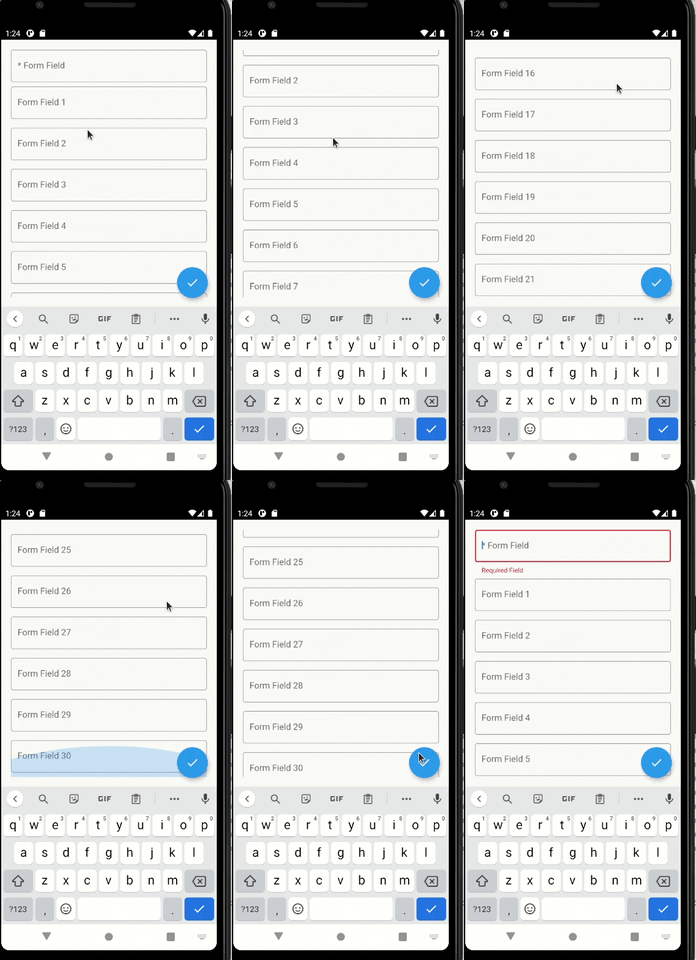
With the setup above, every time the TextFormField gains focus, a scroll will be made to it.
You can give focus to a field just doing:
_focusNode.requestFocus();
You can configure more things, such as the scroll duration and it's curve.
enter image description here
For any suggestions or bug report please head to issue tracker.