
 v0.0.2
widget_marker_google_map
위젯 마커를 사용한 맞춤형 구글 지도. 위젯 코드로 마커를 표시할 수 있습니다.
23좋아요 6730일 다운로드140Pub 점수
AndroidiOSWeb
위젯 마커가 있는 사용자 정의 구글 지도.

{"sdk":"flutter"}^2.1.0^2.1.3{"sdk":"flutter"}^1.0.0아래는 영문 원문 스냅샷입니다. 최신 내용은 GitHub에서 확인하세요.
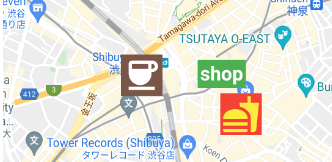
Google map with widget markers.
https://user-images.githubusercontent.com/43510799/142984717-853a7686-503e-4e2c-b090-9767e25fb8d3.pngFollow the steps on google_maps_flutter document.
Same as google_maps_flutter except for widgetMarkers.
 WidgetMarkerGoogleMap(
    initialCameraPosition: shibuya,
    mapType: MapType.normal,
    widgetMarkers: [
      WidgetMarker(
        position: cafePosition,
        markerId: 'cafe',
        widget: Container(
          color: Colors.brown,
          padding: const EdgeInsets.all(2),
          child: const Icon(
            Icons.coffee,
            color: Colors.white,
            size: 64,
          ),
        ),
      ),
      WidgetMarker(
        position: clothesShopPosition,
        markerId: 'clothes',
        widget: Container(
          color: Colors.green,
          padding: const EdgeInsets.all(4),
          child: const Text(
            'shop',
            style: TextStyle(
              color: Colors.white,
              fontWeight: FontWeight.bold,
              fontSize: 32,
            ),
          ),
        ),
      ),
      WidgetMarker(
        position: hamburgerShopPosition,
        markerId: 'hamburger',
        widget: Container(
          color: Colors.red,
          padding: const EdgeInsets.all(2),
          child: const Icon(
            Icons.fastfood,
            color: Colors.yellow,
            size: 64,
          ),
        ),
      ),
    ],
  ),
You need to insert the list of WidgetMarker to use widget markers.
Make sure that you still need to use onTap method when you use gestures.
class WidgetMarker {
  WidgetMarker({
    required this.position,
    required this.markerId,
    required this.widget,
    this.onTap,
  }) : assert(markerId.isNotEmpty);

  final LatLng position;

  /// Keep this unique, otherwise it will not appear.
  final String markerId;

  /// Gestures of widget is disabled.
  /// Use this callback instead.
  final VoidCallback? onTap;

  final Widget widget;
}
If you have any requests or questions, feel free to ask on github.
Thanks goes to these wonderful people (emoji key):
| Devin Devin 💻 |
Santa Takahashi Santa Takahashi 💻 |
This project follows the all-contributors specification. Contributions of any kind welcome!