

v1.0.7
loadmore_listview
더 많은 항목을 로드하고 새로 고침 기능이 있는 사용하기 쉬운 ListView 제공
25좋아요 1.5천30일 다운로드140Pub 점수
AndroidiOSmacOSWindowsLinux
더 많은 항목 로드 및 새로 고침 기능이 있는 Listview

아래는 영문 원문 스냅샷입니다. 최신 내용은 GitHub에서 확인하세요.
An Widget with the Load more item and refresh
Base on ListView and CustomScrollListview
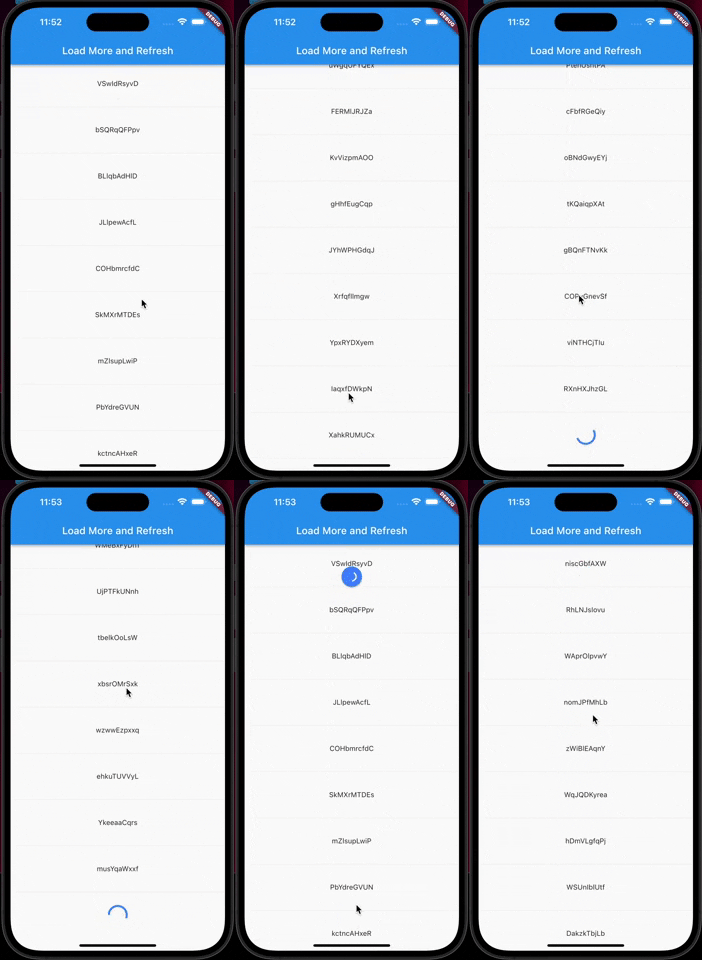
In the pubspec.yaml of your flutter project, add the following dependency:
dependencies:
  ...
  loadmore_listview: ^1.0.7
Import it:
import 'package:loadmore_listview/loadmore_listview.dart';
LoadMoreListView.builder(
    //is there more data to load
    haveMoreItem: true,
    //Trigger the bottom loadMore callback
    onLoadMore: () async{
      //wait for your api to fetch more items
      await Future.delayed(const Duration(seconds: 1));
    },
    //pull down refresh callback
    onRefresh: () async{
      //wait for your api to update the list
      await Future.delayed(const Duration(seconds: 1));
    },
    //you can set your loadMore Animation
    loadMoreWidget: Container(
        margin: const EdgeInsets.all(20.0),
        alignment: Alignment.center,
        child: const CircularProgressIndicator(
          valueColor: AlwaysStoppedAnimation(Colors.blueAccent),
        ),
    ),
    //ListView
    itemCount: 20,
    itemBuilder: (context, index) {
        return Container(
            margin: const EdgeInsets.all(30),
            width: double.infinity,
            alignment: Alignment.center,
            child: Text('$index'),
        );
    },
);
LoadMoreListView.separated(
    //...
    separatorBuilder: (context, index) {
      return const Divider();
    },
);
LoadMoreListView.customScrollView(
    //...
    slivers: [
        SliverList(
            delegate: SliverChildBuilderDelegate(
              (context, index) {
                return Container(
                  margin: const EdgeInsets.all(30),
                  width: double.infinity,
                  alignment: Alignment.center,
                  child: Text(list[index]),
                );
              },
              childCount: list.length,
            ),
        ),
    ],
);
의존성 목록 2 개
{"sdk":"flutter"}{"sdk":"flutter"}사용 목적에 따라 검색하고 개발 활동을 비교한 뒤 원본 저장소에서 요구 사항을 확인하세요.
“A repository is the most basic element of GitHub.”
GitHub Docs — About repositories ↗