
newsbuzz
실시간 데이터를 가져오기 위해 News API를 사용하고, Firebase를 백엔드 및 인증자로 사용하여 Flutter로 만든 뉴스 앱.
- 스타
- 597
- 포크
- 190
- 최근 푸시(UTC)
- 2018. 10. 27.
- 프로젝트 상태
- 활성
원본 README
아래는 영문 원문 스냅샷입니다. 최신 내용은 GitHub에서 확인하세요.
News Buzz
News App created in Flutter using News API for fetching realtime data and Firebase as the backend and authenticator.
Features
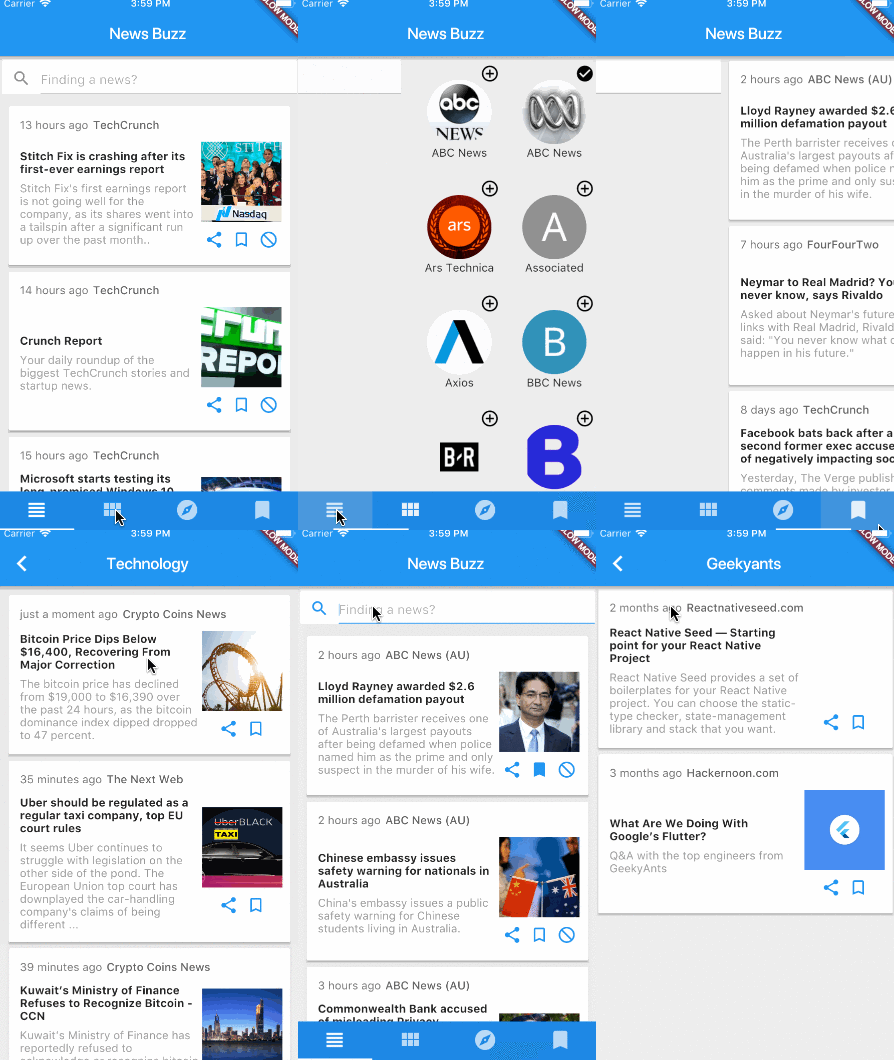
- Custom news feed based on selected sources
- Saving articles
- Explore news based on categories
- Search for topics
- Sharing articles
Preview
Dependencies
Getting Started
1. Setup Flutter
2. Clone the repo
$ git clone https://github.com/theankurkedia/newsbuzz.git
$ cd newsbuzz/
3. Setup firebase app
- You'll need to create a Firebase instance. Follow the instructions at https://console.firebase.google.com.
- Once your Firebase instance is created, you'll need to enable anonymous authentication.
- Go to the Firebase Console for your new instance.
- Click "Authentication" in the left-hand menu
- Click the "sign-in method" tab
- Click "Google" and enable it
- (skip if not running on Android)
- Create an app within your Firebase instance for Android, with package name com.yourcompany.news
- Run the following command to get your SHA-1 key:
keytool -exportcert -list -v \
-alias androiddebugkey -keystore ~/.android/debug.keystore
- In the Firebase console, in the settings of your Android app, add your SHA-1 key by clicking "Add Fingerprint".
- Follow instructions to download google-services.json
- place
google-services.jsonintonewsbuzz/android/app/.
- (skip if not running on iOS)
- Create an app within your Firebase instance for iOS, with package name com.yourcompany.news
- Follow instructions to download GoogleService-Info.plist, and place it into newsbuzz/ios/Runner in XCode
- Open newsbuzz/ios/Runner/Info.plist. Locate the CFBundleURLSchemes key. The second item in the array value of this key is specific to the Firebase instance. Replace it with the value for REVERSED_CLIENT_ID from GoogleService-Info.plist
4. Run the app
$ flutter run
License
Licensed under the MIT license.

GitHub 작성자
Ankur Kedia ↗
언어DartRubyObjective-CJava
분류
사용 중인 의존성
의존성 목록 11 개
- flutter
{"sdk":"flutter"} - flutter_test개발 의존성
{"sdk":"flutter"} - share개발 의존성
^0.2.1 - flutter_webview_plugin개발 의존성
^0.0.9+1 - google_sign_in개발 의존성
0.3.1 - firebase_analytics개발 의존성
0.0.4 - firebase_auth개발 의존성
0.2.0 - firebase_database개발 의존성
0.0.12 - firebase_storage개발 의존성
0.0.5 - timeago개발 의존성
^1.2.0 - cupertino_icons개발 의존성
^0.1.0
순위
프로젝트에 맞는 저장소를 선택하려면?
사용 목적에 따라 검색하고 개발 활동을 비교한 뒤 원본 저장소에서 요구 사항을 확인하세요.
- 이름, 작성자 또는 설명으로 검색하고 기술 주제로 범위를 좁힙니다.
- 스타, 포크, 최근 푸시를 함께 비교하세요. 스타는 관심의 지표이며 품질을 보장하지 않습니다.
- 사용하기 전에 GitHub에서 README, 라이선스, Issues를 확인하세요.
출처 및 관리
“A repository is the most basic element of GitHub.”
GitHub Docs — About repositories ↗