
 v1.1.1
rich_readmore
제공된 설정에 따라 더 보기 또는 덜 보기 옵션을 제공하는 텍스트를 표시하는 위젯입니다.
45좋아요 1.7천30일 다운로드160Pub 점수
AndroidiOSWebmacOSWindowsLinux
동적으로 풍부한 텍스트를 확장하고 축소할 수 있는 Flutter 플러그인

{"sdk":"flutter"}{"sdk":"flutter"}아래는 영문 원문 스냅샷입니다. 최신 내용은 GitHub에서 확인하세요.
rich_readmore workflow codecov MIT License
A widget that displays text with an option to show more or show less based on the provided settings.
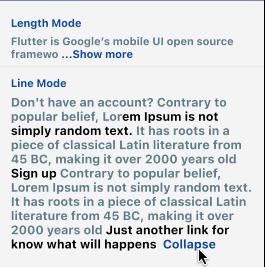
The RichReadMoreText widget allows you to trim text either based on the character length or the number of lines.
When the text is longer than the specified trim length or exceeds the maximum number of lines, it provides a toggle option to show more or show less of the text.
It has two options for settings, the LineModeSettings or LengthModeSettings for trimming using the behavior that you want.
If you want to pass a string directly instead of a TextSpan, you can just be using the the RichReadMoreText.fromString(...). There are some examples for that below.
https://raw.githubusercontent.com/thierryoliveira/rich_readmore/HEAD/read-more-text-view-flutter.gif
import:
import 'package:rich_readmore/rich_readmore.dart';
For TextSpan data:
 RichReadMoreText(
   textSpan,
   settings: LineModeSettings(
     trimLines: 3,
     trimCollapsedText: 'Expand',
     trimExpandedText: ' Collapse ',
     onPressReadMore: () {
       /// specific method to be called on press to show more
     },
     onPressReadLess: () {
       /// specific method to be called on press to show less
     },
   ),
 ),
Or for String data:
 RichReadMoreText.fromString(
   text: 'Lorem ipsum dolor sit amet, consectetur adipiscing elit.',
   textStyle: TextStyle(color: Colors.purpleAccent),
   settings: LengthModeSettings(
     trimLength: 20,
     trimCollapsedText: 'Expand',
     trimExpandedText: ' Collapse ',
     onPressReadMore: () {
       /// specific method to be called on press to show more
     },
     onPressReadLess: () {
       /// specific method to be called on press to show less
     },
     lessStyle: TextStyle(color: Colors.blue),
     moreStyle: TextStyle(color: Colors.blue),
   ),
 ),