
 v2.0.0
prompts
Dart용 풍부하고 간단한 동기 커맨드라인 프롬프트 라이브러리입니다.
29좋아요 106만30일 다운로드140Pub 점수
AndroidiOSmacOSWindowsLinux
Dart용 풍부하고 간단한 동기 커맨드라인 프롬프트 라이브러리입니다.

아래는 영문 원문 스냅샷입니다. 최신 내용은 GitHub에서 확인하세요.
Rich, simple, synchronous command-line prompt library for Dart.
Now with pretty colors!
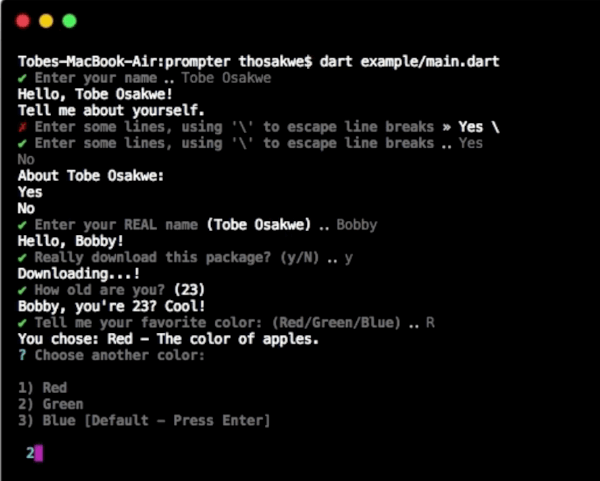
GIF Demo
import 'package:io/ansi.dart';
import 'package:prompts/prompts.dart' as prompts;

void main() {
  // Easily get a single line.
  var name = prompts.get('Enter your name');
  print('Hello, $name!');

  // ... Or many lines.
  print('Tell me about yourself.');
  var bio = prompts.get(
    "Enter some lines, using '\\' to escape line breaks",
    allowMultiline: true,
    inputColor: resetAll,
  );
  print('About $name:\n$bio');

  // Supports default values.
  name = prompts.get('Enter your REAL name', defaultsTo: name);
  print('Hello, $name!');

  // "High-level" prompts are built upon [get].
  // For example, we can prompt for confirmation trivially.
  bool shouldDownload = prompts.getBool('Really download this package?');

  if (!shouldDownload)
    print('Not downloading.');
  else
    print('Downloading...!');

  // Or, get an integer, WITH validation.
  int age = prompts.getInt('How old are you?', defaultsTo: 23, chevron: false);
  print('$name, you\'re $age? Cool!');

  // We can choose from various values.
  // There are two methods - shorthand and regular.
  var rgb = [Color.red, Color.green, Color.blue];
  Color color = prompts.chooseShorthand('Tell me your favorite color', rgb);
  print('You chose: ${color.about}');

  // The standard chooser prints to multiple lines, but is often
  // clearer to read, and has more obvious semantics.
  color = prompts.choose('Choose another color', rgb, defaultsTo: Color.blue);
  print(color.about);
}

class Color {
  final String name, description;

  const Color(this.name, this.description);

  static const Color red = const Color('Red', 'The color of apples.'),
      blue = const Color('Blue', 'The color of the sky.'),
      green = const Color('Green', 'The color of leaves.');

  String get about => '$name - $description';

  @override
  String toString() => name;
}