
 v3.2.0
intl_phone_field
국제 전화 번호와 국가 코드를 함께 입력할 수 있도록 사용자 지정된 Flutter TextFormField입니다.
782좋아요 11.8만30일 다운로드145Pub 점수
AndroidiOSWebmacOSWindowsLinux
국제 전화 번호와 국가 코드를 함께 입력할 수 있도록 사용자 지정된 Flutter TextFormField입니다.

{"sdk":"flutter"}^2.0.1{"sdk":"flutter"}^1.17.12아래는 영문 원문 스냅샷입니다. 최신 내용은 GitHub에서 확인하세요.
A customised Flutter TextFormField to input international phone number along with country code.
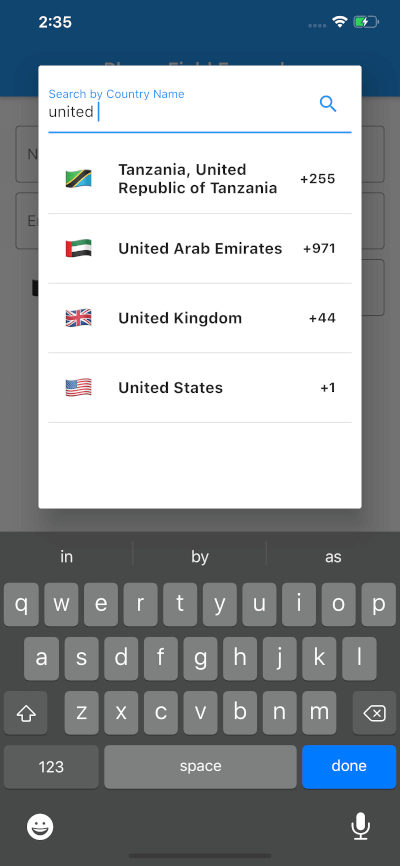
This widget can be used to make customised text field to take phone number input for any country along with an option to choose country code from a dropdown.
As of June 2021, I, @marcaureln, have been maintaining this Flutter package initially created by @vanshg395. Regrettably, Vansh has been unresponsive, and I am unable to release new versions (the last release is 6 months old as of writing).
Considering this, I recommend users to explore alternatives on pub.dev or, if interested, fork this repository for continued support. Life can be hectic, and I wish Vansh is doing well.
Thank you for your understanding and continued support.
https://github.com/vanshg395/intl_phone_field/blob/master/1.png?raw=true https://github.com/vanshg395/intl_phone_field/blob/master/2.png?raw=true https://github.com/vanshg395/intl_phone_field/blob/master/3.png?raw=true
To use this package:
Run this command:
flutter pub add intl_phone_field
Or, add the following to your pubspec.yaml file:
dependencies:
  intl_phone_field: ^<latest_version>
Sometimes you may want to use the latest version of the package, instead of a published version. To do that, use the git syntax:
dependencies:
  intl_phone_field:
    git:
      url: git://github.com/vanshg395/intl_phone_field.git
      ref: master
Simply create a IntlPhoneField widget, and pass the required params:
IntlPhoneField(
    decoration: InputDecoration(
        labelText: 'Phone Number',
        border: OutlineInputBorder(
            borderSide: BorderSide(),
        ),
    ),
    initialCountryCode: 'IN',
    onChanged: (phone) {
        print(phone.completeNumber);
    },
)
Use initialCountryCode to set an initial Country Code.
Pull requests are welcome. For major changes, please open an issue first to discuss what you would like to change.
Please make sure to update tests as appropriate.
Comment on Issue or Pull Request, asking @all-contributors to add a contributor:
@all-contributors please add @<username> for <contributions>
<contributions>: See the Emoji Key (Contribution Types Reference) for a list of valid contribution types.
This project is licensed under the MIT license. See LICENSE for more information.