
 v2.0.0
flutter_update_dialog
flutter용 아름다운 애플리케이션 버전 업데이트 대화상자입니다. 자신만의 버전 업데이트 팝업 창을 사용자 정의할 수 있습니다!
58좋아요 22730일 다운로드150Pub 점수
AndroidiOSWebmacOSWindowsLinux
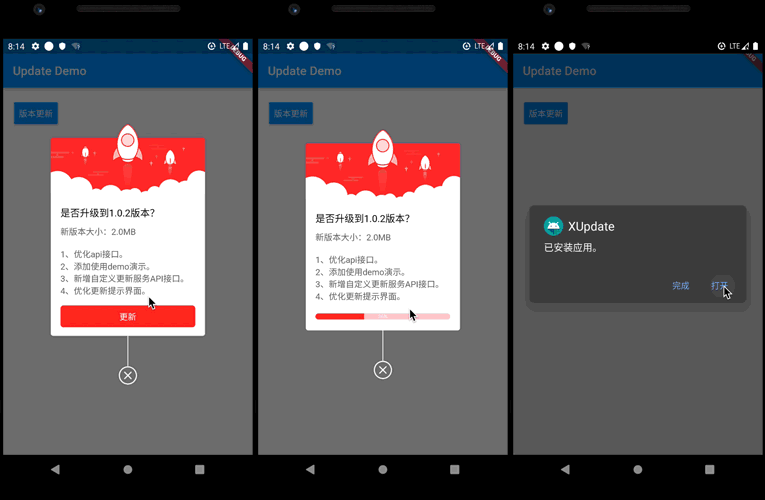
응용 프로그램 버전 업데이트 대화 상자.

{"sdk":"flutter"}{"sdk":"flutter"}아래는 영문 원문 스냅샷입니다. 최신 내용은 GitHub에서 확인하세요.
Version Build Status Issue Star
Application version update dialog. With it, you can customize the logic of version update.
You can refer to the following project:
https://github.com/xuexiangjys/flutter_app_update_example
You should ensure that you add the flutter_update_dialog as a dependency in your flutter project.
// pub 集成
dependencies:
  flutter_update_dialog: ^2.0.0

//github  集成
dependencies:
  flutter_update_dialog:
    git:
      url: git://github.com/xuexiangjys/flutter_update_dialog.git
      ref: master
  void defaultStyle() {
    if (dialog != null && dialog.isShowing()) {
      return;
    }
    dialog = UpdateDialog.showUpdate(context,
        title: "是否升级到4.1.4版本?",
        updateContent: "新版本大小:2.0M\n1.xxxxxxx\n2.xxxxxxx\n3.xxxxxxx",
        onUpdate: onUpdate);
  }
  void customStyle() {
    if (dialog != null && dialog.isShowing()) {
      return;
    }
    dialog = UpdateDialog.showUpdate(context,
        width: 250,
        title: "是否升级到4.1.4版本?",
        updateContent: "新版本大小:2.0M\n1.xxxxxxx\n2.xxxxxxx\n3.xxxxxxx",
        titleTextSize: 14,
        contentTextSize: 12,
        buttonTextSize: 12,
        topImage: Image.asset('assets/bg_update_top.png'),
        extraHeight: 5,
        radius: 8,
        themeColor: Color(0xFFFFAC5D),
        progressBackgroundColor: Color(0x5AFFAC5D),
        isForce: true,
        updateButtonTxt: '升级',
        ignoreButtonTxt: '忽略此版本',
        enableIgnore: true, onIgnore: () {
          ToastUtils.waring("忽略");
          dialog.dismiss();
        },
        onUpdate: onUpdate);
  }
| Name | Type | Default | Description |
|---|---|---|---|
| width | double | 0.618 * screenWidth | dialog width |
| title | String | / | dialog title |
| updateContent | String | / | Update the modified content |
| onUpdate | VoidCallback | / | Click on the update button event |
| titleTextSize | double | 16.0 | The size of the title text |
| contentTextSize | double | 14.0 | The size of the update content text |
| buttonTextSize | double | 14.0 | The size of the button text |
| themeColor | Color | Colors.red | Theme color |
| progressBackgroundColor | Color | 0xFFFFCDD2 | The background color of the progress bar |
| topImage | Image | / | Picture at the top |
| extraHeight | double | 5.0 | Extra height from top image |
| radius | double | 4.0 | Angle of corner |
| enableIgnore | bool | false | Whether to enable the ignore version button |
| updateButtonText | String | '更新' | Update button text |
| ignoreButtonText | String | '忽略此版本' | Ignore button text |
| isForce | bool | false | Whether to force update |
| onIgnore | VoidCallback | / | Click on the ignore button event |