

 v2.3.1
flutter_grid_button
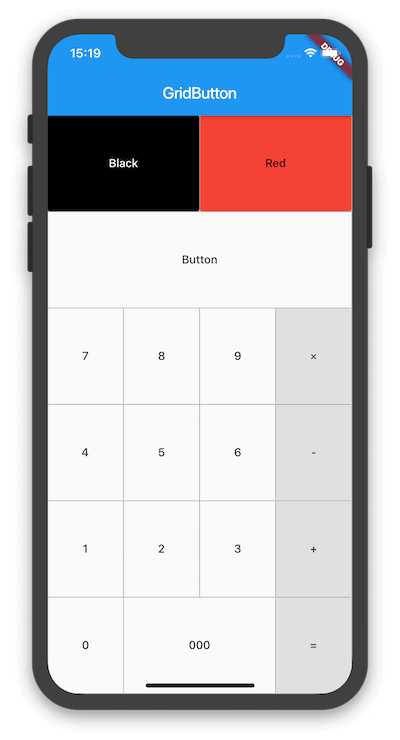
버튼을 그리드 형태로 정렬하는 Flutter 위젯입니다. 숫자 패드, 계산기 등 만들기에 유용합니다.
30좋아요 3.9천30일 다운로드160Pub 점수
AndroidiOSWebmacOSWindowsLinux
버튼을 그리드에 정렬하는 Flutter 위젯입니다.

아래는 영문 원문 스냅샷입니다. 최신 내용은 GitHub에서 확인하세요.
Flutter widget that arrange buttons in a grid. It is useful for making a number pad, calculator, and so on.


To use this plugin, add flutter_grid_button as a dependency in your pubspec.yaml file.
dependencies:
 flutter_grid_button:
Import the library in your file.
import 'package:flutter_grid_button/flutter_grid_button.dart';
See the example directory for a complete sample app using GridButton.
Or use the GridButton like below.
GridButton(
  onPressed: (String value) {
    /*...*/
  },
  items: [
    [
      GridButtonItem(title: "1"),
      GridButtonItem(child: Text("2")),
      GridButtonItem(title: "3", flex: 2),
    ],
    [
      GridButtonItem(title: "a", value: "100", longPressValue: "long"),
      GridButtonItem(title: "b", color: Colors.lightBlue)
    ],
  ],
)
의존성 목록 3 개
{"sdk":"flutter"}{"sdk":"flutter"}^1.0.0사용 목적에 따라 검색하고 개발 활동을 비교한 뒤 원본 저장소에서 요구 사항을 확인하세요.
“A repository is the most basic element of GitHub.”
GitHub Docs — About repositories ↗