
 v1.2.1
awesome_drawer_bar
Um pacote Flutter com implementação personalizada do Menu Lateral (Drawer)
56Curtidas 291Downloads em 30 dias140Pontos Pub
AndroidiOSWebmacOSWindowsLinux
AppCheap/awesome_drawer_bar open-source repository details.

{"sdk":"flutter"}^0.3.1{"sdk":"flutter"}Texto original em inglês. Visite o GitHub para a versão atual.
A Flutter package with custom implementation of the Side Menu (Drawer)
To start using this package, add awesome_drawer_bar dependency to your pubspec.yaml
dependencies:
  awesome_drawer_bar: '<latest_release>'
    AwesomeDrawerBar(
      controller: AwesomeDrawerBarController,
      menuScreen: MENU_SCREEN,
      mainScreen: MAIN_SCREEN,
      borderRadius: 24.0,
      showShadow: true,
      angle: -12.0,
      backgroundColor: Colors.grey[300],
      slideWidth: MediaQuery.of(context).size.width*.65,
      openCurve: Curves.fastOutSlowIn,
      closeCurve: Curves.bounceIn,
    )
| Parameters | Value | Required | Docs |
|---|---|---|---|
controller |
AwesomeDrawerBarController |
No | Controller to have access to the open/close/toggle function of the drawer |
mainScreen |
Widget |
Yes | Screen containing the main content to display |
menuScreen |
Widget |
Yes | Screen containing the menu/bottom screen |
slideWidth |
double |
No | Sliding width of the drawer - defaults to 275.0 |
borderRadius |
double |
No | Border radius of the slided content - defaults to 16.0 |
angle |
double |
No | Rotation angle of the drawer - defaults to -12.0 - should be 0.0 to -30.0 |
backgroundColor |
Color |
No | Background color of the drawer shadows - defaults to white |
showShadow |
bool |
No | Boolean, whether to show the drawer shadows - defaults to false |
openCurve |
Curve |
No | open animation curve - defaults to Curves.easeOut |
closeCurve |
Curve |
No | close animation curve - defaults to Curves.easeOut |
To get access to the drawer, and be able to control it, there are 2 ways:
AwesomeDrawerBarController inside the main widget where ou have the AwesomeDrawerBar widget and providing it to the widget, which will allow you to trigger the open/close/toggle methods. final _drawerController = AwesomeDrawerBarController();
_drawerController.open();
_drawerController.close();
_drawerController.toggle();
_drawerController.isOpen();
_drawerController.stateNotifier;
AwesomeDrawerBar. AwesomeDrawerBar.of(context).open();
AwesomeDrawerBar.of(context).close();
AwesomeDrawerBar.of(context).toggle();
AwesomeDrawerBar.of(context).isOpen();
AwesomeDrawerBar.of(context).stateNotifier;
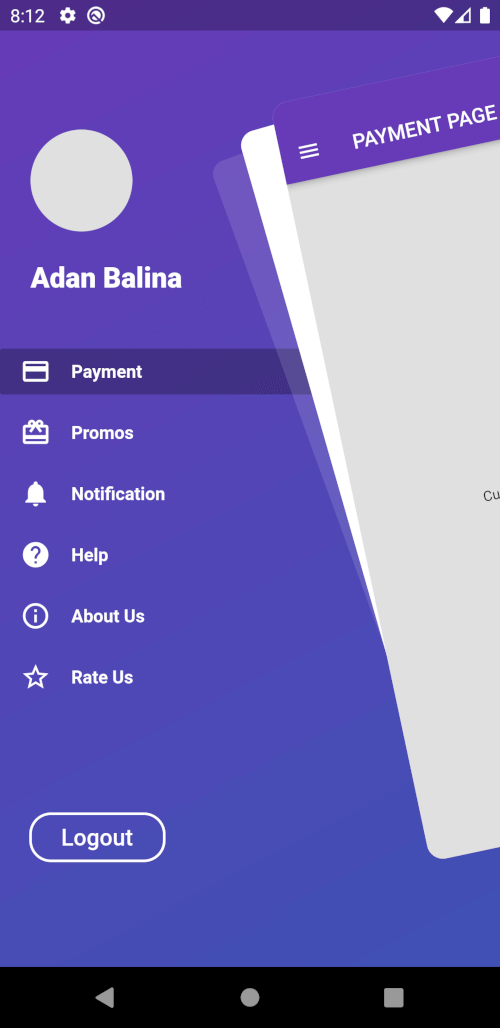
Example app Demo
Example RTL Demo
    AwesomeDrawerBar(
      controller: AwesomeDrawerBarController,
      menuScreen: MENU_SCREEN,
      mainScreen: MAIN_SCREEN,
      borderRadius: 24.0,
      showShadow: false,
      angle: 0.0,
      backgroundColor: Colors.grey[300],
      slideWidth: MediaQuery.of(context).size.width*(AwesomeDrawerBar.isRTL()? .45: 0.65),
    )
Drawer Sliding
    AwesomeDrawerBar(
      controller: AwesomeDrawerBarController,
      menuScreen: MENU_SCREEN,
      mainScreen: MAIN_SCREEN,
      borderRadius: 24.0,
      showShadow: true,
      angle: 0.0,
      backgroundColor: Colors.grey[300],
      slideWidth: MediaQuery.of(context).size.width*(AwesomeDrawerBar.isRTL()? .45: 0.65),
    )
Drawer Sliding
    AwesomeDrawerBar(
      controller: AwesomeDrawerBarController,
      menuScreen: MENU_SCREEN,
      mainScreen: MAIN_SCREEN,
      borderRadius: 24.0,
      showShadow: false,
      angle: -12.0,
      backgroundColor: Colors.grey[300],
      slideWidth: MediaQuery.of(context).size.width*(AwesomeDrawerBar.isRTL()? .45: 0.65),
    )
Drawer Sliding with rotation
    AwesomeDrawerBar(
      controller: AwesomeDrawerBarController,
      menuScreen: MENU_SCREEN,
      mainScreen: MAIN_SCREEN,
      borderRadius: 24.0,
      showShadow: true,
      angle: -12.0,
      backgroundColor: Colors.grey[300],
      slideWidth: MediaQuery.of(context).size.width*(AwesomeDrawerBar.isRTL()? .45: 0.65),
    )
Drawer Sliding with rotation and shadows
Please file any issues, bugs or feature request as an issue on our GitHub page.
If you would like to contribute to the plugin (e.g. by improving the documentation, solving a bug or adding a cool new feature), please carefully review our contribution guide and send us your pull request.
Credits goes to pedromassango as most of this package comes from his implementation.