
 v1.1.3
multi_state_button
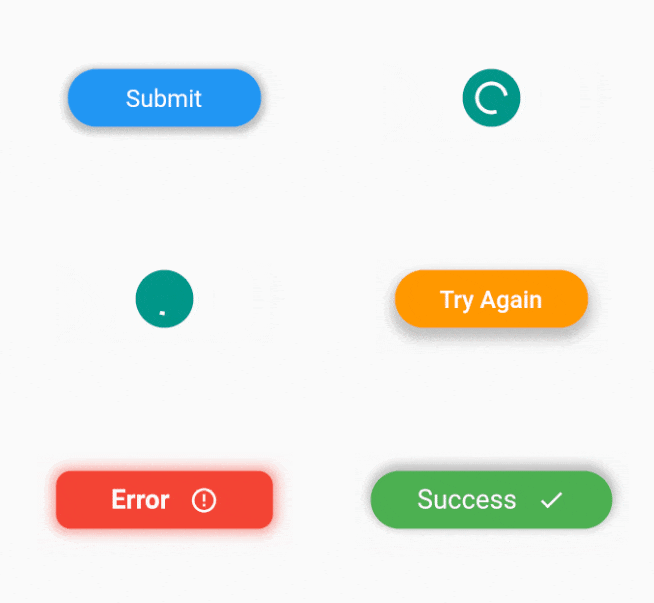
Um pacote que fornece múltiplos estados para um botão com personalização infinita.
34Curtidas 625Downloads em 30 dias150Pontos Pub
AndroidiOSWebmacOSWindowsLinux
Um pacote Flutter que fornece múltiplos estados para um botão com personalização ilimitada.
Texto original em inglês. Visite o GitHub para a versão atual.



A package which provides multiple states for a button with endless customizability.

dependencies:
  multi_state_button: ^1.1.3
import 'package:multi_state_button/multi_state_button.dart';
class MyApp extends StatelessWidget {
    static const String _submit = "Submit";
    static const String _loading = "Loading";
    static const String _success = "Success";
    final MultiStateButtonController multiStateButtonController =  MultiStateButtonController(initialStateName: _submit);
    @override
    Widget build(BuildContext context) {
        return MultiStateButton(
            multiStateButtonController: multiStateButtonController,
            buttonStates:[
                ButtonState(
                  stateName: _submit,
                  child: Text(
                    _submit,
                  ),
                  textStyle: TextStyle(color: Colors.white, fontSize: 20),
                  size: Size(160, 48),
                  color: Colors.blue,
                  onPressed:() => multiStateButtonController.setButtonState = _loading,
                  ),
                  ButtonState(
                  stateName: _loading,
                  alignment: Alignment.center,
                  child: Padding(
                    padding: const EdgeInsets.all(8.0),
                    child: CircularProgressIndicator(
                        strokeWidth: 3,
                        color: Colors.white,
                    ),
                  ),
                  decoration: BoxDecoration(
                    color: Colors.teal,
                    borderRadius: BorderRadius.all(Radius.circular(48)),
                  ),
                  size: Size(48, 48),
                  onPressed: () => multiStateButtonController.setButtonState = _success,
                  ),
                  ButtonState(
                  stateName: _success,
                  child: Row(
                    mainAxisAlignment: MainAxisAlignment.center,
                    children: [
                      Text(
                        _success,
                      ),
                      const SizedBox(
                        width: 16,
                      ),
                      Icon(
                        Icons.check,
                        color: Colors.white,
                      )
                    ],
                  ),
                  textStyle: TextStyle(color: Colors.white, fontSize: 22),
                  color: Colors.green,
                  size: Size(200, 48),
                  onPressed: ()=> multiStateButtonController.setButtonState = _submit,
                  ),
            ],
        );
    }
}
class MultiStateButton extends StatefulWidget {
  /// List of button states.
  /// Note: Default initial State is the first button state.
  /// Can override this behaviour with [initialStateName] constructor parameter of [MultiStateButtonController].
  final List<ButtonState> buttonStates;

  /// Used to change the current state of the button
  final MultiStateButtonController multiStateButtonController;

  /// Transition duration between button state transition.
  /// Defaults to 500 milliseconds
  final Duration transitionDuration;

  /// Transition curve between button state transition.
  /// Defaults to [Curves.easeIn]
  final Curve transitionCurve;
}
class SingleStateButton extends StatelessWidget {
  /// State for single state button
  final ButtonState buttonState;
}
class ButtonState {
  /// This is the name used to identify the state of the button.
  /// This name is used to change the state using [MultiStateButtonController]
  final String stateName;
  final Widget child;
  final VoidCallback? onPressed;

  /// Size of the button
  final Size? size;

  /// Color of the button.
  /// This should be null if boxDecoration is not null.
  final Color color;

  /// Decorate the button with color, border radius, box shadow, gradient etc...
  final BoxDecoration? decoration;

  /// Used to align the child.
  /// Defaults to [Alignment.center]
  final AlignmentGeometry alignment;

  /// If descendant of the button is a Text child, this textStle is used to enable transition animtation between two states.
  final TextStyle? textStyle;

  /// The transformation matrix to apply before painting the button.
  final Matrix4? transform;

  /// The clip behavior when [decoration] is not null.
  final Clip clipBehavior;

  /// The decoration to paint in front of the child.
  final Decoration? foregroundDecoration;

  /// SubRoutine to run on transition animation ends.
  final VoidCallback? onAnimationEnd;

  /// The alignment of the child, relative to the size of the button, if [transform] is specified.
  /// When [transform] is null, the value of this property is ignored.
  final AlignmentGeometry? transformAlignment;
}
Please file feature requests and bugs at the issue tracker.

Lista de dependências 2 itens
{"sdk":"flutter"}{"sdk":"flutter"}Filtre pelo caso de uso, compare a atividade e confira o projeto original antes de adotá-lo.
“A repository is the most basic element of GitHub.”
GitHub Docs — About repositories ↗