Buscar pacotes, repositórios e categorias de apps

Repositório GitHubJErazo7/gauge

medidor

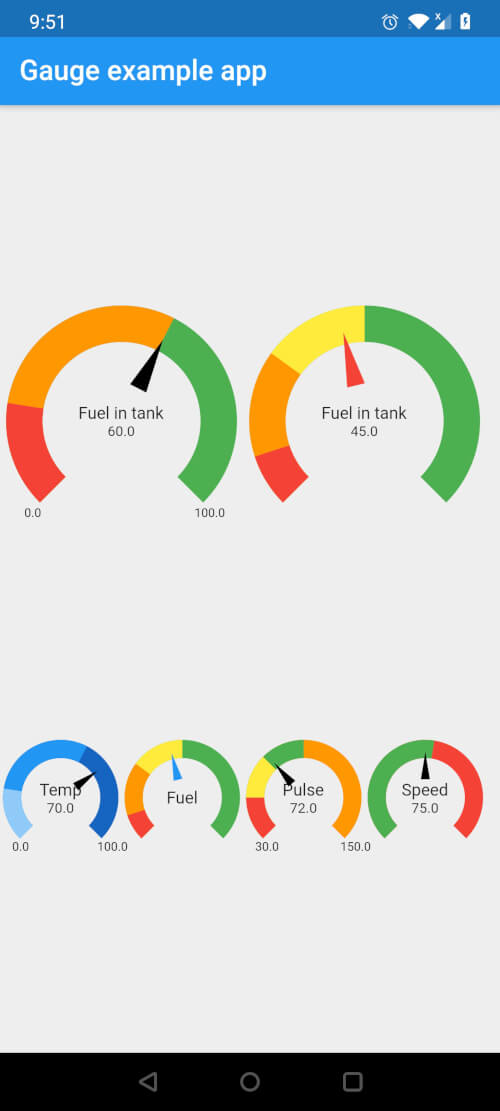
Um pacote Flutter para personalizar medidores com opções para múltiplos segmentos, cores e estilos personalizáveis para exibir o valor atual e texto.

Capa do projeto medidor
Estrelas
2
Forks
8
Último push (UTC)
20 de jan. de 2022
Status do projeto
Ativo

README original

Texto original em inglês. Visite o GitHub para a versão atual.

pretty_gauge

Fully customizable Gauge widget for Flutter

Installing:

In your pubspec.yaml, add the following dependency

dependencies:
  pretty_gauge: 1.0.0

Example Usage:

import 'package:pretty_gauge/pretty_gauge.dart';

PrettyGauge(
    gaugeSize: 200,
    segments: [
        GaugeSegment('Low', 20, Colors.red),
        GaugeSegment('Medium', 40, Colors.orange),
        GaugeSegment('High', 40, Colors.green),
    ],
    currentValue: 46,
    displayWidget: Text('Fuel in tank', style: TextStyle(fontSize: 12)),
),

Features:

  • Fully featured Gauge widget that is built from scratch
  • Can have any number of segments in the Gauge with different segment length and colors
  • Gauge can have any dimension (square dimension only) with any minimum and maximum value
  • Needle color can be customized
  • Display and Value widget can be customized, so that you can display what you want on the Gauge
  • Can turn on/off markers that display Min and Max value on the Gauge. You can even style these markers!

License:

This project is licensed under the BSD 2-Clause license - see the LICENSE file for details

Josue Erazo GitHub avatar
Autor no GitHub

Josue Erazo ↗

Senior Mobile & Applied AI Engineer | Flutter Expert | High-Impact IC ($4M+ Revenue Features) | Building Agentic Workflows

MGM Resorts InternationalEcuador
LinguagensDartKotlinSwiftObjective-C

Categorias

Pacotes publicados por este repositório

Dependências usadas

Lista de dependências 2 itens

  • flutter{"sdk":"flutter"}
  • flutter_testDesenvolvimento{"sdk":"flutter"}

Como escolher um repositório para seu projeto?

Filtre pelo caso de uso, compare a atividade e confira o projeto original antes de adotá-lo.

  1. Busque por nome, autor ou descrição e filtre por tema.
  2. Compare estrelas, forks e envios recentes. Estrelas indicam interesse, mas não garantem qualidade.
  3. Confira o README, a licença e as issues no GitHub antes de usar o projeto.

Fontes e manutenção

“A repository is the most basic element of GitHub.”

GitHub Docs — About repositories ↗