
flutter_boom_menu
Plugin do Flutter para implementar um menu Boom, com ícones, título, subtítulo, ícones animados FAB e ocultar ao rolar.

- Estrelas
- 88
- Forks
- 29
- Último push (UTC)
- 2 de ago. de 2021
- Status do projeto
- Ativo
README original
Texto original em inglês. Visite o GitHub para a versão atual.
Flutter Boom Menu
Usage
The BoomMenu widget is built to be placed in the Scaffold.floatingActionButton argument, replacing the FloatingActionButton widget.
It's not possible to set its position with the Scaffold.floatingActionButtonLocation argument, but it's possible to set right/bottom margin with the marginRight and marginBottom arguments (default to 16) to place the button anywhere in the screen.
Using the Scaffold.bottomNavigationBar the floating button will be always placed above the bar, so the BottomAppBar.hasNotch should be always false.
Title
Every child button can have a Icon,Title, SubTitle which can be customized providing by yourself. If the Title parameter is not provided the title will be not rendered.
The package will handle the animation by itself.
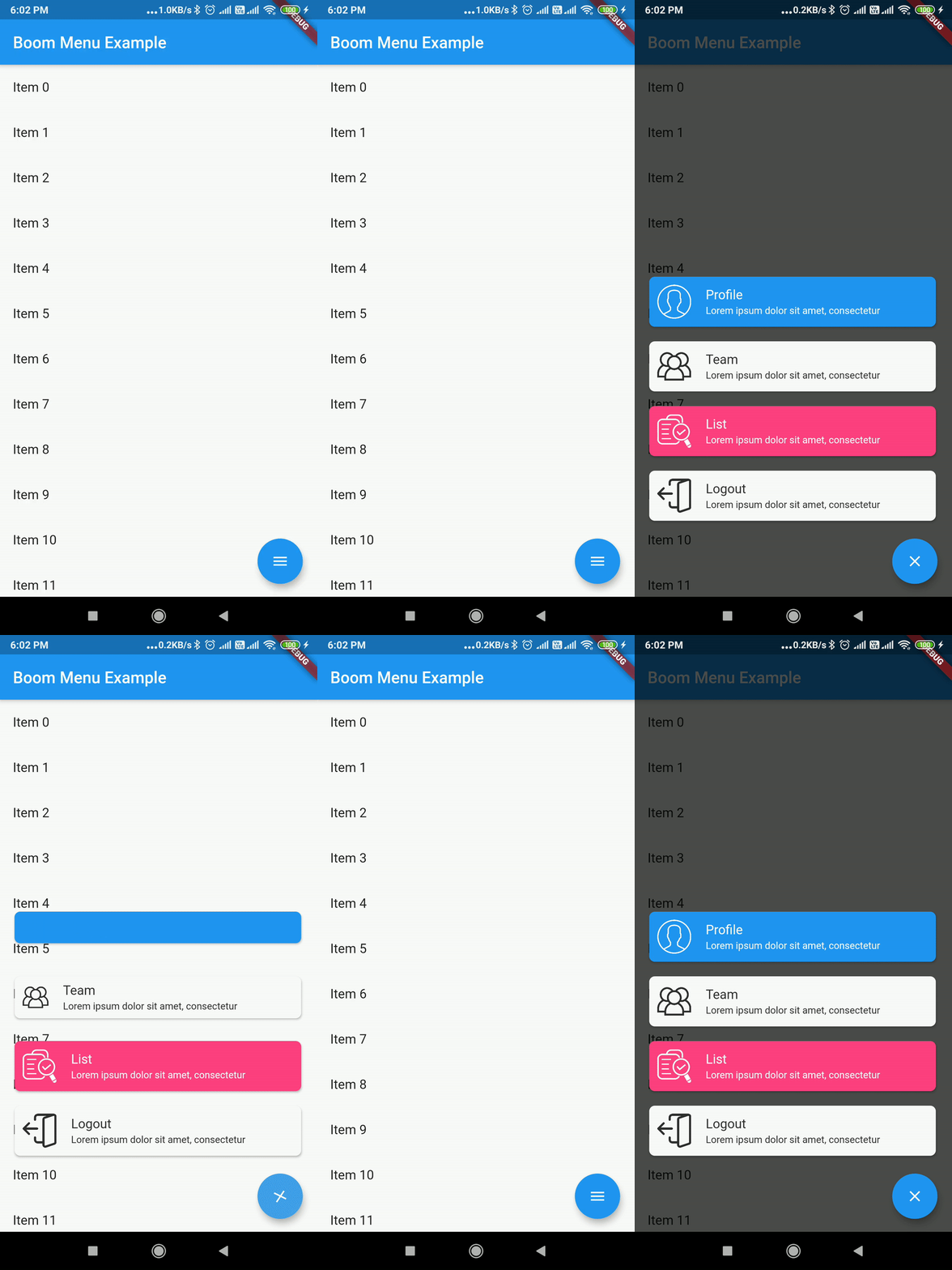
Example Usage ( complete with all params ):
Widget build(BuildContext context) {
    return Scaffold(
        floatingActionButton: BoomMenu(
      animatedIcon: AnimatedIcons.menu_close,
      animatedIconTheme: IconThemeData(size: 22.0),
      //child: Icon(Icons.add),
      onOpen: () => print('OPENING DIAL'),
      onClose: () => print('DIAL CLOSED'),
      scrollVisible: scrollVisible,
      overlayColor: Colors.black,
      overlayOpacity: 0.7,
      children: [
        MenuItem(
          child: Icon(Icons.accessibility, color: Colors.black),
          title: "Profiles",
          titleColor: Colors.white,
          subtitle: "You Can View the Noel Profile",
          subTitleColor: Colors.white,
          backgroundColor: Colors.deepOrange,
          onTap: () => print('FIRST CHILD'),
        ),
        MenuItem(
          child: Icon(Icons.brush, color: Colors.black),
          title: "Profiles",
          titleColor: Colors.white,
          subtitle: "You Can View the Noel Profile",
          subTitleColor: Colors.white,
          backgroundColor: Colors.green,
          onTap: () => print('SECOND CHILD'),
        ),
        MenuItem(
          child: Icon(Icons.keyboard_voice, color: Colors.black),
          title: "Profile",
          titleColor: Colors.white,
          subtitle: "You Can View the Noel Profile",
          subTitleColor: Colors.white,
          backgroundColor: Colors.blue,
          onTap: () => print('THIRD CHILD'),
        ),
        MenuItem(
          child: Icon(Icons.ac_unit, color: Colors.black),
          title: "Profiles",
          titleColor: Colors.white,
          subtitle: "You Can View the Noel Profile",
          subTitleColor: Colors.white,
          backgroundColor: Colors.blue,
          onTap: () => print('FOURTH CHILD'),
        )
      ],
    ),
    );
}
Issues & Feedback
Please file an issue to send feedback or report a bug. Thank you!
Contributing
Every pull request is welcome.

Mohanraj ↗
Dependências usadas
Lista de dependências 2 itens
- flutter
{"sdk":"flutter"} - flutter_testDesenvolvimento
{"sdk":"flutter"}
Como escolher um repositório para seu projeto?
Filtre pelo caso de uso, compare a atividade e confira o projeto original antes de adotá-lo.
- Busque por nome, autor ou descrição e filtre por tema.
- Compare estrelas, forks e envios recentes. Estrelas indicam interesse, mas não garantem qualidade.
- Confira o README, a licença e as issues no GitHub antes de usar o projeto.
Fontes e manutenção
“A repository is the most basic element of GitHub.”
GitHub Docs — About repositories ↗