

v0.0.5+1
overlay_container
Um widget do Flutter que renderiza seu filho fora da hierarquia original de widgets.
50Curtidas 3Downloads em 30 dias40Pontos Pub
Plataformas indisponíveis
Um widget do Flutter que renderiza seu filho fora da hierarquia original de widgets.

Texto original em inglês. Visite o GitHub para a versão atual.


A flutter widget which renders its child outside the original widget hierarchy.
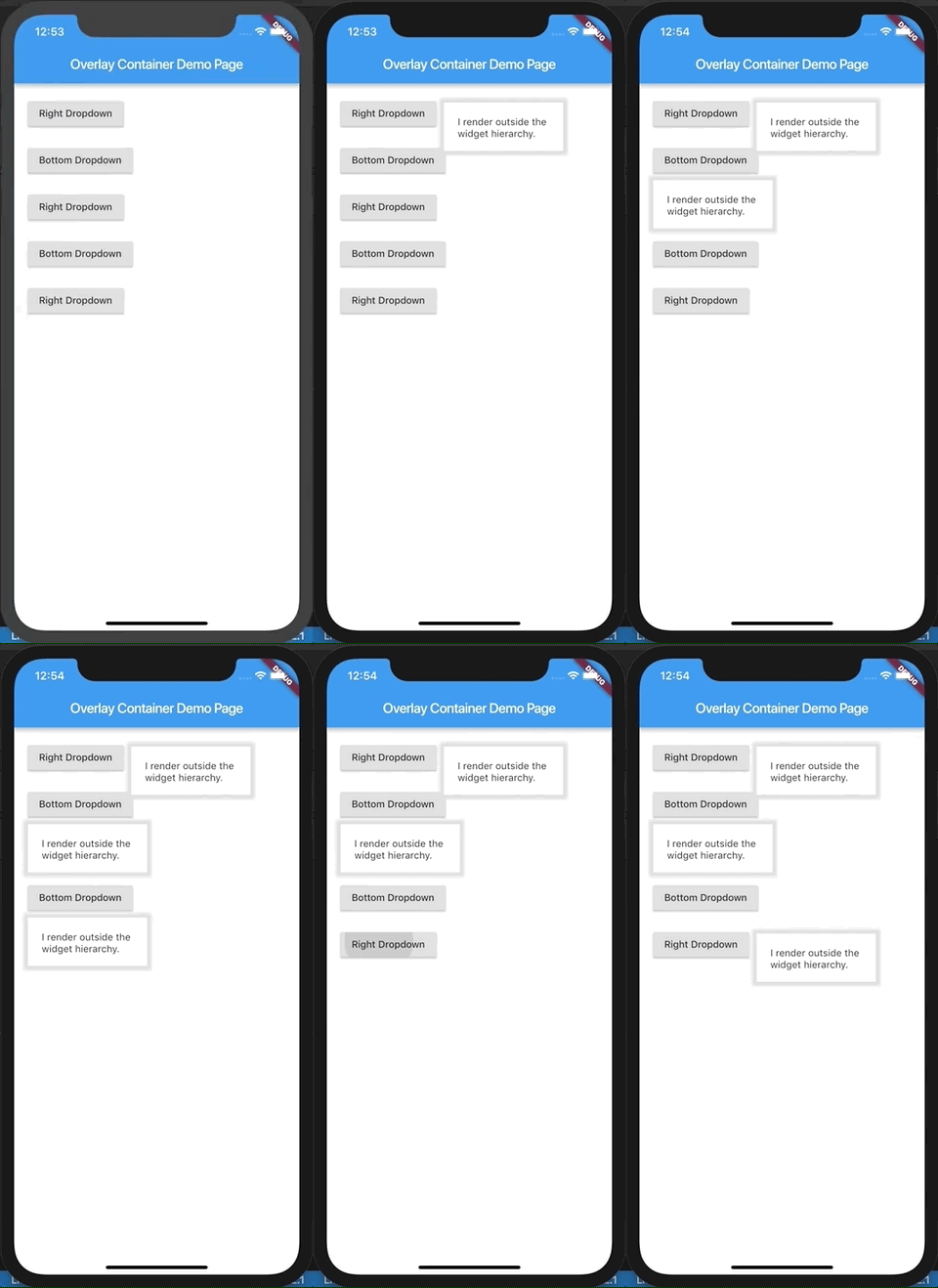
This demo is present as an example here. You can also checkout the examples folder.
The child passed to this widget is rendered outside the widget hierarchy as an overlay to the exisiting widget tree. As a result this widget is highly suitable for building custom dropdown options, autocomplete suggestions, dialogs, etc. Think of it as widget placed absolutely and having a positive z-index over the rest of the widget tree. It is actually a friendly wrapper over the Flutter's Overlay and OverlayEntry APIs.
If you've ever used react, this tries to do what React Portal does, in a way.
import 'package:flutter/material.dart';
import 'package:overlay_container/overlay_container.dart';

class MyApp extends StatelessWidget {
  @override
  Widget build(BuildContext context) {
    return MaterialApp(
      title: 'Overlay Container Demo',
      theme: ThemeData(
        primarySwatch: Colors.blue,
      ),
      home: MyHomePage(),
    );
  }
}

class MyHomePage extends StatefulWidget {
  _MyHomePageState createState() => _MyHomePageState();
}

class _MyHomePageState extends State<MyHomePage> {
  // Need to maintain a "show" state either locally or inside
  // a bloc.
  bool _dropdownShown = false;

  void _toggleDropdown() {
    setState(() {
      _dropdownShown = !_dropdownShown;
    });
  }

  @override
  Widget build(BuildContext context) {
    return Scaffold(
      appBar: AppBar(
        title: Text('Overlay Container Demo Page'),
      ),
      body: Padding(
        padding: const EdgeInsets.all(20),
        child: Column(
          crossAxisAlignment: CrossAxisAlignment.start,
          children: <Widget>[
            RaisedButton(
              onPressed: _toggleDropdown,
              child: Column(
                children: <Widget>[
                  Text("Dropdown button"),
                ],
              ),
            ),
            // By default the overlay (since this is a Column) will
            // be added right below the raised button
            // but outside the widget tree.
            // We can change that by supplying a "position".
            OverlayContainer(
              show: _dropdownShown,
              // Let's position this overlay to the right of the button.
              position: OverlayContainerPosition(
                // Left position.
                150,
                // Bottom position.
                45,
              ),
              // The content inside the overlay.
              child: Container(
                height: 70,
                padding: const EdgeInsets.all(20),
                margin: const EdgeInsets.only(top: 5),
                decoration: BoxDecoration(
                  color: Colors.white,
                  boxShadow: <BoxShadow>[
                    BoxShadow(
                      color: Colors.grey[300],
                      blurRadius: 3,
                      spreadRadius: 6,
                    )
                  ],
                ),
                child: Text("I render outside the \nwidget hierarchy."),
              ),
            ),
          ],
        ),
      ),
    );
  }
}
A more elaborate example is found here.
Lista de dependências 2 itens
{"sdk":"flutter"}{"sdk":"flutter"}Filtre pelo caso de uso, compare a atividade e confira o projeto original antes de adotá-lo.
“A repository is the most basic element of GitHub.”
GitHub Docs — About repositories ↗